
BenQ ScreenBar Halo 2 Monitor Light Bar — Tri-Zone Backlight, Wireless Dial, Motion Sensor
BenQ ScreenBar Halo 2 review: our best overall monitor light bar (9.5/10) — a glare-free front light, a tri-zone backlight for dark rooms, a wireless dial and a motion sensor. Worth it for evening work; daylight users can save with the BenQ ScreenBar Pro.


 eBay
 eBay
| Price history for BenQ ScreenBar Halo 2 LED Monitor Light Bar - Wireless Controller, Backlight, Motion Sensor | |
|---|---|
|
Latest updates:
|
|

$199.00
Description
BenQ ScreenBar Halo 2 Review (2026)
The BenQ ScreenBar Halo 2 is still worth it in 2026 if you work at a screen in the evening: it is the only bar on our list that pairs a glare-free front light with a tri-zone backlight for the wall behind the monitor, a wireless dial and a motion sensor — and it scores 9.5/10 as our best overall monitor light bar. If you work mostly in daylight, the backlight is the part you would be paying for and not using, and the cheaper ScreenBar Pro or a Quntis bar makes more sense.
How this review was made: it is research-based — we did not use the light ourselves. The figures below come from the live Amazon listing (re-checked on 12 October 2026), BenQ’s own ScreenBar Halo 2 product page and comparison table, and How-To Geek’s published review (July 2025). Where a figure comes from a review rather than BenQ, we say so.
Update, 12 October 2026: the Halo 2 was back at $199.00 on Amazon today (sold by BenQ’s own store, in stock), after a $179.10 deal on 8 October. This review was also expanded with a ScreenBar Pro comparison, first-generation Halo differences and a longer FAQ.
Table of Contents
- Key Specifications
- Is It Worth It? Best For and Skip If
- Front Light: Glare-Free Desk Lighting
- The Tri-Zone Backlight Is the Point
- Wireless Dial, Motion Sensor and Auto-Dimming
- Fit: Curved Monitors, Webcams and Power
- ScreenBar Halo 2 vs ScreenBar Pro
- Halo 2 vs the Original ScreenBar Halo
- Cheaper Alternatives
- Limitations
- SoftPickr Verdict
- Frequently Asked Questions
Key Specifications
| Feature | Specification |
|---|---|
| Price (12 Oct 2026) | $199.00 on Amazon, sold by BenQ’s store, in stock |
| Amazon rating | 4.7 out of 5 from 1,300 ratings |
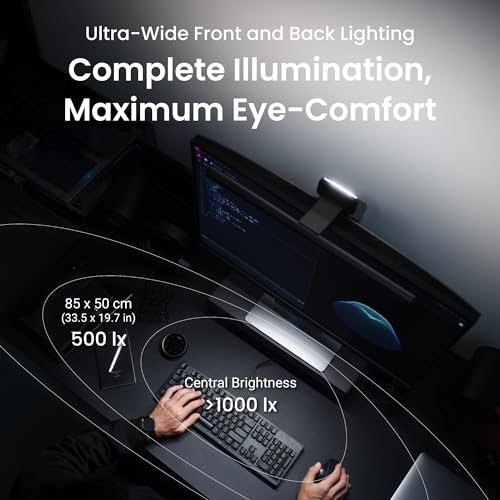
| Front light | ASYM-Light optics with an 18° anti-glare cut-off (listing); 500 lx across 85 x 50 cm / 33.5 x 19.7 in of desk (BenQ) |
| Center brightness | Around 1,000 lux with the bar about 20 in above the desk (How-To Geek’s figure) |
| Backlight | Tri-zone, adjustable; BenQ says its coverage is 423% wider than the first-generation Halo’s |
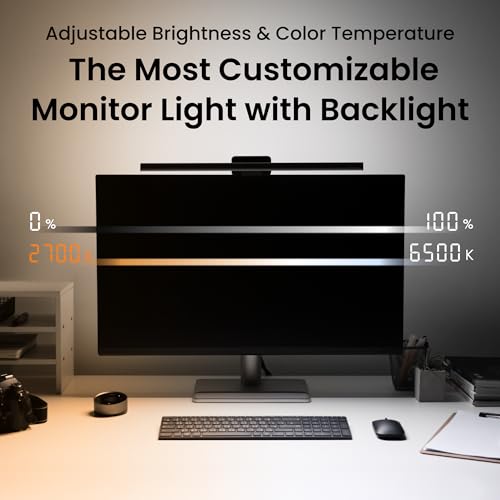
| Color temperature | 2700K–6500K, front and back; stepless brightness |
| Color rendering | Full-spectrum LEDs, Rf > 96 (BenQ) |
| Controller | Wireless dial with a display; rechargeable, up to 3 months per charge (BenQ) |
| Smart features | On/off with the monitor, auto-dimming to room light, “My Favorite” memory (listing); ultrasonic motion sensor that turns the light off after about 5 minutes away (BenQ) |
| Monitor fit | 0.17–2.36 in (0.43–6 cm) thick; flat or 1000R–1800R curved |
| Power | USB-C, 5V / up to 3A; adapter included; 150 cm cable (BenQ) |
| Size and weight | Lamp 50 x 14.3 x 10.9 cm (BenQ); 800 g (listing) |
| In the box | Light bar, wireless controller, power adapter, webcam accessory (listing) |
| LED lifespan | Over 50,000 hours (BenQ figure) |
| Warranty | 1 year (the listing’s warranty field) |
Is the BenQ ScreenBar Halo 2 Worth It?
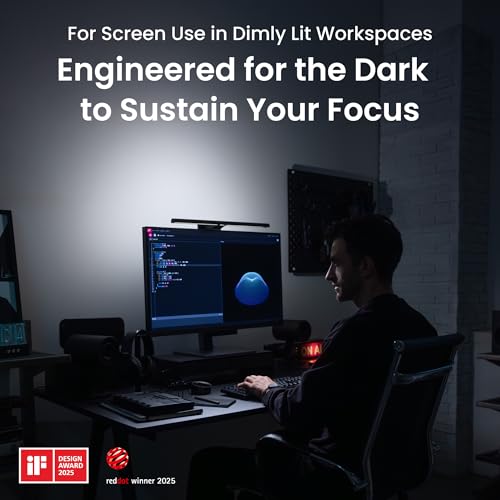
It is worth it for one kind of desk: a screen you use for hours after dark, in a room where the wall behind the monitor goes black. That is where the backlight earns the price, because a bright screen against a dark wall is the contrast that tires eyes. In a bright daytime office you are mostly paying for the front light, and BenQ’s own ScreenBar Pro gives you the same 85 x 50 cm of desk coverage for $60 less.
Best for: evening and night work, dark rooms, curved monitors from 1000R to 1800R, glossy or semi-gloss screens, photo and design work where accurate light on paper matters, and anyone who wants to set the light from the desk rather than by reaching up to the bar.
Skip if: you work in daylight (buy the ScreenBar Pro), want RGB lighting (look at the Quntis RGB Pro+), need one bar across two monitors, or have under about $100 to spend.
Front Light: Glare-Free Desk Lighting
A monitor light bar sits on top of the screen and lights the desk in front of it, so you can see a notebook or keyboard without a desk lamp. The hard part is doing that without bouncing light off the screen or into your eyes. BenQ’s ASYM-Light optics aim the front light at an 18° cut-off so it falls on the desk and stays off the panel. BenQ says the bar keeps 500 lx — a normal working light level — across an 85 x 50 cm patch of desk, and How-To Geek’s review puts the center at around 1,000 lux with the bar about 20 inches above the desk. Color temperature runs from a warm 2700K to a cool 6500K, and BenQ quotes full-spectrum LEDs with an Rf above 96, which matters if you judge color on paper or proofs.
The Tri-Zone Backlight Is the Point
What separates the Halo 2 from almost every other bar is the second light on the back. It washes the wall behind the monitor in three zones, which BenQ says keeps the contrast between screen and surroundings within the 1:3 ratio that ANSI recommends, so your eyes adjust less between the bright screen and a dark room. Its brightness and color temperature are set separately from the front light. BenQ says the backlight now covers 423% more area than the first Halo’s. If you work late with the room lights off, this is the feature you are paying for; in a sunny office it matters much less.
Wireless Dial, Motion Sensor and Auto-Dimming
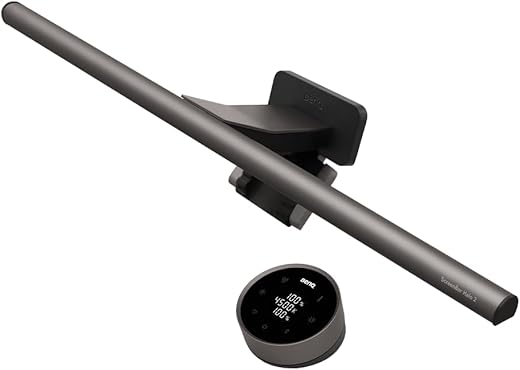
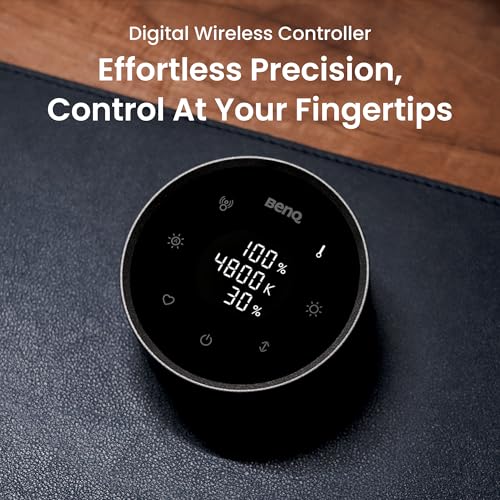
Instead of touch buttons on the bar, the Halo 2 uses a wireless dial that sits on the desk and shows the current brightness and color temperature on a small display. Because you never touch the bar, it cannot be knocked out of position when you adjust it. BenQ rates the dial at up to three months per charge; How-To Geek notes that its USB-C charging cable is not in the box and that the dial is slow to wake from sleep.
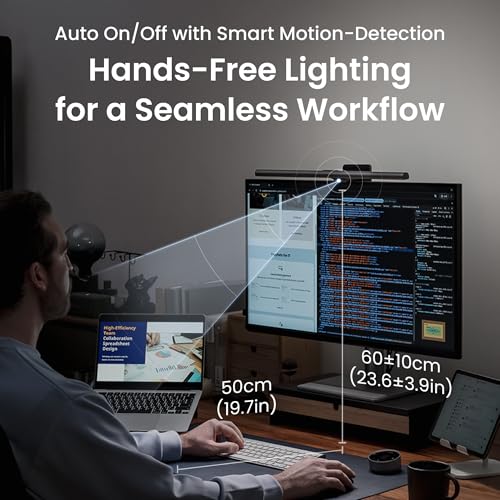
The bar switches on and off with the monitor, dims and brightens with the room light, and returns to saved settings through a “My Favorite” mode. An ultrasonic motion sensor, which BenQ says detects you within about 60 cm (24 in) of the bar, turns the light off after roughly five minutes without movement, and BenQ says the lowest brightness is 64% dimmer than the first Halo’s — useful for late-night work.
Fit: Curved Monitors, Webcams and Power
The clamp fits monitors 0.17 to 2.36 inches (0.43 to 6 cm) thick, flat or curved from 1000R to 1800R, without touching the panel. A webcam accessory is in the box, so a clip-on webcam can sit centered on top of the bar instead of fighting it for the bezel. Power needs more care than with most bars: BenQ specifies USB-C at 5V and up to 3A, so use the included adapter (or a USB-C charger that supplies 3A) rather than a monitor’s or laptop’s spare USB port. The bar is 50 cm (19.7 in) wide — one bar per screen.
BenQ ScreenBar Halo 2 vs ScreenBar Pro
This is the comparison most buyers are actually making. Both are BenQ’s current USB-C bars with the same front coverage, motion sensor and curved-monitor clamp; the Halo 2 adds the backlight and the wireless dial for $60 more.
| ScreenBar Halo 2 | ScreenBar Pro | |
|---|---|---|
| Amazon price (12 Oct 2026) | $199.00 | $139.00 |
| Amazon rating | 4.7 / 1,300 | 4.8 / 1,298 |
| Backlight | Tri-zone, adjustable | None |
| Controls | Wireless dial with a display | Buttons on the bar |
| Desk coverage at 500 lx (BenQ) | 85 x 50 cm | 85 x 50 cm |
| Motion sensor | Ultrasonic, about 60 cm range, off after ~5 min | Ultrasonic, 60 ± 10 cm range, off after 5 min |
| Monitor thickness | 0.43–6 cm | 0.43–6.5 cm |
| Curved monitors | 1000R–1800R | 1000R–1800R |
| Power (BenQ) | USB-C, 5V / up to 3A, 150 cm cable | USB-C, 5V / up to 1.7A, 180 cm cable |
| Weight (listings) | 800 g | 800 g |
Which to buy: pick the Halo 2 if you work after dark or want the dial on the desk; pick the BenQ ScreenBar Pro ($139.00 on 12 October 2026) if you work in a lit room and only need the desk lit. The Pro’s lower power draw also makes it easier to run from a monitor’s USB-C port.
Halo 2 vs the Original ScreenBar Halo
The first ScreenBar Halo did not appear in Amazon’s search results on 12 October 2026, but used and older listings still turn up. BenQ’s own comparison lists these differences:
- Desk coverage at 500 lx: 85 x 50 cm on the Halo 2 vs 63 x 40 cm on the Halo.
- Backlight: a tri-zone backlight that BenQ says covers 423% more area.
- Night use: a minimum brightness 64% lower than the Halo’s.
- Power: USB-C at up to 3A on the Halo 2 vs a USB-A port at up to 1.3A on the Halo.
- Hardware: a new zinc-alloy clamp and a redesigned controller (as reported by TFTCentral at launch in June 2025, when the Halo 2 listed at $179.99).
If you already own the first Halo and it lights your desk well, the upgrade is mainly about the bigger backlight and wider coverage. If you are buying new, buy the Halo 2.
Cheaper Alternatives: Quntis, Xiaomi and More
Every alternative below costs about a third of the Halo 2 and gives up the tri-zone backlight, BenQ’s 18° optics or both. Prices and ratings are from Amazon on 12 October 2026.
- Quntis ScreenLinear Pro+ — $69.99, 4.4 / 2,459. The value pick: wireless remote, auto-dimming and curved-monitor support, front light only.
- Quntis RGB Pro+ — $61.99, 4.6 / 468. The one to buy if you want the backlight idea with RGB colors instead of white.
- Xiaomi Mi Monitor Light Bar — $67.99, 4.4 / 6,288. A wireless dial like BenQ’s at a third of the price; flat monitors only, no backlight.
- Quntis basic light bar — $39.95, 4.6 / 13,866. The cheapest way to find out whether a light bar suits you: touch controls and auto-dimming, no remote. Check price on Amazon.
See all of them side by side in our monitor light bar reviews.
Limitations
- Price: $199.00 on 12 October, about three times a capable budget bar and $60 more than the ScreenBar Pro.
- Power: it needs a 5V / 3A USB-C supply, so plan on the included adapter and a free outlet.
- Controller: the dial’s charging cable is not included (How-To Geek), and there are no backup buttons on the bar.
- Size: at 800 g and 10.9 cm tall it adds bulk above the screen; use the webcam accessory if you have a clip-on camera.
- White light only: no RGB modes and no app.
- Warranty: the listing gives 1 year — shorter than the 50,000-hour LED rating suggests.
SoftPickr Verdict
The Halo 2 scores 9.5/10 and remains our best overall monitor light bar: glare-free front light across a wide patch of desk, the only tri-zone backlight on our list, a wireless dial, a motion sensor and a clamp that fits most curved monitors, with 4.7 stars from 1,300 owner ratings. Buy it for evening work in a dark room. If your desk is lit by day, the ScreenBar Pro does the front-light job for less, and if your budget is under $100, the Quntis ScreenLinear Pro+ is the value answer. Building a full workstation? Our budget ergonomic desk setup covers monitor height, chair and keyboard together.
Frequently Asked Questions
Is the BenQ ScreenBar Halo 2 worth it?
Yes, if you work after dark: the tri-zone backlight and wireless dial are what you pay for, and no cheaper bar on our list matches both. If you mostly work in daylight, the ScreenBar Pro ($139.00 on 12 October 2026) lights the same area of desk for less.
What is the difference between the ScreenBar Halo 2 and the ScreenBar Pro?
The Halo 2 adds a tri-zone backlight and a wireless dial controller; the Pro has neither and uses buttons on the bar. BenQ rates both for 500 lx across an 85 x 50 cm desk area, both have a motion sensor and both fit 1000R–1800R curved monitors.
What changed from the original ScreenBar Halo?
Per BenQ: wider desk coverage (85 x 50 cm vs 63 x 40 cm at 500 lx), a backlight that covers 423% more area, a 64% lower minimum brightness and USB-C power. It also has a new clamp and controller.
Does it work with a webcam?
Yes. The listing includes a webcam accessory, so a clip-on webcam can sit centered on top of the bar.
Can I use one Halo 2 on two monitors?
No — the bar is 50 cm wide and clamps to one screen. Buy one per monitor, or look at BenQ’s newer ScreenBar Max, a 33-inch dual-monitor bar ($289.00 on Amazon on 12 October 2026, but only 7 ratings so far).
Does it turn off automatically?
Yes. It switches on and off with the monitor, and BenQ says its ultrasonic motion sensor turns the light off after about five minutes without movement in front of the desk.
What warranty does it have?
The Amazon listing’s warranty field says 1 year. Keep the receipt; BenQ’s warranty terms can differ by country.
Ready to buy? You can check the current price of the BenQ ScreenBar Halo 2 on Amazon — the listing shows live pricing and stock. SoftPickr earns a commission on qualifying purchases at no extra cost to you.
Sources: Amazon listings B0DK59YKRS and B0CZ9P1QW9 (12 October 2026); BenQ’s ScreenBar Halo 2 product page and ScreenBar comparison table; How-To Geek’s ScreenBar Halo 2 review (July 2025); TFTCentral’s launch report (June 2025).
Related Reviews
Additional information
Specification: BenQ ScreenBar Halo 2 Monitor Light Bar — Tri-Zone Backlight, Wireless Dial, Motion Sensor
|
Price History
| Price history for BenQ ScreenBar Halo 2 LED Monitor Light Bar - Wireless Controller, Backlight, Motion Sensor | |
|---|---|
|
Latest updates:
|
|


There are no reviews yet.