

Xiaomi Mi Monitor Light Bar — Best Mid-Range Monitor Light Bar
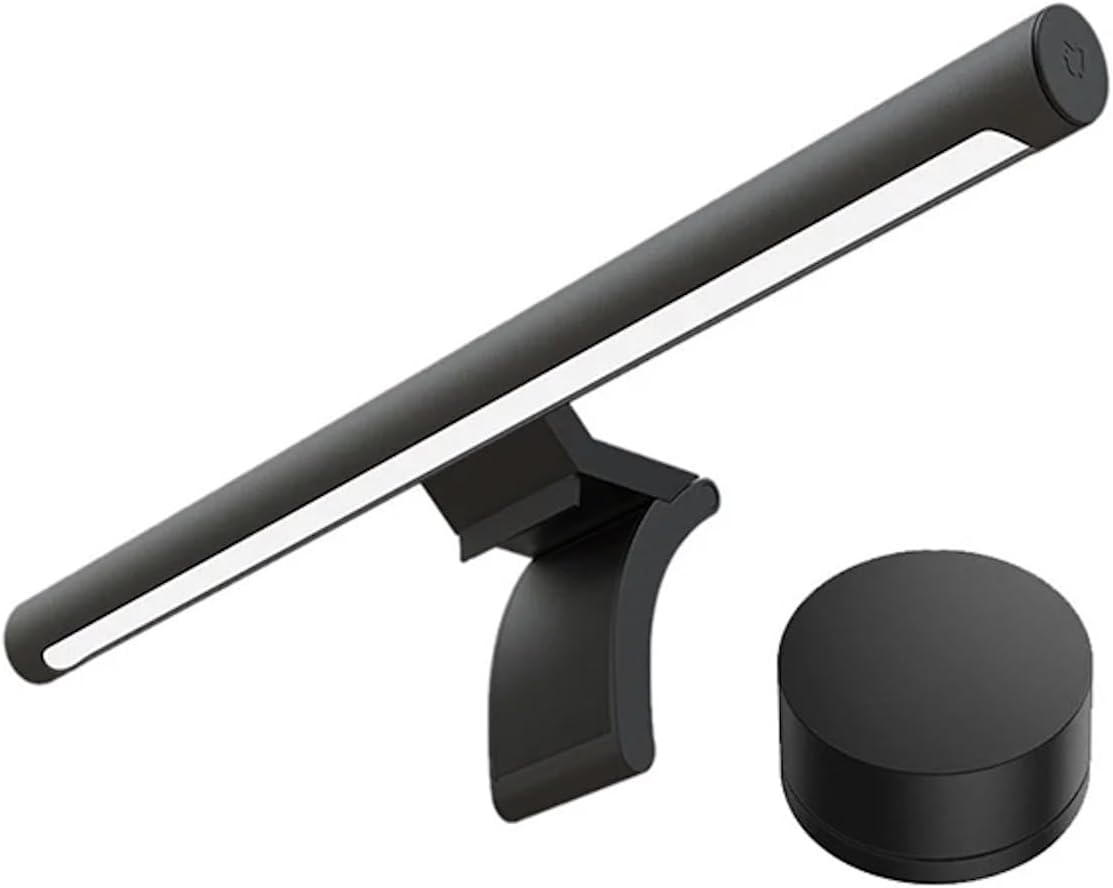
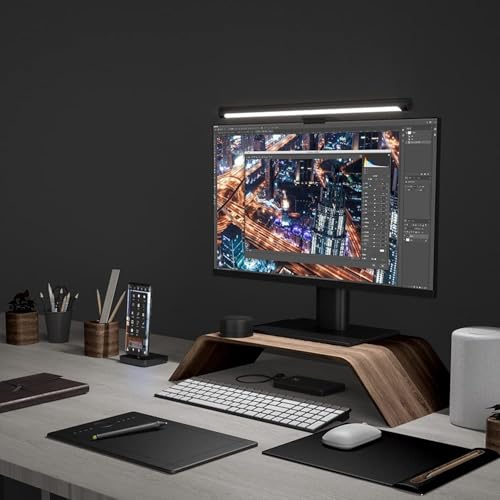
The Xiaomi Mi Monitor Light Bar delivers a full aluminum body, 2.4GHz wireless puck controller, Ra95 CRI color accuracy, and magnetic rotation mount with 25° adjustability — matching BenQ’s premium feel at one-third the price. Features 80 LEDs with 270 lumens, 2700K-6500K stepless color temperature, asymmetric glare-free optics, flicker-free certification, and auto power-on via USB. Ideal for desk setup enthusiasts, remote workers, and gamers on flat monitors.

| Price history for Xiaomi Mi Computer Monitor Light Bar - Easy Installation, Extra Computer Lighting w/o Taking Desktop Space, w/Wireless Remote Control Adjusting Lights Easily | |
|---|---|
|
Latest updates:
|
|

$67.99
Description
Xiaomi Mi Monitor Light Bar Review — Best Mid-Range Monitor Light Bar for Desk Setups?
This Xiaomi Mi Monitor Light Bar review covers why it has become the go-to mid-range pick for desk setup enthusiasts, remote workers, and gamers who want a premium aluminum build, wireless puck controller, and Ra95 CRI color accuracy without paying BenQ prices. With an all-metal body, magnetic rotation mount with 25° adjustability, 80 LEDs delivering 270 lumens, 2700K-6500K stepless color temperature, custom asymmetric optical glass that eliminates screen glare, preset computer modes, flicker-free certification, and a 2.4GHz wireless remote dial, the Xiaomi Mi Monitor Light Bar delivers a genuinely premium experience at roughly one-third the price of the BenQ ScreenBar Halo 2.
The Xiaomi Mi Monitor Light Bar is the monitor light bar that consistently earns “best value wireless puck” recommendations across independent review sites — and for good reason. At $45-60, you get the same wireless dial control system that BenQ charges $109-179 for, wrapped in an aluminum body that rivals BenQ’s build quality. If you want the absolute best with rear backlight and zero screen bleed, see our BenQ ScreenBar Halo 2 review. For the mid-range buyer who wants premium feel without premium pricing, the Xiaomi Mi Monitor Light Bar is the cluster’s smartest mid-range pick.
Xiaomi Mi Monitor Light Bar — Key Specs at a Glance
| Spec | Detail |
|---|---|
| Bar Length | 448mm (17.6 inches) |
| Bar Diameter | 23mm |
| LED Count | 80 LEDs (0.2W per LED module) |
| Luminous Flux | 270 lumens |
| Center Illuminance | ~545 lux (independently tested) |
| Color Rendering Index (CRI) | Ra95 |
| Color Temperature Range | 2700K-6500K (stepless adjustment) |
| Brightness Control | Stepless dimming via wireless remote |
| Auto-Dimming | No — manual control only |
| Control Method | Wireless remote dial (2.4GHz, 2x AAA batteries) |
| Preset Modes | Yes — computer modes via long press |
| Optical Design | Custom asymmetric optical glass + textured hood |
| Flicker-Free | Yes — certified (Test report WTF20F04022940N) |
| Monitor Compatibility | Flat monitors, 1-32mm thickness (unofficially works on gentle 1800R curves) |
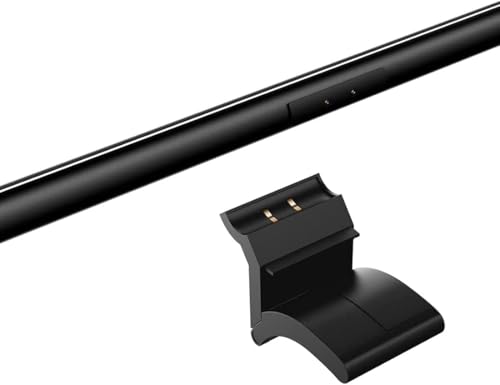
| Mounting System | Magnetic rotation hinge with gravity pivot — no clamp marks |
| Magnetic Rotation | 25° adjustable tilt for glare reduction |
| Webcam Clearance | Yes — works with non-clamping webcams (e.g. Logitech StreamCam) |
| Power | USB-C input (USB-C to USB-A cable included), 5V/1A, 5W rated |
| Auto Power-On | Yes — turns on automatically when computer powers on via USB |
| Body Material | Full aluminum (matte black metal body) |
| Remote Control Size | 66.5mm × 34mm |
| Warranty | 1 year |
| Price | From $45-60 on Amazon |
What Makes the Xiaomi Mi Monitor Light Bar the Best Mid-Range Pick?
The Xiaomi Mi Monitor Light Bar earns the “best mid-range” title by delivering a full aluminum body and wireless puck controller at roughly one-third the price of the BenQ ScreenBar Halo 2. Where most budget light bars use plastic housings and touch controls on the bar itself, the Xiaomi Mi Monitor Light Bar ships with an all-metal construction and a desktop dial that matches BenQ’s premium control experience.
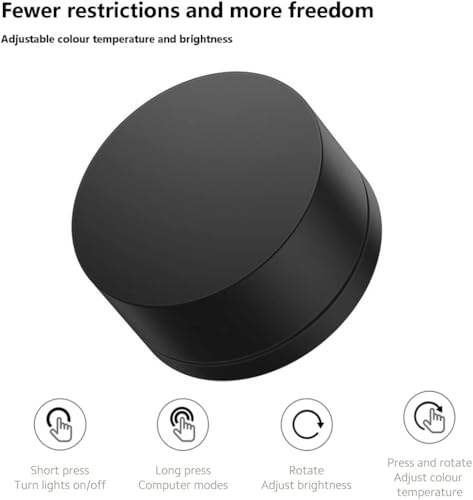
The wireless remote dial is the standout feature. Rotate to adjust brightness, press and rotate to shift color temperature. Short press toggles power on and off, long press activates preset computer modes. The 2.4GHz wireless connection means no Bluetooth pairing — it connects instantly. This is the same control paradigm that BenQ pioneered with the ScreenBar Halo, delivered at a fraction of the cost on the Xiaomi Mi Monitor Light Bar.
What separates the Xiaomi Mi Monitor Light Bar from cheaper budget bars is the build quality. According to Xiaomi’s official product page, the bar features a custom-made optical glass and finely textured hood that work together to eliminate screen reflection. The full aluminum body dissipates heat efficiently and feels genuinely premium in hand — multiple independent reviewers describe the build as “BenQ-rivaling” at a third of the price.
The Ra95 CRI color rendering means colors on your desk appear accurate and natural under the Xiaomi Mi Monitor Light Bar. For designers, photographers, and anyone cross-referencing physical documents against on-screen work, this matches the CRI rating of BenQ’s flagship models.
Xiaomi Mi Monitor Light Bar Review — Magnetic Mount, Light Quality and Design
The Xiaomi Mi Monitor Light Bar review consistently earns praise for its magnetic rotation mount system — a design choice that solves two common light bar complaints simultaneously.
First, the magnetic hinge means the light bar attaches to the mount without clamping force. Unlike weighted clip systems that can leave marks on monitor bezels over time, the Xiaomi Mi Monitor Light Bar’s gravity pivot base grips the monitor gently. The bar itself snaps onto the mount magnetically, making it easy to remove for cleaning or repositioning.
Second, the 25° magnetic rotation range lets you tilt the Xiaomi Mi Monitor Light Bar to precisely direct light onto your desk while minimizing any residual glow on your screen. This is particularly useful on glossy panels where even small angles of light can create visible reflections. According to the American Optometric Association’s research on Computer Vision Syndrome, reducing the contrast between a bright monitor and dark desk surroundings is one of the most effective ways to prevent digital eye strain — and the Xiaomi Mi Monitor Light Bar’s adjustable tilt makes it easy to achieve that balance.
Light quality is strong for the price tier. The 80-LED array delivers 270 lumens through custom asymmetric optical glass, producing ~545 lux at center in independent testing. While this is lower than the 1,200 lux of the Quntis ScreenLinear Pro+ or the 1,000 lux of the BenQ ScreenBar Halo 2, it exceeds the 500 lux minimum recommended for desk work by the American Optometric Association.
The 2700K-6500K color temperature range on the Xiaomi Mi Monitor Light Bar matches BenQ’s flagship models. Warm 2700K for late-night sessions reduces blue light exposure, neutral 4000K for daytime productivity, and cool 6500K for color-critical work. Stepless adjustment means you dial in exactly the warmth you want rather than jumping between presets.
Xiaomi Mi Monitor Light Bar Wireless Remote and Everyday Usability
The wireless remote dial is what elevates the Xiaomi Mi Monitor Light Bar above every other light bar at this price point. The puck sits naturally on your desk, has satisfying weight so it doesn’t slide around, and the rotary control feels intuitive within minutes of first use.
The control scheme is simple and well-designed. Rotate for brightness, press and rotate for color temperature, short press for power toggle, long press for preset computer modes. No app required, no Bluetooth pairing, no connectivity issues. The 2.4GHz wireless connection works reliably across desk distances.
One notable advantage of the Xiaomi Mi Monitor Light Bar is the auto power-on feature. When connected to your computer’s USB port, the light turns on automatically when your PC powers up and turns off when it shuts down. This eliminates the daily ritual of reaching up to press a power button — a small convenience that adds up over months of use.
The main usability limitation of the Xiaomi Mi Monitor Light Bar is the lack of auto-dimming. Unlike the Quntis ScreenLinear Pro+ or BenQ models with ambient light sensors, the Xiaomi requires manual brightness adjustment as room lighting changes throughout the day. However, some users actually prefer this — auto-dimming sensors can be inconsistent, and the wireless dial makes manual adjustment effortless.
The remote runs on 2x AAA batteries with no rechargeable option, which is a minor friction point. Expect a battery swap every 6-8 months with frequent use.
Xiaomi Mi Monitor Light Bar vs Quntis ScreenLinear Pro+ vs BenQ ScreenBar Halo 2 — Comparison
| Feature | Xiaomi Mi Monitor Light Bar | Quntis ScreenLinear Pro+ | BenQ ScreenBar Halo 2 |
|---|---|---|---|
| Price | ~$45-60 | ~$55-70 | ~$179-189 |
| Bar Length | 17.6 inches (448mm) | 20.1 inches (51cm) | 19.7 inches |
| Body Material | Full aluminum | Aluminum + plastic hybrid | Full aluminum |
| Center Illuminance | ~545 lux | ≥1,200 lux | ~1,000 lux |
| CRI | Ra95 | Ra95 | Ra95+ |
| Color Temperature | 2700K-6500K stepless | 3000K-6500K stepless | 2700K-6500K stepless |
| Control Method | Wireless dial (2.4GHz) | Wireless remote (2.4GHz) | Wireless dial (USB-C rechargeable) |
| Auto-Dimming | No | Yes | Yes |
| Rear Backlight | No | No | Yes — tri-zone |
| Screen Glare | Minimal (minor bleed on glossy panels) | Minimal (minor bleed on glossy panels) | Zero — best-in-class |
| Mount System | Magnetic gravity pivot | Weighted clip | Patented weighted clamp |
| Curved Monitor Support | Unofficial (flat preferred, gentle 1800R may work) | Yes (1500R and above) | Yes (1000R-1800R) |
| Auto Power-On | Yes (via USB) | No | Motion sensor on/off |
| Best For | Premium feel on a mid-range budget | Maximum features for the price | Zero-compromise premium experience |
The Xiaomi Mi Monitor Light Bar wins the mid-range category on build quality and wireless dial experience at the lowest price. The all-aluminum body and BenQ-style puck give it a premium feel that the Quntis plastic hybrid construction doesn’t match.
The trade-off is clear: the Quntis ScreenLinear Pro+ delivers more raw brightness (1,200 lux vs ~545 lux), auto-dimming, and better curved monitor support. The BenQ ScreenBar Halo 2 adds rear backlight, zero screen bleed, and motion sensor auto on/off. The Xiaomi Mi Monitor Light Bar delivers the best build quality per dollar and the most satisfying control experience under $60.
Who Should Buy the Xiaomi Mi Monitor Light Bar?
- Desk setup enthusiasts who value premium aluminum build quality and minimalist design
- Mid-range buyers wanting a wireless puck controller without paying $100+ for BenQ
- Remote workers and students with flat monitors (27-32 inches) who need reliable desk lighting
- Users who prefer manual brightness control over sometimes-inconsistent auto-dimming sensors
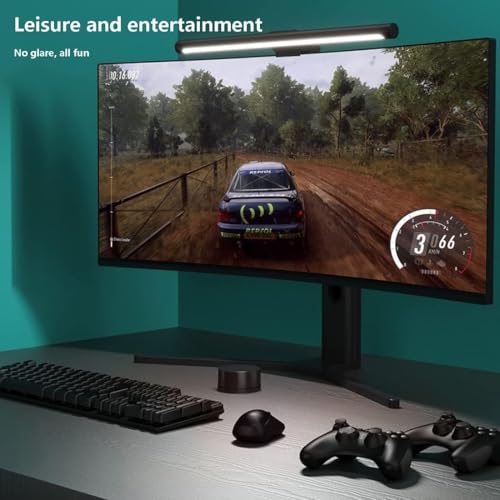
- Gamers wanting glare-free ambient desk lighting during late-night sessions
- Designers and photographers who need Ra95 CRI accuracy for physical reference materials
- Buyers upgrading from cheap $15-25 plastic light bars who want a significant quality jump
- Anyone who appreciates the auto power-on/off feature tied to their computer’s USB power
Skip the Xiaomi Mi Monitor Light Bar if you have a curved monitor and need guaranteed compatibility (the Quntis ScreenLinear Pro+ officially supports 1500R+), you need maximum raw brightness for daytime color work (the Quntis delivers 1,200+ lux vs the Xiaomi’s ~545 lux), you want rear backlight for dark room wall illumination (the BenQ ScreenBar Halo 2 has tri-zone backlight), or you need auto-dimming for hands-free brightness adjustment throughout the day.
Xiaomi Mi Monitor Light Bar Alternatives from Our Cluster
If the Xiaomi Mi Monitor Light Bar doesn’t perfectly match your needs, here are the best alternatives from our monitor light bar cluster:
- Best overall premium: The BenQ ScreenBar Halo 2 at ~$179 delivers tri-zone rear backlight, wireless dial controller, motion sensor auto on/off, and zero screen glare — the best monitor light bar money can buy.
- Best value with auto-dimming: The Quntis ScreenLinear Pro+ at ~$55-70 adds auto-dimming, 1,200 lux brightness, and curved monitor support for $10-15 more than the Xiaomi Mi Monitor Light Bar.
- Best zero-glare no-frills: The BenQ ScreenBar at ~$109 is the only light bar with truly zero screen bleed, with touch controls on the bar and proven BenQ optics.
- Best under $35: The Baseus i-Wok Pro at ~$30-38 is the cheapest legitimate asymmetric light bar with Ra97 CRI and USB-C power — no remote, but solid fundamentals.
Xiaomi Mi Monitor Light Bar Review — Frequently Asked Questions
Is the Xiaomi Mi Monitor Light Bar worth it over cheaper budget bars?
Yes — the Xiaomi Mi Monitor Light Bar’s full aluminum body, wireless puck controller, Ra95 CRI, and magnetic mount system represent a significant quality jump over $20-30 plastic light bars with on-bar touch controls. The build quality rivals BenQ at a fraction of the price.
Does the Xiaomi Mi Monitor Light Bar cause screen glare?
On matte IPS and VA panels, the custom asymmetric optical glass eliminates visible glare effectively. On glossy panels, independent testing shows minor light bleed at the top of the screen — not as clean as BenQ’s optics. The 25° magnetic rotation helps you angle the Xiaomi Mi Monitor Light Bar to minimize any residual reflection.
Does the Xiaomi Mi Monitor Light Bar fit curved monitors?
The Xiaomi Mi Monitor Light Bar is officially designed for flat monitors with 1-32mm thickness. Users report it works on gentle 1800R curves but grip is not guaranteed. For curved monitors, the Quntis ScreenLinear Pro+ (1500R+) or BenQ ScreenBar Halo 2 (1000R-1800R) are safer choices.
How does the Xiaomi Mi Monitor Light Bar wireless remote work?
The wireless puck connects via 2.4GHz signal — no Bluetooth pairing needed. Rotate for brightness, press and rotate for color temperature, short press for power, long press for preset modes. It uses 2x AAA batteries (not included) and provides satisfying tactile feedback during adjustments.
Does the Xiaomi Mi Monitor Light Bar have auto-dimming?
No — the Xiaomi Mi Monitor Light Bar uses manual brightness control via the wireless dial only. There is no ambient light sensor for auto-dimming. Some users prefer this since auto-dimming sensors on budget bars can be inconsistent, but if you want hands-free adjustment, the Quntis ScreenLinear Pro+ includes it.
Does the Xiaomi Mi Monitor Light Bar turn on automatically?
Yes — when powered via your computer’s USB port, the Xiaomi Mi Monitor Light Bar turns on automatically when your PC boots up and turns off when it shuts down. This is a genuine convenience feature that most competitors don’t offer.
How does the Xiaomi Mi Monitor Light Bar compare to the BenQ ScreenBar?
The Xiaomi Mi Monitor Light Bar delivers similar Ra95 CRI, comparable color temperature range (2700-6500K vs BenQ’s 2700-6500K), and a wireless puck that BenQ charges $109+ for. You lose BenQ’s zero-glare optics, auto-dimming sensor, and the proven BenQ clamp system. For most users on flat monitors, the Xiaomi Mi Monitor Light Bar delivers 80% of the BenQ experience at 40% of the price.
What makes the magnetic mount different from clip mounts?
The Xiaomi Mi Monitor Light Bar uses a gravity pivot base that rests on your monitor’s top edge without clamping force, preventing the bezel marks that weighted clip systems can leave over time. The bar snaps onto the mount magnetically, allowing easy removal for cleaning and 25° of rotational adjustment.
Xiaomi Mi Monitor Light Bar Review — Final Verdict
The Xiaomi Mi Monitor Light Bar is the best mid-range monitor light bar for desk setup enthusiasts who want premium aluminum build quality and a wireless puck controller without paying BenQ prices. The all-metal body, magnetic rotation mount with 25° adjustability, Ra95 CRI color accuracy, 2700-6500K stepless color temperature, and custom asymmetric optical glass deliver a genuinely premium desk lighting experience at $45-60.
The Xiaomi Mi Monitor Light Bar’s wireless dial matches BenQ’s control paradigm at a third of the cost, and the auto power-on via USB eliminates daily power button hassles. The trade-offs are honest: no auto-dimming sensor, no rear backlight, lower raw lux than the Quntis, and flat-monitor-only official support. But for the flat-monitor user who values build quality and control feel above raw feature count, the Xiaomi Mi Monitor Light Bar hits the sweet spot between budget and premium.
For the full cluster including premium, budget, value, and zero-glare alternatives, see our monitor light bar reviews roundup.
SoftPickr Rating: 8.8/10
Additional information
Specification: Xiaomi Mi Monitor Light Bar — Best Mid-Range Monitor Light Bar
|
Price History
| Price history for Xiaomi Mi Computer Monitor Light Bar - Easy Installation, Extra Computer Lighting w/o Taking Desktop Space, w/Wireless Remote Control Adjusting Lights Easily | |
|---|---|
|
Latest updates:
|
|


There are no reviews yet.