
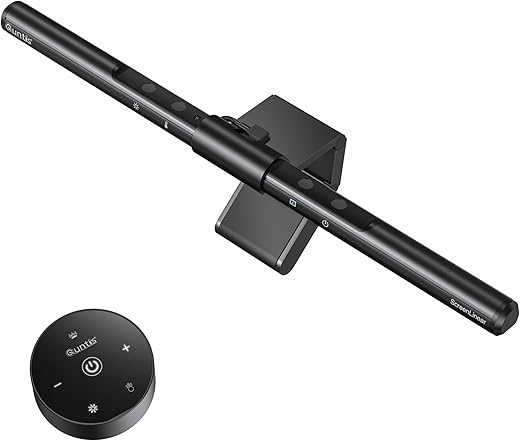


Quntis ScreenLinear Pro+ — Best Value Monitor Light Bar
The Quntis ScreenLinear Pro+ is the best value monitor light bar with wireless remote control, auto-dimming sensor, 1200+ lux brightness, and CRI95 color accuracy — delivering premium eye comfort at half the price of BenQ. Fits flat and curved monitors (1500R+), features 45° asymmetrical glare-free optics, IEC62778 anti-blue light certification, and stepless 3000K-6500K color temperature adjustment. Ideal for remote workers, gamers, and designers spending 6+ hours daily at a screen.


 eBay
eBay
 eBay
eBay
 eBay
eBay
 eBay
eBay
| Price history for Quntis Monitor Light Bar PRO+ with Remote Control, Fit for Curved/Flat Monitor, Eye-Care USB Computer Lamp Dimmable Screen Light Bar with Auto-Dimming, No Glare Home Office Gaming Desk Lamp | |
|---|---|
|
Latest updates:
|
|

$69.99
Description
Quntis ScreenLinear Pro+ Review — Best Value Monitor Light Bar for Eye Comfort?
This Quntis ScreenLinear Pro+ review covers why it has become the top value pick for remote workers, gamers, and productivity users who want premium monitor light bar features without paying BenQ prices. With a wireless remote control for stepless dimming, auto-dimming ambient light sensor, 1200+ lux center illuminance, CRI95 color accuracy, 3000K-6500K adjustable color temperature, asymmetrical 45° optical design that eliminates screen glare, and an upgraded weighted clip that fits curved monitors from 0.12″ to 2.36″ thick, the Quntis ScreenLinear Pro+ delivers a near-flagship experience at roughly half the cost of the BenQ ScreenBar Halo 2.
The Quntis ScreenLinear Pro+ is the monitor light bar that consistently earns “best value” recommendations across independent review sites, and for good reason — it includes features like a wireless puck controller and auto-dimming that were exclusive to $100+ light bars just a year ago. If you want the absolute best with zero compromises, see our BenQ ScreenBar Halo 2 review. For the budget-conscious buyer who refuses to overpay, the Quntis ScreenLinear Pro+ is the cluster’s smartest pick.
Quntis ScreenLinear Pro+ — Key Specs at a Glance
| Spec | Detail |
|---|---|
| Bar Length | 20.1 inches (51cm) |
| LED Count | High-density LED array |
| Center Illuminance | ≥1,200 lux |
| Color Rendering Index (CRI) | Ra ≥95 |
| Color Temperature Range | 3000K-6500K (stepless adjustment) |
| Brightness Control | Stepless dimming (5%-100%) |
| Auto-Dimming | Yes — built-in ambient light sensor |
| Control Method | Wireless remote control (2.4GHz, 2x AAA batteries included) |
| Optical Design | 45° asymmetrical — illuminates desk only, zero screen glare |
| Blue Light Certification | IEC62778 anti-blue light certified |
| Flicker-Free | Yes — IEC/EN 62471 certified |
| Monitor Compatibility | Flat + curved monitors (1500R and above), 0.12″-2.36″ thickness |
| Mounting System | Upgraded weighted clip with 45° adjustable rotation |
| Webcam Clearance | Yes — 90° USB cable leaves space for webcam mounting |
| Power | USB-A to USB-C cable (DC 5V/1.5A), 70.86″ (1.8m) cable length |
| Body Material | Aluminum alloy + plastic hybrid |
| Weight | Lightweight (stable on monitors without tipping) |
| Settings Memory | Yes — remembers last brightness and color temperature |
| Warranty | 1 year (extendable to 18 months via Quntis VIP registration) |
| Price | From $55-70 on Amazon |
What Makes the Quntis ScreenLinear Pro+ the Best Value Monitor Light Bar?
The Quntis ScreenLinear Pro+ earns the “best value” title by delivering three features that were exclusive to $100+ monitor light bars until recently: a wireless remote control, auto-dimming ambient light sensor, and curved monitor compatibility — all at roughly half the price of the BenQ ScreenBar Halo 2.
The wireless remote is the standout differentiator. Instead of reaching up to touch controls on the light bar itself (which wobbles the bar and disrupts your workflow), the Quntis ScreenLinear Pro+ ships with a 2.4GHz wireless puck that sits on your desk. Rotate to adjust brightness, press and rotate for color temperature. Batteries are included in the box — a thoughtful touch that budget competitors consistently skip.
What separates the Quntis ScreenLinear Pro+ from cheaper monitor light bars is the 1,200+ lux center illuminance combined with CRI95 color accuracy. According to the U.S. Department of Energy’s lighting guidelines, adequate task lighting with high color rendering is essential for reducing visual fatigue during extended screen use — and the Quntis ScreenLinear Pro+ exceeds the 500 lux minimum recommended for detailed desk work by more than double.
The auto-dimming sensor continuously monitors ambient light conditions and adjusts the bar’s brightness to maintain optimal illumination throughout the day. As natural light fades in the evening, the Quntis ScreenLinear Pro+ gradually increases output. When morning sunlight fills the room, it dims accordingly. This hands-free adjustment prevents the constant manual tweaking that cheaper light bars without sensors require.
Quntis ScreenLinear Pro+ Review — Why It Works for Eye Comfort and Productivity
The Quntis ScreenLinear Pro+ review consistently earns recommendations from remote workers and productivity users because of three specific design choices grounded in ergonomic lighting research.
First, the 45° asymmetrical optical design directs all light downward onto your desk and keyboard while keeping your monitor screen completely glare-free. This is the core technology that separates purpose-built monitor light bars from generic desk lamps. According to the American Optometric Association’s research on Computer Vision Syndrome, the contrast between a bright monitor and a dark surrounding workspace is one of the primary causes of digital eye strain — and the Quntis ScreenLinear Pro+ eliminates that contrast by flooding your desk area with balanced light.
Second, the IEC62778 anti-blue light certification and flicker-free operation address two invisible causes of eye fatigue that most users never identify. Blue light emission contributes to disrupted sleep patterns during late-night work sessions, while imperceptible screen flicker causes cumulative eye strain over 6-8 hour workdays. The Quntis ScreenLinear Pro+ is certified to eliminate both.
Third, the CRI95 rating means colors on your physical desk — documents, notebooks, product samples, reference prints — appear accurate and natural under the Quntis ScreenLinear Pro+ light. For designers, photographers, and anyone doing color-sensitive work, this matters. Budget light bars with CRI below 90 distort physical colors, creating a mismatch between what you see on-screen and what you see on your desk.
Quntis ScreenLinear Pro+ Wireless Remote, Auto-Dimming and Build Quality
The wireless remote control is what elevates the Quntis ScreenLinear Pro+ above every other monitor light bar at this price point. The 2.4GHz puck connects instantly with no Bluetooth pairing required — it just works out of the box. The tactile feel is solid and the puck has enough weight that it doesn’t slide around on your desk during adjustments.
Brightness adjustment is stepless from 5% to 100%, meaning you get precise control rather than jumping between 3-5 preset levels like budget competitors. Color temperature adjustment is equally smooth across the full 3000K-6500K range — warm amber for late-night reading, neutral white for daytime productivity, cool daylight for color-critical work. The Quntis ScreenLinear Pro+ remembers your last settings after power cycling, so you don’t reconfigure every morning.
The auto-dimming ambient light sensor targets approximately 900-1,200 lux based on room conditions. Independent reviews report that the sensor responds smoothly to changing ambient light rather than jumping between brightness presets — a meaningful quality-of-life improvement over manual-only light bars.
Build quality on the Quntis ScreenLinear Pro+ is a step above pure budget territory. The bar itself uses aluminum alloy construction for heat dissipation and rigidity, with plastic elements in the mounting system. The upgraded weighted clip accommodates monitors from 0.12″ to 2.36″ thick and includes a 45° adjustable rotation angle for fine-tuning light coverage. The USB-A to USB-C cable measures 70.86 inches (1.8m), which is long enough to reach most computer USB ports without a hub.
The 90° angled USB-C connector on the Quntis ScreenLinear Pro+ is a design detail worth noting — it leaves clearance for clip-on webcams, solving the common complaint that many monitor light bars force you to choose between video calls and good lighting.
Quntis ScreenLinear Pro+ vs BenQ ScreenBar vs BenQ ScreenBar Halo 2 — Comparison
| Feature | Quntis ScreenLinear Pro+ | BenQ ScreenBar | BenQ ScreenBar Halo 2 |
|---|---|---|---|
| Price | ~$55-70 | ~$109 | ~$179-189 |
| Bar Length | 20.1 inches | 17.7 inches | 19.7 inches |
| Center Illuminance | ≥1,200 lux | ~800 lux | ~1,000 lux |
| CRI | Ra95 | Ra95 | Ra95+ |
| Color Temperature | 3000K-6500K stepless | 2700K-6500K stepless | 2700K-6500K stepless |
| Control Method | Wireless remote (2.4GHz) | Touch controls on bar | Wireless dial controller |
| Auto-Dimming | Yes | Yes | Yes |
| Rear Backlight | No | No | Yes — tri-zone |
| Screen Glare | Minimal (minor bleed on glossy panels) | Zero — best-in-class | Zero — best-in-class |
| Curved Monitor Support | Yes (1500R and above) | Limited (flat preferred) | Yes (1000R-1800R) |
| Webcam Clearance | Yes (90° cable design) | Yes (patented clamp) | Yes (patented clamp) |
| Power | USB-C (USB-A adapter) | USB-A | USB-C |
| Settings Memory | Yes | Yes | Yes |
| Best For | Value buyers wanting premium features | No-frills zero-glare purists | Premium users wanting backlight + wireless |
The Quntis ScreenLinear Pro+ wins the value category by delivering wireless control, auto-dimming, curved monitor support, and higher raw lux output at roughly half the price of the BenQ ScreenBar. The trade-off is minor light bleed on glossy panels — BenQ’s asymmetrical optics remain the only ones that fully eliminate screen glare.
If zero screen bleed is your absolute priority and budget allows, the BenQ ScreenBar at $109 is the no-frills premium pick. If you want the full premium experience with rear backlight and wireless dial, the BenQ ScreenBar Halo 2 at $179 is the best overall monitor light bar. For everyone else, the Quntis ScreenLinear Pro+ delivers 80-90% of the BenQ experience at 35-40% of the Halo 2’s price.
Who Should Buy the Quntis ScreenLinear Pro+?
- Remote workers and home office users spending 6-8+ hours daily at a monitor who want to reduce eye strain
- Budget-conscious buyers wanting wireless remote control and auto-dimming without paying $100+
- Curved monitor owners (1500R and above) who need a compatible light bar with a secure weighted clip
- Designers and photographers who need CRI95 color accuracy for physical reference materials
- Gamers wanting ambient desk lighting during late-night sessions without introducing screen glare
- Multi-monitor users who need a 20.1-inch bar for wider desk coverage
- Users upgrading from cheap $15-25 light bars that lack auto-dimming and wireless control
- Anyone tired of desk lamps that create shadows, take up space, and cause screen reflections
Skip the Quntis ScreenLinear Pro+ if you absolutely need zero screen glare on a glossy panel (the BenQ ScreenBar eliminates it completely), you want rear backlight for wall illumination in dark rooms (the BenQ ScreenBar Halo 2 has tri-zone backlight), or you need smart home integration with Alexa or Google Home (the Yeelight Monitor Light Bar Pro supports that).
Quntis ScreenLinear Pro+ Alternatives from Our Cluster
If the Quntis ScreenLinear Pro+ doesn’t perfectly match your needs, here are the best alternatives from our monitor light bar cluster:
- Best overall premium: The BenQ ScreenBar Halo 2 at ~$179 delivers tri-zone rear backlight, wireless dial controller, motion sensor auto on/off, and zero screen glare — the best monitor light bar money can buy.
- Best zero-glare no-frills: The BenQ ScreenBar at ~$109 is the only light bar with truly zero screen bleed, proven by independent testing. No wireless remote — touch controls on the bar only.
- Best mid-range value: The Xiaomi Mi Monitor Light Bar at ~$45-68 offers an aluminum body, wireless puck, and Ra95 CRI at the lowest price for a puck-equipped light bar.
- Best under $35: The Baseus i-Wok Pro at ~$30-38 is the cheapest legitimate asymmetric light bar with Ra97 CRI and USB-C power — no remote, no auto-dimming, but gets the fundamentals right.
Quntis ScreenLinear Pro+ Review — Frequently Asked Questions
Is the Quntis ScreenLinear Pro+ worth it over cheaper light bars?
Yes — the Quntis ScreenLinear Pro+ adds a wireless remote, auto-dimming sensor, CRI95 color accuracy, and curved monitor support that $20-30 light bars consistently lack. These are meaningful quality-of-life features for anyone using a monitor 6+ hours daily.
Does the Quntis ScreenLinear Pro+ cause screen glare?
On matte IPS and VA panels, screen glare is negligible thanks to the 45° asymmetrical optical design. On glossy QD-OLED or high-gloss panels, independent testing shows minor light bleed at the top of the screen. For glossy panel users who need absolute zero glare, the BenQ ScreenBar is the only model that fully eliminates it.
Does the Quntis ScreenLinear Pro+ fit curved monitors?
Yes — the upgraded weighted clip fits curved monitors rated 1500R and above, with monitor thicknesses from 0.12″ to 2.36″. For tighter curves (1000R), the BenQ ScreenBar Halo 2 is the better-supported option.
How does the Quntis ScreenLinear Pro+ wireless remote work?
The remote connects to the light bar via 2.4GHz wireless signal — no Bluetooth pairing required. It uses 2x AAA batteries (included in the box). Rotate the housing to adjust brightness, rotate the upper cover to adjust color temperature. The remote is solid, weighted, and doesn’t slide on your desk.
Does the Quntis ScreenLinear Pro+ block webcams?
No — the 90° angled USB-C cable and clamp design leave clearance above the bar for clip-on webcams. This is a deliberate design choice that solves the common complaint of having to choose between a light bar and a webcam.
What’s the difference between Quntis ScreenLinear Pro and Pro+?
The Quntis ScreenLinear Pro+ adds the wireless remote control, upgraded weighted clip for curved monitors, and the 45° adjustable rotation angle. The standard Pro uses touch controls on the bar itself and has a simpler clip. For the price difference, the Pro+ wireless remote alone justifies the upgrade.
How long is the Quntis ScreenLinear Pro+ USB cable?
The USB-A to USB-C cable measures 70.86 inches (1.8m), which is longer than most competitors. This is long enough to reach most desktop USB ports directly without requiring a USB hub.
Does the Quntis ScreenLinear Pro+ remember settings?
Yes — the Quntis ScreenLinear Pro+ remembers your last brightness and color temperature settings after power cycling. When your computer turns on and powers the bar via USB, it resumes at your previous configuration.
Quntis ScreenLinear Pro+ Review — Final Verdict
The Quntis ScreenLinear Pro+ is the best value monitor light bar for buyers who want premium features without premium pricing. The wireless remote control, auto-dimming ambient sensor, 1,200+ lux illuminance, CRI95 color accuracy, and curved monitor compatibility put it in direct competition with light bars costing $100-180 — at roughly half the price.
The 45° asymmetrical optical design keeps your screen glare-free on matte panels, the IEC62778 anti-blue light and flicker-free certifications protect your eyes during long sessions, and the 20.1-inch bar length provides wider coverage than the standard BenQ ScreenBar. The only meaningful trade-off is minor light bleed on glossy panels and no rear backlight — both solved by stepping up to the BenQ ScreenBar Halo 2 at 3x the price.
For remote workers, students, designers, and anyone spending 6+ hours daily at a monitor, the Quntis ScreenLinear Pro+ is the cluster’s smartest value pick. For the full cluster including premium, mid-range, and budget alternatives, see our monitor light bar reviews roundup.
SoftPickr Rating: 9.0/10
Additional information
Specification: Quntis ScreenLinear Pro+ — Best Value Monitor Light Bar
|
Price History
| Price history for Quntis Monitor Light Bar PRO+ with Remote Control, Fit for Curved/Flat Monitor, Eye-Care USB Computer Lamp Dimmable Screen Light Bar with Auto-Dimming, No Glare Home Office Gaming Desk Lamp | |
|---|---|
|
Latest updates:
|
|


There are no reviews yet.