



LYMAX Monitor Light Bar — Best Budget Monitor Light Bar
The LYMAX Monitor Light Bar packs premium features at a budget price — radar motion sensor auto on/off, adaptive auto-dimming, rechargeable wireless remote, and rear ambient backlight all under $40. Features 2700K-6500K stepless color temperature, flicker-free eye-care technology, gravity damper bracket for flat and curved monitors, and USB-C power. The only budget light bar that rivals the BenQ ScreenBar Halo 2’s feature set at one-fifth the price.


 eBay
eBay
| Price history for LYMAX Monitor Light Bar, Eye-Care USB Computer Lamp with Wireless Remote, Motion Sensor, Fit for All Monitor, Adjustable Color Temperature/Brightness, No Screen Glare for Home Office Gaming Desk Lamp | |
|---|---|
|
Latest updates:
|
|

$65.99
Description
LYMAX Monitor Light Bar Review — Best Budget Monitor Light Bar with Premium Features?
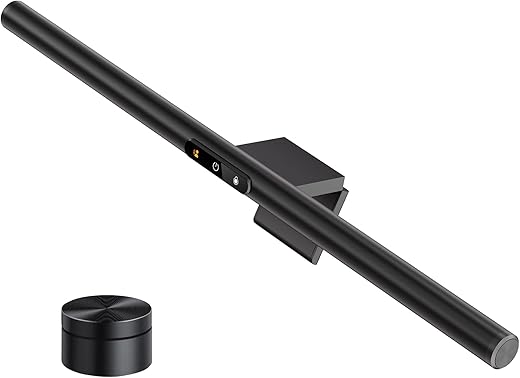
This LYMAX Monitor Light Bar review covers why it has become the most feature-packed budget pick for users who want motion sensor auto on/off, auto-dimming, wireless remote control, and rear backlight — all features normally exclusive to $100-180 monitor light bars — at under $40. With a radar motion sensor that detects your presence and auto-powers on/off, adaptive auto-brightness that adjusts to ambient lighting, rechargeable wireless remote for desk-level control, rear-facing backlight for ambient wall illumination, 2700K-6500K adjustable color temperature, flicker-free eye-care technology, and a gravity damper bracket that fits flat and curved monitors, the LYMAX Monitor Light Bar delivers a feature set that directly rivals the BenQ ScreenBar Halo 2 at roughly one-fifth the price.
The LYMAX Monitor Light Bar is the budget monitor light bar that shouldn’t exist at this price. Motion sensor, auto-dimming, wireless remote, and rear backlight in a single product under $40 — these are features that BenQ charges $179 for. If you want the absolute best optics with zero screen glare and proven durability, see our BenQ ScreenBar Halo 2 review. For the budget buyer who wants maximum features per dollar, the LYMAX Monitor Light Bar is the cluster’s best value discovery.
LYMAX Monitor Light Bar — Key Specs at a Glance
| Spec | Detail |
|---|---|
| Bar Length | ~17-18 inches |
| Color Temperature Range | 2700K-6500K (stepless adjustment) |
| Brightness Control | Stepless dimming via wireless remote |
| Auto-Dimming | Yes — adaptive ambient light sensor |
| Motion Sensor | Yes — radar sensor, auto on when you sit, auto off when you leave (customizable interval) |
| Rear Backlight | Yes — ambient wall illumination |
| Control Method | Rechargeable wireless remote |
| Optical Design | Asymmetric illumination — directed at desk, not screen |
| Flicker-Free | Yes — eye-care technology, no blue light hazard |
| Monitor Compatibility | Flat + curved monitors (gravity damper bracket) |
| Mounting System | Gravity damper bracket — no pressure on screen |
| Power | USB-C |
| Body Material | Aluminum alloy + ABS |
| Settings Memory | Yes — remembers last settings |
| Warranty | 1 year |
| Price | From $30-40 on Amazon |
What Makes the LYMAX Monitor Light Bar the Best Budget Pick?
The LYMAX Monitor Light Bar earns the “best budget” title not by being the cheapest — but by packing more premium features per dollar than any other monitor light bar in this cluster. At $30-40, the LYMAX Monitor Light Bar includes four features that competitors charge $100-180 for: a radar motion sensor, adaptive auto-dimming, a rechargeable wireless remote, and rear backlight.
To put this in perspective: the BenQ ScreenBar Halo 2 at $179 is the only other monitor light bar in this cluster with all four of those features. The LYMAX Monitor Light Bar delivers the same feature checklist at roughly one-fifth the price. You’re not getting BenQ’s patented zero-glare optics or their 12-lens optical system — but you are getting the same convenience features that make premium light bars worth using daily.
The radar motion sensor is the standout at this price point. According to the American Optometric Association’s research on Computer Vision Syndrome, consistent ambient lighting around your monitor reduces digital eye strain during extended sessions. The LYMAX Monitor Light Bar auto-powers on when you sit at your desk and turns off after a customizable inactivity interval — eliminating the daily routine of manually toggling your light bar.
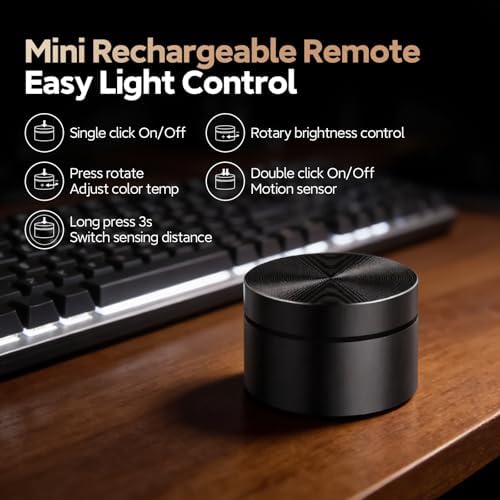
The rechargeable wireless remote means desk-level control without reaching up to the bar. At this price, most competitors offer only touch controls on the bar itself — the LYMAX Monitor Light Bar’s inclusion of a rechargeable remote is genuinely unusual value.
LYMAX Monitor Light Bar Review — Motion Sensor, Auto-Dimming and Rear Backlight
The LYMAX Monitor Light Bar review earns its recommendation because of three features that normally cost $100+ to access.
First, the radar motion sensor detects when you sit down at your desk and automatically turns the LYMAX Monitor Light Bar on. When you leave for an extended period, it powers off to conserve energy. The detection interval is customizable, so you can set it to your preferred sensitivity. This hands-free operation eliminates the daily power-button routine and ensures your desk lighting is always active when you’re working — and off when you’re not.
Second, the adaptive auto-dimming sensor monitors ambient room light and adjusts the LYMAX Monitor Light Bar’s brightness accordingly. As natural light fades in the evening, the bar gradually increases output. When morning sunlight fills the room, it dims to maintain comfortable illumination. This is the same feature that the Quntis ScreenLinear Pro+ offers at $55-70 — the LYMAX Monitor Light Bar includes it at nearly half the price.
Third, the rear-facing backlight illuminates the wall behind your monitor with ambient light. According to the U.S. Department of Energy’s lighting research, reducing the contrast between a bright screen and dark surroundings is one of the most effective ways to prevent visual fatigue. The LYMAX Monitor Light Bar’s rear backlight addresses this at a price point where no competitor offers the same feature. The BenQ ScreenBar Halo 2 is the only other model in this cluster with rear backlight — at $179.
LYMAX Monitor Light Bar Build Quality, Remote and Honest Trade-Offs
Build quality on the LYMAX Monitor Light Bar uses aluminum alloy for the base with ABS plastic for the lamp body. The gravity damper bracket sits on top of your monitor without applying clamping pressure to the screen — a design that prevents bezel marks and works on a wider range of monitor shapes. The bar feels solid enough for the price point, though not as premium as the full-aluminum Xiaomi or BenQ builds.
The rechargeable wireless remote on the LYMAX Monitor Light Bar handles all adjustments from your desk. Brightness, color temperature (2700K-6500K stepless), and power toggle are all accessible without reaching up to the bar. The rechargeable battery means no AAA replacements — a meaningful upgrade over the battery-powered remotes on the Quntis and Xiaomi models.
Now for the honest trade-offs at this price. The LYMAX Monitor Light Bar’s CRI is lower than premium competitors — independent reviews report approximately Ra85, which is acceptable for general desk work and gaming but noticeably below the Ra95+ CRI of the Quntis, Xiaomi, and BenQ models. For color-sensitive design or photography work, this matters. For everyday productivity and gaming, most users won’t notice the difference.
Screen glare control on the LYMAX Monitor Light Bar is adequate but not BenQ-level. The asymmetric illumination directs light downward at your desk, but independent testing shows some light bleed onto the screen — similar to the Quntis and Xiaomi models, and worse than BenQ’s patented zero-glare optics. On matte panels, the bleed is minimal. On glossy panels, it’s noticeable.
Stability on very thin OLED monitors can be an issue. Some reviewers report the gravity damper bracket may feel front-heavy on extremely thin bezels. For standard 24-32 inch flat monitors, mounting is secure. For ultra-thin OLED panels, test carefully before committing.
LYMAX Monitor Light Bar vs Quntis ScreenLinear Pro+ vs BenQ ScreenBar Halo 2 — Comparison
| Feature | LYMAX Monitor Light Bar | Quntis ScreenLinear Pro+ | BenQ ScreenBar Halo 2 |
|---|---|---|---|
| Price | ~$30-40 | ~$55-70 | $179.99 |
| Motion Sensor | Yes — radar auto on/off | No | Yes — ultrasonic |
| Auto-Dimming | Yes — ambient sensor | Yes — ambient sensor | Yes — ambient sensor |
| Wireless Remote | Yes — rechargeable | Yes — AAA batteries | Yes — USB-C rechargeable |
| Rear Backlight | Yes — ambient white | No | Yes — tri-zone |
| CRI | ~Ra85 | Ra95 | Ra95+ (Rf >96) |
| Screen Glare | Some bleed on glossy | Minimal bleed on glossy | Zero — best-in-class |
| Color Temperature | 2700K-6500K stepless | 3000K-6500K stepless | 2700K-6500K stepless |
| Curved Monitor | Yes (gravity damper bracket) | Yes (1500R+) | Yes (1000R-1800R) |
| Body Material | Aluminum + ABS | Aluminum + plastic | Full aluminum alloy |
| Warranty | 1 year | 1 year | 2 years |
| Best For | Maximum features at minimum price | Best value with high CRI | Zero-compromise premium |
The LYMAX Monitor Light Bar wins the budget category on feature density per dollar — no other monitor light bar under $40 includes a motion sensor, auto-dimming, wireless remote, AND rear backlight. The trade-off is lower CRI (~Ra85 vs Ra95+) and less refined glare control compared to premium competitors.
For buyers who prioritize color accuracy and higher brightness, the Quntis ScreenLinear Pro+ at $55-70 delivers Ra95 CRI, 1,200 lux, and auto-dimming — without the motion sensor or rear backlight. For the zero-compromise experience, the BenQ ScreenBar Halo 2 matches the LYMAX Monitor Light Bar’s feature set with vastly superior optics and build quality at $179. The LYMAX Monitor Light Bar is the right choice for buyers who want the convenience features that make monitor light bars worth using daily — at the lowest possible price.
Who Should Buy the LYMAX Monitor Light Bar?
- Budget buyers wanting motion sensor, auto-dimming, wireless remote, and rear backlight under $40
- First-time monitor light bar users who want the full feature experience before deciding to upgrade later
- Students and remote workers on tight budgets who can’t justify $60-180 on a desk light
- Users who value convenience features (auto on/off, auto brightness) over raw light quality
- Gamers wanting rear ambient backlight for dark room sessions at the lowest price
- Anyone who hates reaching up to touch controls on the bar and wants a desk-level wireless remote
- Secondary monitor users who need a full-featured light bar for a second screen
- Buyers testing whether premium features like motion sensor and auto-dimming are worth upgrading for
Skip the LYMAX Monitor Light Bar if you need high CRI (Ra95+) for color-sensitive design or photography work (the Quntis ScreenLinear Pro+ or Xiaomi Mi Monitor Light Bar deliver Ra95), you need absolute zero screen glare on glossy panels (only the BenQ ScreenBar Halo 2 achieves this), you have an ultra-thin OLED monitor where the gravity bracket may not sit securely, or you want RGB backlight modes for gaming atmosphere (the Quntis RGB Pro+ is the RGB pick).
LYMAX Monitor Light Bar Alternatives from Our Cluster
If the LYMAX Monitor Light Bar doesn’t match your needs, here are the best alternatives from our monitor light bar cluster:
- Best overall premium: The BenQ ScreenBar Halo 2 at $179 delivers zero screen glare, tri-zone rear backlight, motion sensor, and Rf >96 color fidelity — the same feature set as the LYMAX Monitor Light Bar with vastly superior optics.
- Best value with high CRI: The Quntis ScreenLinear Pro+ at ~$55-70 delivers Ra95 CRI, 1,200 lux brightness, auto-dimming, and wireless remote — the step-up for users who need better color accuracy.
- Best mid-range build quality: The Xiaomi Mi Monitor Light Bar at ~$45-60 offers a full aluminum body, wireless puck, and Ra95 CRI — premium materials at a mid-range price.
- Best gaming RGB: The Quntis RGB Pro+ at ~$55-62 adds 15 RGB backlight modes and wireless touch remote for gamers who want customizable atmosphere lighting.
LYMAX Monitor Light Bar Review — Frequently Asked Questions
Is the LYMAX Monitor Light Bar worth it at $30-40?
For the feature set — absolutely. No other monitor light bar under $40 includes a motion sensor, auto-dimming, wireless remote, and rear backlight. The trade-off is lower CRI (~Ra85 vs Ra95+ on premium models), which matters for color-sensitive work but is fine for general productivity and gaming.
Does the LYMAX Monitor Light Bar motion sensor work well?
The radar motion sensor reliably detects when you sit at your desk and powers on automatically. The auto-off interval is customizable. It’s the same type of feature that BenQ charges $179 for on the ScreenBar Halo 2 — functional and genuinely convenient at this price.
Does the LYMAX Monitor Light Bar cause screen glare?
Some light bleed is present, especially on glossy panels. The asymmetric design directs most light downward onto your desk, but the glare control is not as refined as BenQ’s patented optics. On matte IPS and VA panels, the bleed is minimal and tolerable for most users.
How does the LYMAX Monitor Light Bar rear backlight compare to BenQ’s?
The LYMAX Monitor Light Bar’s rear backlight provides basic ambient wall illumination — functional but simpler than the BenQ ScreenBar Halo 2’s tri-zone system with independent brightness and color temperature control. It reduces screen-to-wall contrast effectively, which is the primary purpose of rear backlighting.
Does the LYMAX Monitor Light Bar fit curved monitors?
Yes — the gravity damper bracket design sits on top of the monitor without clamping, making it more flexible with curved shapes than traditional clip systems. However, stability on very thin-bezel OLED monitors has been flagged by some reviewers.
Is the LYMAX Monitor Light Bar wireless remote rechargeable?
Yes — unlike the Quntis and Xiaomi remotes that use AAA batteries, the LYMAX Monitor Light Bar’s wireless remote has a built-in rechargeable battery. No battery swaps, no disposal — just plug in to recharge periodically.
What’s the CRI on the LYMAX Monitor Light Bar?
Independent reviews report approximately Ra85, which is acceptable for general desk work and gaming but below the Ra95+ standard of premium competitors. If you do color-sensitive design or photography work, step up to the Quntis ScreenLinear Pro+ (Ra95) or BenQ ScreenBar Halo 2 (Rf >96).
How does the LYMAX Monitor Light Bar compare to the Baseus i-Wok Pro?
The LYMAX Monitor Light Bar includes four features the Baseus lacks entirely: motion sensor, auto-dimming, wireless remote, and rear backlight. The Baseus has higher CRI (Ra97 vs ~Ra85) but no convenience features. For most users, the LYMAX Monitor Light Bar’s daily usability advantages outweigh the Baseus’s CRI edge.
LYMAX Monitor Light Bar Review — Final Verdict
The LYMAX Monitor Light Bar is the best budget monitor light bar for buyers who want premium convenience features without premium pricing. At $30-40, it is the only monitor light bar under $50 that includes a radar motion sensor, adaptive auto-dimming, rechargeable wireless remote, and rear ambient backlight — a feature set that directly rivals the $179 BenQ ScreenBar Halo 2.
The LYMAX Monitor Light Bar’s trade-offs are honest: lower CRI (~Ra85 vs Ra95+), less refined glare control than BenQ’s patented optics, and questions about stability on ultra-thin OLED bezels. But for the budget buyer, student, or first-time monitor light bar user who wants the daily convenience features that make premium models worth using, the LYMAX Monitor Light Bar delivers more value per dollar than any other product in this cluster.
For the full cluster including premium, mid-range, gaming RGB, and value alternatives, see our monitor light bar reviews roundup.
SoftPickr Rating: 8.7/10
Additional information
Specification: LYMAX Monitor Light Bar — Best Budget Monitor Light Bar
|
Price History
| Price history for LYMAX Monitor Light Bar, Eye-Care USB Computer Lamp with Wireless Remote, Motion Sensor, Fit for All Monitor, Adjustable Color Temperature/Brightness, No Screen Glare for Home Office Gaming Desk Lamp | |
|---|---|
|
Latest updates:
|
|

There are no reviews yet.