

The best ergonomic mouse for large hands for most people is the Razer DeathAdder V3 Pro: a long 128 mm right-hand shell that weighs only 63 g, with up to 90 hours of wireless battery, and on 5 October 2026 it was $69.99 on Amazon against a $149.99 list price. If your hands are very large or wide, the Logitech G502 X Plus is the roomier shape. If your wrist or forearm is the problem rather than the fit, a vertical mouse or a trackball does more than any flat mouse can.
We compared seven mice that publish the numbers a big hand needs: length, width, weight, buttons and battery. Every price and rating below was read from the live Amazon listing on 5 October 2026, and dimensions come from the makers’ published specifications. This guide is research-based. We did not use these mice ourselves, and where a figure is not published, we say so.
Prime Big Deal Days runs 6–7 October; prices for the picks below were checked on Amazon on 5 October 2026 and will move during the event. The live listing is always the accurate price.
Quick Picks
- Best overall: Razer DeathAdder V3 Pro — 128 x 68 mm, 63 g, wireless, $69.99
- Best with a thumb rest: Razer Basilisk V3 Pro 35K — 130 x 75.4 mm, 13 controls, $129.99
- Best for very large hands: Logitech G502 X Plus — 131.4 x 79.2 mm, 13 programmable controls, $147.99
- Best vertical mouse: Logitech MX Vertical — 57° handshake angle, $77.99
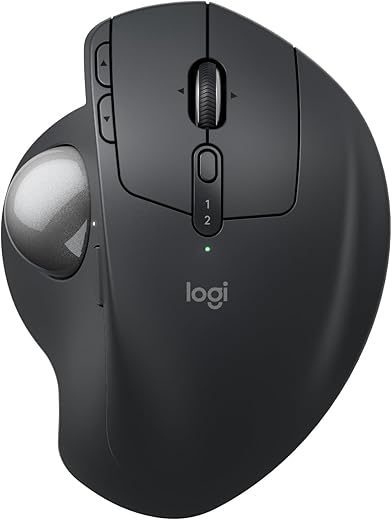
- Best premium trackball: Logitech MX Ergo S — made for medium to large hands, 20° tilt, $115.99
- Best wired: Razer DeathAdder V3 Wired — same 128 mm shape, 59 g, $44.99
- Best budget trackball: Logitech ERGO M575S — 134 x 100 mm, one AA for up to 18 months, $49.10
Ergonomic Mouse for Large Hands: Comparison Table
| Mouse | Type | Size (L x W) | Weight | Connection | Price (5 Oct) | Amazon rating | Score |
|---|---|---|---|---|---|---|---|
| Razer DeathAdder V3 Pro | Flat, right-hand | 128 x 68 mm | 63 g | HyperSpeed wireless | $69.99 | 4.3 (2,216) | 9.2 |
| Razer Basilisk V3 Pro 35K | Flat, thumb rest | 130 x 75.4 mm | 112 g | HyperSpeed + Bluetooth | $129.99 | 4.4 (695) | 9.0 |
| Logitech G502 X Plus | Flat, thumb groove | 131.4 x 79.2 mm | 106 g | LIGHTSPEED wireless | $147.99 | 4.4 (2,667) | 8.9 |
| Logitech MX Vertical | Vertical, 57° | about 120 mm tall | about 135 g | USB receiver, USB-C | $77.99 | 4.4 (15,113) | 8.8 |
| Logitech MX Ergo S | Thumb trackball, 0/20° tilt | 132.5 x 99.8 mm | 164 g | Bluetooth + Logi Bolt | $115.99 | 4.4 (829) | 8.7 |
| Razer DeathAdder V3 Wired | Flat, right-hand | 128 x 68 mm | 59 g | Wired | $44.99 | 4.2 (1,767) | 8.6 |
| Logitech ERGO M575S | Thumb trackball | 134 x 100 mm | 145 g | Bluetooth + Logi Bolt | $49.10 | 4.5 (2,417) | 8.4 |
Sizes and weights are the makers’ published figures (the MX Vertical’s from published spec sheets; Logitech’s own figures are not in its Amazon listing). Prices are Amazon prices on 5 October 2026.
Why Large Hands Need a Different Mouse
Measure your hand from the crease at the base of your palm to the tip of your middle finger. Most office mice are made for hands of about 17–19 cm. Above that, a short shell leaves the palm hanging off the back and the fingers curling over the front, which pushes you into a claw grip you never chose. A narrow shell does the same thing sideways: the ring and little fingers drag on the desk.
So the first filter for a large hand is size. For a relaxed palm grip, look for a shell of roughly 125 mm or longer and at least 68 mm wide; every flat mouse below meets that. The second filter is posture. A bigger flat mouse fixes the fit, but it still makes the forearm rotate palm-down. If that rotation is what bothers you, size alone won’t fix it, and the vertical mouse and trackballs below exist for exactly that reason.
Tall people often ask for the best mouse for their height. Height itself does not matter; hand length does, and tall people usually have longer hands. Measure first, then pick by hand size.
1. Razer DeathAdder V3 Pro — Best Overall Ergonomic Mouse for Large Hands
128 x 68 x 44 mm · 63 g · Focus Pro 30K sensor · Gen-3 optical switches · 5 buttons · HyperSpeed wireless · up to 90 h battery · $69.99 (list $149.99) · 4.3 stars from 2,216 ratings · Score 9.2
The DeathAdder shape is long and leans to the right, so a large palm rests on it instead of perching on top. Razer publishes the V3 Pro at 128 mm long, 68 mm wide and 44 mm tall, and it weighs just 63 g, about half the weight of the G502 X Plus and the trackballs. Light and long is an unusual mix, and it is why this mouse suits both a workday and a gaming evening.
Razer fits its top parts: the Focus Pro 30K optical sensor, optical switches rated for 90 million clicks with 0.2 ms actuation, and HyperSpeed wireless with up to 90 hours per USB-C charge. What puts it first today is the price. At $69.99 on 5 October 2026 it cost less than the MX Vertical and only $25 more than its own wired version.
Best for: hands of roughly 19–21 cm that palm or claw grip, and anyone who wants one wireless mouse for work and play.
Skip if: your wrist hurts from rotation (pick the MX Vertical), you want more than five buttons, or you are left-handed.
Read the full Razer DeathAdder V3 Pro review or check the price on Amazon.
2. Razer Basilisk V3 Pro 35K — Best With a Thumb Rest
130 x 75.4 x 42.5 mm · 112 g · Focus Pro 35K Gen-2 sensor · 13 customizable controls · HyperSpeed + Bluetooth · up to 140 h battery · $129.99 (list $159.99) · 4.4 stars from 695 ratings · Score 9.0
If your thumb never knows where to rest, this is the shape. The Basilisk adds a built-out thumb rest to a 130 mm long, 75.4 mm wide shell, so a big hand fills it and the thumb sits on a shelf rather than gripping the side. It also has more controls than anything else here: 13, including a multi-function trigger under the thumb and a HyperScroll wheel that switches between tactile and free-spin scrolling, or does it by itself in Smart-Reel mode.
Razer rates the battery at up to 140 hours, the longest of the gaming mice here, and adds Bluetooth for a laptop. The 8,000 Hz polling headline needs Razer’s Mouse Dock Pro or HyperPolling dongle, both sold separately.
Best for: large right hands that want a thumb rest and lots of programmable controls.
Skip if: you want a light mouse (112 g is nearly double the DeathAdder V3 Pro) or you are left-handed.
Read the full Razer Basilisk V3 Pro 35K review or check the price on Amazon.
3. Logitech G502 X Plus — Best for Very Large Hands
131.4 x 79.2 x 41.1 mm · 106 g · HERO 25K sensor (100–25,600 DPI) · LIGHTFORCE hybrid switches · 13 programmable controls · LIGHTSPEED wireless · $147.99 (list $159.99) · 4.4 stars from 2,667 ratings · Score 8.9
Width is where most mice fail big hands, and the G502 X Plus is the widest flat mouse here at 79.2 mm, by Logitech’s figures, and 131.4 mm long. The thumb sits in a deep groove under two side buttons and a DPI-shift button that can be flipped or removed, and the outer fingers have a real flank to rest on. For hands of about 21 cm and up, it is the one that does not feel small.
It has 13 programmable controls, a scroll wheel that switches between free-spin and ratcheted modes and tilts left and right, eight-LED LIGHTSYNC RGB, and support for Logitech’s POWERPLAY charging mat (sold separately). Battery life depends on the lighting; the Amazon spec field lists 120 hours.
Best for: very large or wide hands, MMO players and anyone who wants lots of buttons.
Skip if: price matters: today it costs about twice the DeathAdder V3 Pro. The listing also showed “Only 5 left in stock” on 5 October.
Read the full Logitech G502 X Plus review or check the price on Amazon.
4. Logitech MX Vertical — Best Vertical Mouse for Large Hands
57° vertical angle · 4,000 DPI with cursor speed switch · 4 buttons · USB receiver + USB-C charging · listing battery figure 4 months · $77.99 (list $119.99) · 4.4 stars from 15,113 ratings · Score 8.8
A flat mouse, however big, keeps your forearm twisted palm-down all day. The MX Vertical stands your hand up at 57°, the handshake position, with the thumb on a ledge. Logitech says that reduces muscular activity by 10% compared with a standard mouse. For a large hand, a vertical body has one more advantage: the hand wraps around it instead of stretching along it, so shell length matters less.
The 4,000 DPI sensor moves the cursor further for each inch of hand travel, and a button on top changes cursor speed. It is the most-rated mouse here by a wide margin (15,113 ratings), and $77.99 on 5 October was well under its $119.99 list price.
Best for: large hands with wrist or forearm discomfort, and office work.
Skip if: you game competitively, need more than four buttons, or are left-handed. Vertical mice also take a few days to get used to.
Read the full Logitech MX Vertical review or check the price on Amazon.
5. Logitech MX Ergo S — Best Premium Trackball
132.5 x 99.8 x 51.4 mm · 164 g (259 g with tilt plate) · thumb trackball · 0° or 20° tilt · 8 buttons (6 customizable) · Bluetooth + Logi Bolt · up to 120 days per charge · $115.99 · 4.4 stars from 829 ratings · Score 8.7
This is the only mouse here whose maker says outright that it is designed for medium- to large-sized hands. The body is 132.5 mm long and nearly 100 mm wide, so a big hand rests on it completely while the thumb moves the ball and the arm stays still. A metal plate tilts it to 20°, which Logitech says improves forearm posture and cuts muscle strain by 27%; clicks are 80% quieter than before.
A one-minute USB-C charge gives up to 24 hours and a full charge up to 120 days, by Logitech’s figures, but the listing says the cable is not included. An Easy-Switch button moves between computers, and a precision-mode button slows the cursor for fine work.
Best for: large hands that want zero arm movement, crowded desks, and shoulder or forearm fatigue.
Skip if: you game, or the $49 M575S would do the job. The listing showed “Only 3 left in stock” on 5 October.
Read the full Logitech MX Ergo S review or check the price on Amazon.
6. Razer DeathAdder V3 Wired — Best Wired Mouse for Large Hands
128 x 68 x 44 mm · 59 g · Focus Pro 30K sensor · 8,000 Hz HyperPolling · 6 programmable buttons · Speedflex cable · $44.99 (list $69.99) · 4.2 stars from 1,767 ratings · Score 8.6
Same long shape as our overall pick, published at the same 128 x 68 x 44 mm, with no battery, so it drops to 59 g. Razer gives it the same Focus Pro 30K sensor and Gen-3 optical switches, plus 8,000 Hz HyperPolling, which reports the mouse’s position up to 8,000 times a second. The Speedflex cable is woven to keep drag down.
At $44.99 it is the cheapest mouse in this comparison. The catch is today’s sale on the wireless V3 Pro: for $25 more you lose the cable.
Best for: desktop users with large hands who like the DeathAdder shape and never need wireless.
Skip if: you carry a laptop around, or the V3 Pro is still $69.99 when you buy.
Read the full Razer DeathAdder V3 Wired review or check the price on Amazon.
7. Logitech ERGO M575S — Best Budget Trackball
134 x 100 x 48 mm · 145 g · thumb trackball · 100–2,000 DPI · 5 buttons (3 customizable) · quiet clicks · Bluetooth + Logi Bolt · 1 AA, up to 18 months · $49.10 · 4.5 stars from 2,417 ratings · Score 8.4
The cheapest way to stop moving your arm. Your thumb drives the ball and the hand stays put, and Logitech says the shape gives 25% less forearm muscle strain; it was developed with Logi Ergo Lab experts and certified by ergonomists. The 134 x 100 mm body is as long as the MX Ergo S and slightly wider, and Logitech calls it a good fit for most hand sizes.
This listing is the current M575S: quiet clicks, the Logi Bolt receiver, and up to 18 months on one AA battery (older pages quote 24 months for the original M575). It has the highest Amazon rating in our comparison. What you give up against the MX Ergo S is the tilt plate, the rechargeable battery and switching between computers.
Best for: first-time trackball users, small desks and tight budgets.
Skip if: you want a tilt adjustment or a rechargeable battery, or you game.
Read the full Logitech ERGO M575S review or check the price on Amazon.
The Trade-Off None of Them Escapes
A mouse can fix fit or fix posture, but the ones that do both well are slow. The flat mice (DeathAdder, Basilisk, G502) fit large hands and aim fast, yet they all keep the forearm rotated. The MX Vertical fixes rotation but has four buttons and a learning curve. The trackballs remove arm movement entirely, but they are the slowest for fast, precise cursor work and need cleaning. Decide which problem you actually have before you decide how much to spend.
How to Choose an Ergonomic Mouse for Large Hands
Measure your hand
Measure from the base of the palm to the tip of the middle finger. Around 19–21 cm, the 128–131 mm flat shells here fit a palm grip. Above about 21 cm, or with a wide palm, the G502 X Plus or a trackball gives the most room.
Know your grip
Palm grip rests the whole hand on the mouse and needs the longest shell. Claw grip arches the fingers and can work on a slightly shorter shell. Fingertip grip uses the smallest shells; if that is you, length matters less and weight matters more.
Flat, vertical or trackball?
Flat for speed and games. Vertical if your forearm or wrist complains after long days. Trackball if you want to stop moving your arm, or your desk is small.
Weight
Light mice (59–63 g) start and stop with less effort; heavier ones (106–112 g) can feel steadier for office work. Trackballs don’t move, so their weight only matters for keeping them in place.
Wireless and battery
Battery figures here range from up to 90 hours (DeathAdder V3 Pro) to up to 18 months on one AA (M575S). Rechargeable mice need a cable now and then; note the MX Ergo S does not include one.
The rest of the desk
A mouse is one part of the setup. Keep the mouse at elbow height and close to the keyboard, and see our budget ergonomic desk setup for the whole checklist. A padded rest under the keyboard helps too; our best wrist rest for keyboard guide compares five.
Which Ergonomic Mouse Should You Buy?
- One mouse for everything, large hand: DeathAdder V3 Pro.
- Very large or wide hand: G502 X Plus.
- Want somewhere to put your thumb: Basilisk V3 Pro 35K.
- Wrist or forearm discomfort: MX Vertical.
- Don’t want to move your arm: M575S on a budget, MX Ergo S for the tilt and rechargeable battery.
- Cheapest good fit, desktop only: DeathAdder V3 Wired.
Shopping for someone who works from home? Several of these mice also appear in our work from home gifts guide, and tall buyers may want our office chair for tall person picks too.
Frequently Asked Questions
What is the best ergonomic mouse for large hands?
For most people, the Razer DeathAdder V3 Pro: a 128 mm right-hand shell at 63 g with up to 90 hours of wireless battery. For very large or wide hands, the Logitech G502 X Plus (131.4 x 79.2 mm) has more room.
What size hand counts as large for a mouse?
Most mice are shaped for hands of about 17–19 cm, measured from the base of the palm to the tip of the middle finger. From about 19 cm, look for a shell of 125 mm or longer for a palm grip.
Is a vertical mouse good for large hands?
Usually yes. The hand wraps around a vertical body, so the shell’s length matters less. The Logitech MX Vertical’s thumb rest and 57° angle suit medium and large hands.
Which Logitech mouse is best for large hands?
The G502 X Plus for gaming and lots of buttons, the MX Vertical for wrist posture, and the MX Ergo S, which Logitech says is made for medium- to large-sized hands, if you want a trackball.
Is a trackball better than a mouse for large hands?
A trackball doesn’t need to fit the hand’s movement, only its size, and both Logitech trackballs here are over 130 mm long. They suit people who want to stop moving their arm; they are slower for fast, precise work.
What is the best wired ergonomic mouse for large hands?
The Razer DeathAdder V3 Wired: the same 128 x 68 x 44 mm shape as the V3 Pro, 59 g, and $44.99 on 5 October 2026.
What is the best mouse for tall people?
Choose by hand length, not height. Tall people usually have longer hands, so start with the DeathAdder V3 Pro or, above about 21 cm, the G502 X Plus.
Will an ergonomic mouse fix wrist pain?
The makers’ claims (10% less muscular activity for the MX Vertical, 25–27% less strain for the Logitech trackballs) are Logitech’s own figures, not medical findings. A better mouse can help posture, but it is not a treatment. If pain persists, see a clinician.
Final Verdict
Buy the Razer DeathAdder V3 Pro if your hand is large and your wrist is fine: it is the best ergonomic mouse for large hands at today’s price. Go bigger with the G502 X Plus, more comfortable for the thumb with the Basilisk V3 Pro 35K, and switch shape entirely with the MX Vertical or a Logitech trackball if your forearm is the problem.
How We Compared
We read each mouse’s live Amazon listing on 5 October 2026 for price, rating, stock and the seller’s specifications, and took dimensions and weights from the makers’ published specifications (Logitech’s support pages and Razer’s published dimensions; the MX Vertical’s size and weight from published spec sheets). We ranked them on fit for hands of 19 cm and up, posture, features, battery and price. We did not use these mice ourselves. SoftPickr earns a commission on qualifying Amazon purchases at no extra cost to you; that does not change the ranking.




I had a similar experience last month. Switched to recharging through a dedicated top-up platform instead of in-game and the savings were noticeable. Definitely worth comparing options before you buy.