


Best price Logitech ERGO M575 Review — Best Budget Trackball Mouse for Large Hands?

Logitech ERGO M575 Review — Best Budget Trackball Mouse for Large Hands?

Add your review
Add to compare
8.8
Expert ScoreRead review

Logitech ERGO M575 review — budget wireless trackball mouse with sculpted ergonomic design, 2,000 DPI sensor, dual Bluetooth and Logi Bolt connectivity, and 24-month AA battery. Best budget trackball mouse for medium-to-large hands at under $50.

$49.99

Best deal at: amazon.comAmazon.com
Buy for best price
Set Lowest Price Alert
×
Notify me, when price drops
Set Alert for Product: Logitech Ergo M575S Wireless Trackball Mouse, Wireless Ergonomic Mouse with Bluetooth and Encrypted Dongle, Comfortable Thumb Control, Precise and Smooth Tracking, for PC/Mac - Black Silver Ball - $49.99
Last Amazon price update was: May 2, 2026 11:06 pm
× Product prices and availability are accurate as of the date/time indicated and are subject to change. Any price and availability information displayed on Amazon.com (Amazon.in, Amazon.co.uk, Amazon.de, etc) at the time of purchase will apply to the purchase of this product.
Add to wishlistAdded to wishlistRemoved from wishlist 0
Last updated on May 2, 2026 11:06 pm
Logitech ERGO M575 Review — Best Budget Trackball Mouse for Large Hands?

Description

Logitech ERGO M575 Review — Best Budget Trackball Mouse for Large Hands?

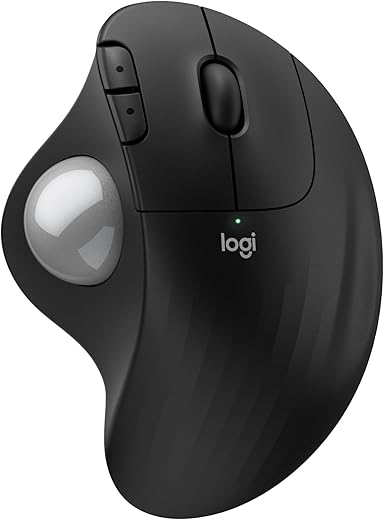
This Logitech ERGO M575 review covers why it has become the top budget pick for users with medium-to-large hands seeking ergonomic relief without paying premium trackball prices. With a sculpted ergonomic shape, smooth responsive thumb-controlled trackball, dual wireless connectivity via Bluetooth and Logi receiver, 24-month AA battery life, and Logi Options+ software customization, the Logitech ERGO M575 delivers genuine RSI prevention and wrist pain relief at $49.99.

The trackball eliminates wrist movement entirely while the curved body cradles medium-to-large hands in a relaxed position. For buyers wanting more advanced ergonomic features like 20° tilt and rechargeable battery, see our Logitech MX Ergo S review at $99-119. For the budget-conscious large-handed buyer who refuses to pay premium prices, the Logitech ERGO M575 is the cluster’s best value entry point.

Logitech ERGO M575 — Key Specs at a Glance

Spec Detail
Length 134mm (5.28 inches)
Width 100mm (3.94 inches)
Height 48mm (1.89 inches)
Weight 145 grams (with battery)
Sensor Optical with thumb-controlled trackball
Max DPI 2,000 DPI (default 400 DPI)
Switches Mechanical, rated for 3 million clicks
Connectivity Bluetooth + Logi 2.4GHz USB Receiver (included)
Multi-Device Switching Yes — switch between 2 computers
Battery Life Up to 24 months on a single AA battery
Battery Type AA (one included)
Buttons 5 (left, right, scroll click, 2 thumb buttons)
Customizable Buttons Via Logi Options+ software
Tilt Angle Fixed natural angle (no adjustable tilt)
USB Receiver Storage Hidden in battery compartment
Compatibility Windows, macOS, iPadOS, Chrome OS, Linux
Software Logi Options+
Color Options Graphite, Off-White
Ideal Hand Size Medium to large (17-21cm)
Trackball Diameter 34mm (removable for cleaning)
Warranty 1 year limited
Price From $49.99 on Amazon

What Makes the Logitech ERGO M575 the Best Budget Pick for Large Hands?

The Logitech ERGO M575 earns the “best budget” title for large hands by delivering genuine ergonomic value at less than half the price of premium trackballs. Where the Logitech MX Ergo S retails at $99-119 with a 20° tilt and rechargeable battery, the Logitech ERGO M575 hits $49.99 with the core trackball benefits intact: zero wrist movement, sculpted ergonomic shape, dual wireless connectivity, and Logitech’s productivity ecosystem.

For buyers who want trackball ergonomics without committing $100+ for premium features, the Logitech ERGO M575 is the most accessible entry point on the market.

What separates the Logitech ERGO M575 from cheaper trackballs is the Logitech build quality and software ecosystem. The 3-million click rating means the mouse will likely outlast the PC it’s paired with. The Logi Bolt receiver and Bluetooth dual connectivity match the more expensive MX Ergo S in pairing flexibility, and Logi Options+ software offers genuine button customization, app-specific profiles, and Smart Actions.

For users wanting the most refined ergonomic trackball experience with 20° tilt and 80% quieter clicks, the Logitech MX Ergo S is the premium upgrade. For wired esports performance instead of trackball ergonomics, the Razer DeathAdder V3 Wired is the gaming-focused budget pick at $69.

Logitech ERGO M575 Review — Why It Works for 17-21cm Hands and Wrist Pain

The Logitech ERGO M575 review consistently wins recommendations from RSI sufferers and large-handed budget buyers because of three specific design choices.

First, the 134mm length and 100mm width create a substantial shell that fully supports medium-to-large hands at rest. Verified user feedback consistently confirms the Logitech ERGO M575 is sized for hands in the 17-21cm range — the curved body cradles your palm naturally without the cramped feel that smaller trackballs cause for larger hands.

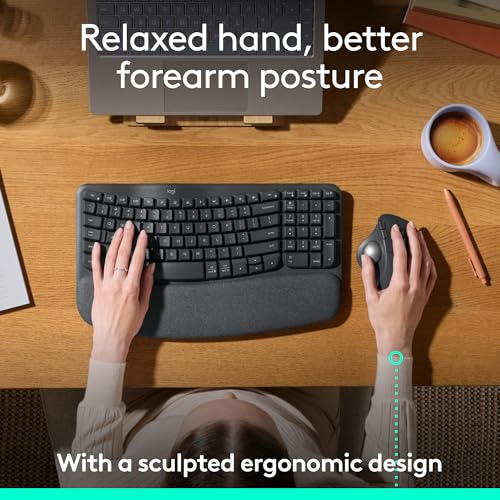
Second, the trackball on the Logitech ERGO M575 eliminates the root cause of most mouse-related wrist injuries — repetitive wrist movement. With the M575, your hand stays anchored in one position while your thumb operates the ball to move the cursor. There’s no wrist supination, no shoulder reach, no repetitive lift-and-replace cycle. According to Mayo Clinic research on carpal tunnel syndrome, repetitive wrist motion is the primary contributor to most mouse-related strain injuries — and the Logitech ERGO M575 eliminates that root cause entirely.

Verified user feedback from tendinitis, carpal tunnel, and chronic wrist pain sufferers consistently reports meaningful symptom reduction within the first 1-2 weeks of switching to the Logitech ERGO M575. For the price of $49.99, this is a remarkably effective ergonomic intervention.

Third, the Logitech ERGO M575 sits at a comfortable angle between a vertical mouse and a traditional flat mouse — what reviewers often call a “natural pitch.” Your wrist isn’t forced into the extreme handshake position of a vertical mouse, but it’s also not flat-pronated like with a traditional mouse.

This middle-ground angle reduces forearm strain without requiring the steep adaptation curve of fully vertical mice. For users wanting the steeper 57° vertical handshake position instead, the Logitech MX Vertical is the cluster’s vertical pick.

Logitech ERGO M575 Trackball, Battery and Productivity Features

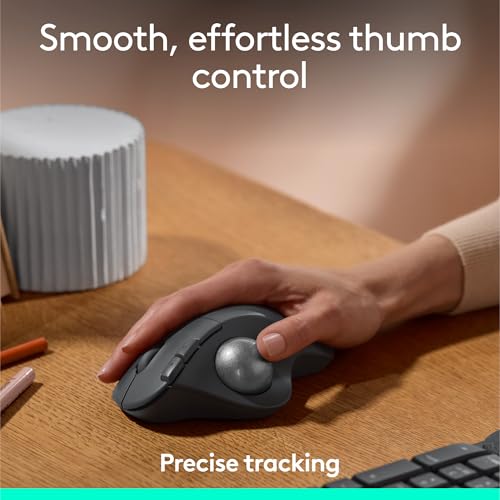
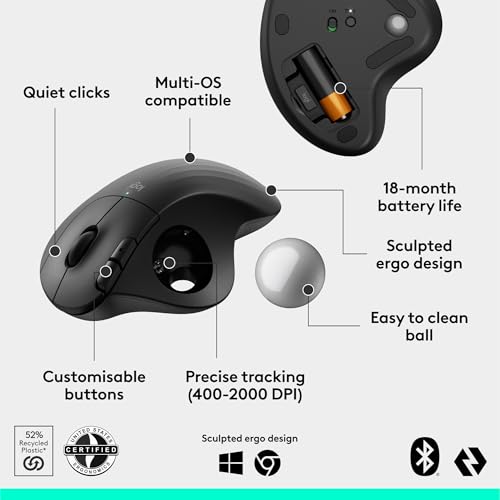
The trackball is the headline feature of the Logitech ERGO M575, and Logitech executes it well at the budget price point. The 34mm ball is positioned naturally for thumb control, rotates smoothly with light finger pressure, and tracks accurately for general productivity work via a 400-2,000 DPI optical sensor.

The default 400 DPI is conservative — most users adjust this up via Logi Options+ to suit their preferred cursor speed. The trackball on the Logitech ERGO M575 is removable for cleaning, which solves the long-standing trackball complaint about debris buildup over time, though some users report the ball is harder to remove than the MX Ergo S.

Battery life on the Logitech ERGO M575 is genuinely best-in-class for the budget tier. A single AA battery powers the M575 for up to 24 months under typical productivity use. While some users prefer rechargeable USB-C trackballs, the AA approach has advantages: no charging cable required, no battery degradation over time, and you can keep a spare AA on hand for instant swap.

The included AA battery covers your first 2 years of use out of the box. For buyers who prefer rechargeable battery and USB-C charging, the Logitech MX Ergo S is the upgrade option.

Dual wireless connectivity is a meaningful differentiator on the Logitech ERGO M575 versus cheaper budget trackballs. The included Logi Bolt USB receiver provides reliable 2.4GHz wireless for desktop use, while built-in Bluetooth lets you pair the Logitech ERGO M575 to a second device — useful for users juggling a work laptop and personal computer.

Switching between paired devices requires unpairing or using the connectivity button on the bottom, which is less seamless than the Easy-Switch button on premium Logitech mice but still functional. According to Logitech’s official ERGO M575 product page, the device switching is designed for users who need basic multi-device flexibility without the cost of premium Easy-Switch hardware.

Logitech ERGO M575 vs Logitech MX Ergo S vs Logitech MX Vertical — Comparison

Feature Logitech ERGO M575 Logitech MX Ergo S Logitech MX Vertical
Price $49.99 $99.99 $99.99
Form Factor Trackball, fixed angle Trackball with 20° tilt Vertical 57° angle
Wrist Movement None — thumb controls cursor None — thumb controls cursor Reduced — handshake position
Tilt Adjustability Fixed natural angle 0° or 20° magnetic hinge Fixed 57° vertical
Muscle Strain Reduction Reduced via zero wrist movement 27% (Logitech ergonomist study) 10% (Logitech ergonomist study)
Battery AA, 24-month life Rechargeable USB-C, 4-month life Rechargeable USB-C, 4-month life
Buttons 5 (limited customization) 6 customizable + DPI button 6 (4 customizable)
Multi-Device Switching 2 devices (manual switching) 2 devices (Easy-Switch) 3 devices (Easy-Switch)
Quiet Clicks Standard 80% quieter primary clicks Standard
Logitech Flow No Yes Yes
Hand Size Fit 17-21cm 17-21cm 17-21cm
Best Use Case Budget trackball entry Premium trackball + maximum ergonomic features RSI prevention + multi-device productivity

The Logitech ERGO M575 wins the budget category on price-to-ergonomic-value ratio. If you want the most refined trackball experience with 20° tilt and quieter clicks, the Logitech MX Ergo S is the premium upgrade.

If you prefer vertical handshake orientation over trackball, the Logitech MX Vertical is the cluster’s vertical pick. For users wanting trackball benefits without paying $100+, the Logitech ERGO M575 is the right entry point.

Who Should Buy the Logitech ERGO M575?

  • Budget-conscious large-handed buyers wanting trackball ergonomics under $50
  • First-time trackball users wanting to test the Logitech ERGO M575 form factor before upgrading
  • Users with mild-to-moderate wrist pain or RSI symptoms
  • Productivity workers with limited desk space who can’t move a traditional mouse
  • Users with hand sizes 17-21cm (medium to large) seeking ergonomic relief
  • Buyers who prefer the Logitech ERGO M575’s 24-month AA battery life over weekly USB-C charging
  • Multi-device users juggling a work laptop and personal desktop on a budget
  • Anyone tired of moving a traditional mouse and dealing with mouse pad clutter

Skip the Logitech ERGO M575 if you want the most refined ergonomic trackball with 20° tilt and quieter clicks (the Logitech MX Ergo S is worth the upgrade), you primarily play games (the Razer DeathAdder V3 Wired at $69 is built for that), you need rechargeable battery instead of AA (the MX Ergo S has USB-C), or you prefer vertical handshake orientation over trackball (the Logitech MX Vertical is the right pick).

Logitech ERGO M575 Alternatives for Large Hands

If the Logitech ERGO M575 doesn’t perfectly match your needs, here are the best alternatives from our cluster:

  • Best overall pick: The Razer DeathAdder V3 Pro at 63g is the lightest large-hand mouse for 19-21cm hands, ideal for FPS gaming and all-around productivity at $149.
  • Best for heaviest hands: The Logitech G502 X Plus offers a 131.4mm shell and 13 programmable buttons for hands 20-22cm and longer.
  • Best for vertical / RSI prevention: The Logitech MX Vertical puts your hand in a 57° handshake position to relieve wrist pronation strain.
  • Best with thumb rest: The Razer Basilisk V3 Pro 35K adds a sculpted thumb rest plus Bluetooth multi-device switching for hybrid gaming and productivity.
  • Best premium trackball: The Logitech MX Ergo S upgrades to 20° tilt, 80% quieter clicks, and rechargeable USB-C battery at $99-119.
  • Best wired option: The Razer DeathAdder V3 Wired offers the same DeathAdder shape as the V3 Pro at less than half the price for esports buyers.

Logitech ERGO M575 Review — Frequently Asked Questions

Is the Logitech ERGO M575 good for large hands?
Yes — the Logitech ERGO M575 is sculpted for medium-to-large hands measuring 17-21cm. The 134mm length and 100mm width fully support a relaxed palm rest, with the trackball positioned naturally for thumb control.

Does the Logitech ERGO M575 actually help with wrist pain and RSI?
For most users yes — the trackball on the Logitech ERGO M575 eliminates wrist movement entirely, which is the root cause of most mouse-related repetitive strain injuries. Verified user feedback from tendinitis and carpal tunnel sufferers consistently reports meaningful symptom reduction within 1-2 weeks of switching.

How long is the Logitech ERGO M575 learning curve for a trackball mouse?
Most users adapt within 7-14 days. The first 1-3 days feel awkward as your thumb learns precise cursor control, but by week two most users report the Logitech ERGO M575 feels natural. Slowing the cursor speed in Windows or macOS settings during the adaptation period helps significantly.

What’s the difference between the Logitech ERGO M575 and MX Ergo S?
The MX Ergo S adds a 20° magnetic tilt mechanism, 80% quieter primary clicks, USB-C rechargeable battery (versus AA on the Logitech ERGO M575), Easy-Switch button for multi-device, and Logitech Flow for cross-machine copy-paste. The Logitech ERGO M575 keeps the core trackball benefits at half the price. Choose the M575 for budget, MX Ergo S for maximum features.

How long does the battery last on the Logitech ERGO M575?
Up to 24 months (2 years) on a single AA battery under typical productivity use. The included AA battery covers your first 2 years out of the box. AA replacement batteries are inexpensive and widely available.

Can the Logitech ERGO M575 be used for gaming?
Not recommended — the Logitech ERGO M575 trackball is fundamentally less precise for fast aim adjustments needed in competitive games. For casual strategy games and slow-paced RPGs it works adequately. For gaming, the Razer DeathAdder V3 Wired at $69 is the cluster’s budget gaming pick.

Is the Logitech ERGO M575 trackball removable for cleaning?
Yes — the trackball can be removed by pushing it out from the underside hole. Some users report it’s harder to remove than the MX Ergo S, but cleaning is straightforward once the ball is out.

Does the Logitech ERGO M575 work on macOS and iPadOS?
Yes — the Logitech ERGO M575 is officially compatible with Windows, macOS, iPadOS, Chrome OS, and Linux via Bluetooth or the Logi Bolt USB receiver. Logi Options+ software is available for Windows and macOS for button customization.

Logitech ERGO M575 Review — Final Verdict

The Logitech ERGO M575 is the best budget trackball mouse for medium-to-large hands at $49.99. It delivers the core ergonomic benefit of a trackball — eliminating wrist movement entirely — at less than half the price of premium trackballs, while keeping Logitech’s build quality, dual wireless connectivity, 24-month AA battery life, and Logi Options+ customization.

The fixed angle (no 20° tilt) and AA battery are the trade-offs versus the premium Logitech MX Ergo S, but for buyers entering the trackball world or unwilling to spend $100+, the Logitech ERGO M575 hits the sweet spot.

For users with tendinitis, carpal tunnel, or chronic wrist pain who want a meaningful ergonomic intervention without breaking the bank, the Logitech ERGO M575 is the cluster’s most accessible solution. For the full cluster including premium trackball, vertical, gaming, and overall picks, see our best ergonomic mouse for large hands roundup.

SoftPickr Rating: 8.8/10

Additional information

Specification: Logitech ERGO M575 Review — Best Budget Trackball Mouse for Large Hands?

Connectivity Technology

Bluetooth, USB

Additional Features

Lightweight, Portable, Wireless

Movement Detection

Optical

Button Quantity

2

Hand Orientation

Right

Compatible Devices

Personal Computer, Tablet

Operating System

Windows, macOS

Battery Average Life (months)

18

Number of Batteries

1 Nonstandard Battery batteries required. (included)

Hardware Platform

PC

Power Source

Battery Powered

Minimum Required Operating System Version

Windows 10

Range (meters)

10

Color

Black + Silver Ball

Style Name

Modern

Enclosure Material

Plastic

Brand

Logitech

Model Name

ERGO M575s

Antenna Location

Gaming, Office

Model Number

910-007392

Are Batteries Included

Yes

Are Batteries Required

Yes

Manufacturer

Logitech

UPC

097855198853

Mfr Part Number

910-007392

Warranty Description

1 Year limited Hardware Warranty

ASIN

B0D6PZ5DPN

Item Weight (Kilograms)

0.21

Unit Count (Count)

1.0

Price History

-

Reviews (0)

User Reviews

0.0 out of 5
0
0
0
0
0
Write a review

There are no reviews yet.

Be the first to review “Logitech ERGO M575 Review — Best Budget Trackball Mouse for Large Hands?”

Your email address will not be published. Required fields are marked *

softpickr.com
Logo
Register New Account
Compare items
  • Total (0)
Compare
0
Shopping cart