

Best price Logitech MX Ergo S Review — Best Trackball Mouse for Large Hands?

Logitech MX Ergo S Review — Best Trackball Mouse for Large Hands?

Add your review
Add to compare
9
Expert ScoreRead review

Logitech MX Ergo S review — ergonomic wireless trackball mouse with 20° tilt angle, 27% less forearm muscle strain, 80% quieter clicks, 6 customizable buttons, and 4-month battery. Best trackball mouse for medium-to-large hands and RSI sufferers.

Best deal at: amazon.comAmazon.com
Buy for best price
Set Lowest Price Alert
×
Notify me, when price drops
Set Alert for Product: Logitech MX Ergo S Advanced Wireless Trackball Mouse, USB-C Rechargeable Wireless Ergonomic Mouse with Bluetooth and Encrypted Dongle, 6 Programmable Buttons, for PC/Mac - Graphite -
Last Amazon price update was: May 2, 2026 9:59 pm
× Product prices and availability are accurate as of the date/time indicated and are subject to change. Any price and availability information displayed on Amazon.com (Amazon.in, Amazon.co.uk, Amazon.de, etc) at the time of purchase will apply to the purchase of this product.
Add to wishlistAdded to wishlistRemoved from wishlist 0
Last updated on May 2, 2026 9:59 pm
Logitech MX Ergo S Review — Best Trackball Mouse for Large Hands?

Description

Logitech MX Ergo S Review — Best Trackball Mouse for Large Hands?

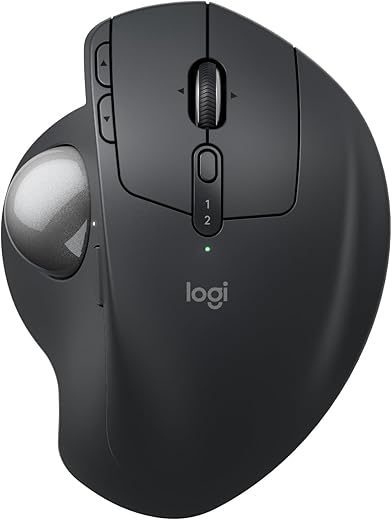
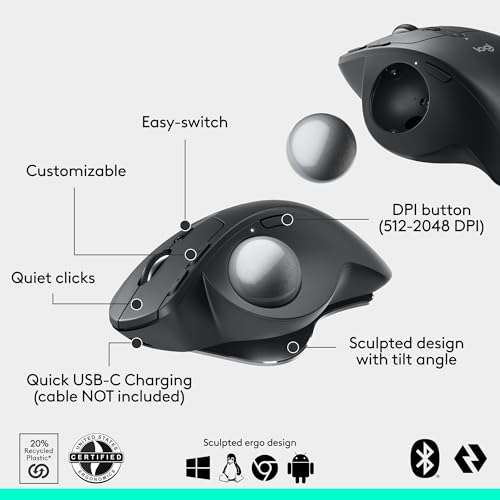
This Logitech MX Ergo S review covers why it has become the go-to wireless trackball mouse for users with medium-to-large hands suffering from wrist pain, RSI, arthritis, or limited desk space. With a 20° adjustable tilt angle that reduces forearm muscle strain by 27%, ergonomist-certified design, 80% quieter clicks than its predecessor, USB-C quick charging delivering 24 hours of use from a 1-minute charge, and Bluetooth multi-device switching across 2 computers, the Logitech MX Ergo S is the ergonomic-first pick for productivity buyers who refuse to choose between comfort and precision. According to Logitech’s official ergonomist-validated study, the trackball eliminates wrist movement entirely — you control the cursor with your thumb while your hand rests in a relaxed, supported position. If you prefer a vertical handshake mouse instead of trackball orientation, see our Logitech MX Vertical review.

Logitech MX Ergo S — Key Specs at a Glance

Spec Detail
Length 132.5mm (5.22 inches)
Width 99.8mm (3.93 inches)
Height 51.4mm (2.02 inches)
Weight 164 grams
Tilt Angle 0° flat or 20° tilted (magnetic hinge base)
Muscle Strain Reduction 27% less forearm activity at 20° tilt vs flat mouse (Logitech ergonomist study)
Sensor Optical with thumb-controlled trackball
DPI Range Adjustable speed via DPI button (precision mode toggle)
Switches Mechanical, 80% quieter clicks (left and right buttons)
Connectivity Bluetooth Low Energy + Logi Bolt USB Receiver (included)
Multi-Device Switching Easy-Switch — pair to 2 computers
Battery Life Up to 120 days (4 months) on full charge
Quick Charge 1 minute charge equals 24 hours of use
Charging Port USB-C (cable not included)
Buttons 6 customizable controls + DPI button
Logitech Flow Yes — copy and paste between machines
Ergonomist Certified Yes
Ideal Hand Size Medium to large (17-21cm)
Sustainability 26% certified post-consumer recycled plastic (Plus variant)
Software Logi Options+
Trackball Material Removable for cleaning (magnetic plate access)
Warranty 1-2 years (region dependent)
Price From $99.99 on Amazon

What Makes the Logitech MX Ergo S the Best Trackball Pick for Large Hands?

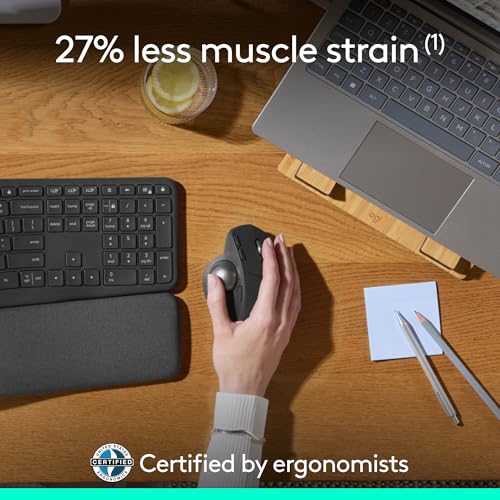
The Logitech MX Ergo S earns the “best trackball” title for medium-to-large hands by being the only Logitech trackball certified by ergonomists with a 20° adjustable tilt. Where most trackballs offer trackball convenience without ergonomic angle, the Logitech MX Ergo S combines both — the 20° tilt reduces forearm muscle activity by 27% compared to flat mice, while the trackball eliminates wrist movement entirely. According to Mayo Clinic research on carpal tunnel syndrome, repetitive wrist movement is the primary cause of most mouse-related strain injuries — and the MX Ergo S is engineered to eliminate that root cause entirely. For users with RSI, carpal tunnel, arthritis, or general wrist fatigue, this is a fundamentally different ergonomic solution than what horizontal mice offer.

What separates the Logitech MX Ergo S from cheaper trackballs is the productivity infrastructure underneath the shape. The 80% quieter clicks make it suitable for office, library, or shared workspace environments. The Logi Bolt receiver plus Bluetooth dual connectivity lets you pair to 2 computers and switch with a button press. The 4-month battery life with USB-C quick charging means you charge once per quarter rather than weekly. For users who specifically want a vertical handshake-position mouse instead of trackball, the Logitech MX Vertical is the cluster’s vertical pick. For productivity buyers wanting a horizontal large-hand mouse with thumb rest, the Razer Basilisk V3 Pro 35K offers a different ergonomic approach.

Logitech MX Ergo S Review — Why It Works for 17-21cm Hands and RSI

The Logitech MX Ergo S review consistently wins recommendations from RSI sufferers and large-handed users because of three specific design choices grounded in ergonomic research. First, the 132.5mm length combined with 99.8mm width creates a shell that fully supports medium-to-large hands at rest. Verified user feedback consistently confirms the Logitech MX Ergo S is sized for users with hands in the 17-21cm range — smaller hands struggle to reach the secondary buttons comfortably, while larger hands find the palm rest naturally supportive without forcing fingers to over-curl.

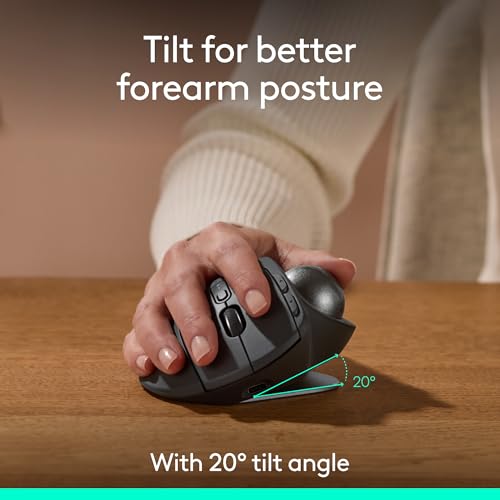
Second, the 20° magnetic tilt base is the standout differentiator. The base hinges between flat (0°) and tilted (20°) via a magnetic hinge that’s surprisingly strong in practice. At 20°, your forearm rotates slightly outward into a more natural posture rather than the forced pronation that flat mice require. Logitech’s ergonomist-validated study shows this reduces forearm muscle activity by 27% versus a Logitech M650 flat mouse, which translates to less cumulative tendon stress across long workdays. For users with early RSI symptoms or chronic wrist ache, this 27% reduction is meaningful.

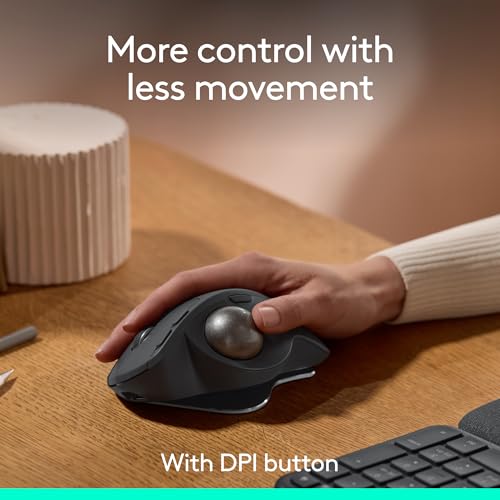
Third, the trackball itself eliminates the root cause of most mouse-related wrist injuries — repetitive wrist movement. With the Logitech MX Ergo S, your hand stays anchored in one position while your thumb operates the ball to move the cursor. There’s no wrist supination, no shoulder reach, no repetitive lift-and-replace cycle. For users with carpal tunnel, arthritis, or limited desk space, this fundamentally different control method is often the difference between manageable computer use and progressive injury. For users wanting maximum gaming performance instead of ergonomic comfort, the Razer DeathAdder V3 Pro is the lightweight gaming pick.

Trackball, Battery and Productivity Features

The trackball is the headline feature of the Logitech MX Ergo S, and Logitech executes it well. The ball is positioned naturally for thumb control, rotates smoothly with light finger pressure, and tracks accurately for general productivity work. For ultra-precise tasks like detailed photo editing or pixel-perfect design work, the dedicated DPI button drops sensitivity to a near-zero precision mode for fine cursor control. The trackball is removable for cleaning via a magnetic plate, which solves the long-standing trackball complaint about debris buildup over time.

The 80% quieter clicks are the second meaningful upgrade over the original MX Ergo. The left and right primary buttons no longer produce the audible “click” sound, which makes the Logitech MX Ergo S genuinely usable in shared offices, libraries, late-night work sessions, or video calls where keyboard and mouse noise affects audio. The secondary buttons (back, forward, scroll wheel click, and thumb button) retain their standard click sound, which is a minor inconsistency but doesn’t undermine the productivity benefit of the silent primary clicks.

Battery life and charging are best-in-class. A full charge lasts up to 4 months under typical productivity use, and USB-C quick charging delivers 24 hours of use from just a 1-minute top-up. The mouse can be used while charging via USB-C, so there’s no forced downtime. The only minor friction is that Logitech does not include a USB-C cable in the box — an odd omission at the $99-119 price point.

Logitech MX Ergo S vs Logitech MX Vertical vs Razer DeathAdder V3 Pro — Comparison

Feature Logitech MX Ergo S Logitech MX Vertical Razer DeathAdder V3 Pro
Price $99.99 $99.99 $149.99
Form Factor Trackball with 20° tilt Vertical 57° angle Horizontal ergonomic
Wrist Movement None — thumb controls cursor Reduced — handshake position Standard horizontal movement
Weight 164g 135g 63g
Muscle Strain Reduction 27% (Logitech study) 10% (Logitech study) N/A
Buttons 6 customizable + DPI 6 (4 customizable) 5 programmable
Battery Life Up to 4 months Up to 4 months 90 hours
Multi-Device 2 computers via Easy-Switch 3 computers via Easy-Switch No
Logitech Flow Yes Yes No
Quiet Clicks Yes (80% quieter) No No
Hand Size Fit 17-21cm 17-21cm 19-21cm
Best Use Case RSI relief + limited desk space RSI prevention + multi-device productivity FPS + all-around lightweight

The Logitech MX Ergo S wins the trackball/severe-RSI category on the 27% muscle strain reduction and zero-wrist-movement design. If you want vertical handshake orientation with multi-device switching across 3 computers, the Logitech MX Vertical is the cluster’s vertical pick. If you primarily play games and want lightweight all-around large-hand performance, the Razer DeathAdder V3 Pro at 63g is built for that. For the most severe RSI or wrist injury cases where eliminating wrist movement entirely matters, the Logitech MX Ergo S is the right choice.

Who Should Buy the Logitech MX Ergo S?

  • Users with severe RSI, carpal tunnel syndrome, arthritis, or chronic wrist pain
  • Productivity workers spending 8+ hours daily on a computer who need maximum ergonomic relief
  • Buyers with limited desk space who cannot move a traditional mouse comfortably
  • Designers, architects, audio engineers, and creative professionals wanting precision thumb control
  • Hand sizes 17-21cm (medium to large) seeking ergonomist-certified comfort
  • Users invested in the Logitech MX productivity ecosystem (Logitech Flow, Options+, Bolt receiver)
  • Office and shared-workspace users wanting silent clicks (80% quieter than predecessor)
  • Buyers willing to accept a 1-2 week trackball learning curve for long-term wrist health

Skip it if you primarily play games (the Razer DeathAdder V3 Pro is built for that), you have small hands under 17cm (the Logitech MX Ergo S is sized for medium-to-large only), you’re left-handed (this mouse is right-handed only), or you need to pair to 3 or more computers (the Logitech MX Vertical supports 3-device switching).

Logitech MX Ergo S Alternatives for Large Hands

If the Logitech MX Ergo S doesn’t perfectly match your needs, here are the best alternatives from our cluster:

  • Best overall pick: The Razer DeathAdder V3 Pro at 63g is the lightest large-hand mouse for 19-21cm hands, ideal for FPS gaming and all-around productivity.
  • Best for heaviest hands: The Logitech G502 X Plus offers a 131.4mm shell and 13 programmable buttons for hands 20-22cm and longer.
  • Best for vertical / RSI prevention: The Logitech MX Vertical puts your hand in a 57° handshake position to relieve wrist pronation strain.
  • Best with thumb rest: The Razer Basilisk V3 Pro 35K adds a sculpted thumb rest plus Bluetooth multi-device switching for hybrid gaming and productivity.
  • Best wired option: The Razer DeathAdder V3 Wired offers refined ergonomic shape at less than half the price for wired-only setups.
  • Best budget pick: The Logitech ERGO M575 covers entry-level large-hand ergonomics under $50.

Logitech MX Ergo S Review — Frequently Asked Questions

Is the Logitech MX Ergo S good for large hands?
Yes — the Logitech MX Ergo S is sculpted for medium-to-large hands measuring 17-21cm. The 132.5mm length and 99.8mm width fully support a relaxed palm rest, with the trackball positioned naturally for thumb control.

Does the Logitech MX Ergo S actually help with RSI and wrist pain?
For most users yes — the 20° tilt reduces forearm muscle activity by 27% versus a flat mouse, and the trackball eliminates wrist movement entirely. Verified user feedback from RSI and carpal tunnel sufferers consistently reports reduced wrist ache within the first 1-2 weeks of switching.

How long is the learning curve for a trackball mouse?
Most users adapt within 7-14 days. The first 1-3 days feel awkward as your thumb learns precise cursor control, but by week two most users report it feels natural. Some report never going back to a traditional mouse after the adaptation period.

What is the 20-degree tilt for?
The Logitech MX Ergo S has a magnetic hinge base that switches between flat (0°) and tilted (20°). The 20° tilt rotates your forearm into a more natural posture and reduces forearm muscle activity by 27% according to Logitech’s ergonomist-validated study.

How long does the battery last on the Logitech MX Ergo S?
Up to 4 months (120 days) on a full charge under typical productivity use. A 1-minute USB-C quick charge delivers 24 hours of use, and the mouse can be used while charging.

Are the Logitech MX Ergo S clicks really silent?
The left and right primary buttons are 80% quieter than the original MX Ergo, making them effectively silent for shared workspaces, libraries, or video calls. The secondary buttons (back, forward, scroll wheel, thumb button) retain a standard click sound.

Logitech MX Ergo vs MX Ergo S — what’s the difference?
The Logitech MX Ergo S adds 80% quieter clicks on the primary buttons, USB-C charging (replacing micro-USB), and minor software improvements via Logi Options+. Shape, trackball, tilt mechanism, and button layout are identical. If you already own the original MX Ergo, the upgrade is mostly cosmetic.

Can the Logitech MX Ergo S be used for gaming?
For casual gaming, strategy games, and slow-paced RPGs yes — the trackball handles those genres adequately. For competitive FPS or fast-twitch shooters no — the trackball is fundamentally less precise for fast aim adjustments. The Razer DeathAdder V3 Pro is the cluster’s gaming pick.

Why isn’t a USB-C cable included with the Logitech MX Ergo S?
This is a known criticism — Logitech does not include a USB-C cable in the box, requiring users to supply their own. Any standard USB-A to USB-C or USB-C to USB-C cable works for charging.

Logitech MX Ergo S Review — Final Verdict

The Logitech MX Ergo S is the best trackball mouse for medium-to-large hands seeking maximum ergonomic relief. The 20° magnetic tilt reduces forearm muscle activity by 27%, the trackball eliminates wrist movement entirely, and the ergonomist-certified design delivers genuine RSI and carpal tunnel benefit rather than marketing claims. The 80% quieter clicks make it usable in shared workspaces, the 4-month battery life with USB-C quick charging is best in class, and Logitech’s mature productivity ecosystem (Easy-Switch, Logitech Flow, Options+) makes multi-device workflows seamless. The 1-2 week learning curve is the only meaningful downside, and most users report adapting quickly. For users with severe RSI, carpal tunnel symptoms, arthritis, or limited desk space, the Logitech MX Ergo S is the cluster’s most refined ergonomic solution. For the full cluster including overall, vertical, heaviest-hands, and budget alternatives, see our best ergonomic mouse for large hands roundup.

SoftPickr Rating: 9.0/10

Additional information

Specification: Logitech MX Ergo S Review — Best Trackball Mouse for Large Hands?

Connectivity Technology

Bluetooth, USB

Additional Features

Lightweight, Portable, Wireless

Movement Detection

Optical

Button Quantity

2

Hand Orientation

Right

Compatible Devices

Personal Computer, Tablet

Operating System

Windows, macOS

Battery Average Life (days)

120

Hardware Platform

PC

Power Source

Battery Powered

Minimum Required Operating System Version

Mac OS 14 Sonoma, Windows 11

Range (meters)

10

Color

Graphite

Style Name

Modern

Enclosure Material

Plastic

Brand

Logitech

Model Name

MX Ergo S

Antenna Location

Gaming, Office

Model Number

910-007259

Are Batteries Included

Yes

Are Batteries Required

Yes

Manufacturer

Logitech

UPC

097855196675

Mfr Part Number

910-007259

Warranty Description

1 Year limited Hardware Warranty

ASIN

B0D6PTR6MP

Unit Count (Count)

1.0

Price History

-

Reviews (0)

User Reviews

0.0 out of 5
0
0
0
0
0
Write a review

There are no reviews yet.

Be the first to review “Logitech MX Ergo S Review — Best Trackball Mouse for Large Hands?”

Your email address will not be published. Required fields are marked *

softpickr.com
Logo
Register New Account
Compare items
  • Total (0)
Compare
0
Shopping cart