
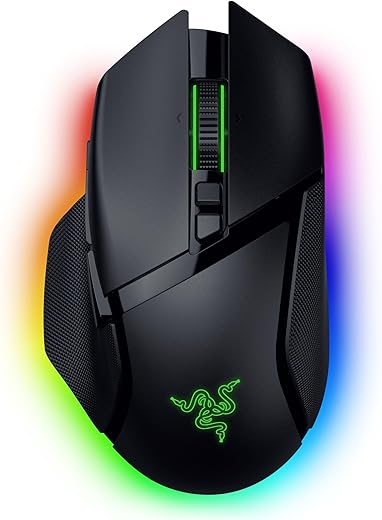
Razer Basilisk V3 Pro 35K Review — Best Mouse with Thumb Rest for Large Hands?
Razer Basilisk V3 Pro 35K review — wireless ergonomic gaming mouse with 130mm body, sculpted thumb rest with clutch button, Focus Pro 35K Gen-2 sensor, HyperScroll Tilt Wheel, 13 programmable controls, Bluetooth, and up to 210-hour battery. Best mouse with thumb rest for large hands.
$159.99 Original price was: $159.99.$129.99Current price is: $129.99.
| Price history for Razer Basilisk V3 Pro 35K Wireless Gaming Mouse: HyperScroll Tilt Wheel - 35K DPI Optical Sensor Gen 2-13 Customizable Controls - Chroma RGB - Optical Switches Gen 3 - Up to 140 Hr Battery - Black | |
|---|---|
|
Latest updates:
|
|
$159.99 Original price was: $159.99.$129.99Current price is: $129.99.
Description
Razer Basilisk V3 Pro 35K Review — Best Mouse with Thumb Rest for Large Hands?
This Razer Basilisk V3 Pro 35K review covers why it has become the go-to wireless mouse for users with large hands who want a sculpted thumb rest, premium gaming performance, and Bluetooth multi-device productivity in one package. With a 130mm right-handed ergonomic body, signature thumb rest, Focus Pro 35K Optical Sensor Gen-2, HyperScroll Tilt Wheel with three scroll modes, 13 programmable controls, and up to 140 hours of 2.4GHz wireless battery (210 hours over Bluetooth), the Razer Basilisk V3 Pro 35K is the all-rounder pick for buyers who refuse to choose between gaming performance and productivity convenience. Refined through years of esports pro feedback, the sculpted thumb rest reduces finger drag and supports your thumb naturally across long sessions, and the 35K sensor handles everything from FPS games to detailed design work. If you prefer ultra-lightweight gaming over the substantial 112g feel, see our Razer DeathAdder V3 Pro review at 63g instead.
Razer Basilisk V3 Pro 35K — Key Specs at a Glance
| Spec | Detail |
|---|---|
| Length | 130mm (5.11 inches) |
| Width | 75.4mm (2.97 inches) at widest |
| Height | 42.5mm (1.67 inches) |
| Weight | 112 grams |
| Sensor | Razer Focus Pro 35K Optical Gen-2 |
| Max DPI | 35,000 |
| Max Tracking Speed | 750 IPS |
| Resolution Accuracy | 99.8% |
| Switches | Razer Optical Gen-3 (90M click lifespan) |
| Connectivity | 2.4GHz HyperSpeed Wireless + Bluetooth + Wired USB-C |
| Battery Life | Up to 140 hours (2.4GHz) / 210 hours (Bluetooth) |
| Polling Rate | 1,000Hz default (8,000Hz with Mouse Dock Pro, sold separately) |
| Buttons | 13 programmable controls |
| Scroll Wheel | HyperScroll Tilt Wheel — Tactile, Free-Spin, Smart-Reel modes |
| Thumb Rest | Sculpted with multi-function clutch button |
| RGB Lighting | Razer Chroma — 13 customizable zones, scroll wheel + logo + underglow |
| Wireless Charging | Compatible with Mouse Dock Pro / Wireless Charging Puck (sold separately) |
| Ideal Hand Size | 19-22cm (7.5-8.7 inches) |
| Grip Style Fit | Palm grip primary, claw secondary |
| Software | Razer Synapse 4 |
| Warranty | 2 years |
| Price | From $159.99 on Amazon |
What Makes the Razer Basilisk V3 Pro 35K the Best Thumb-Rest Pick for Large Hands?
The Razer Basilisk V3 Pro 35K earns the “best with thumb rest” title for large hands by combining a 130mm ergonomic right-handed shell with a sculpted thumb rest that no other large-hand mouse in this cluster offers. The thumb rest is not just a styling feature — it’s a contoured shelf that supports your thumb at the natural rest position, eliminating the finger drag and pinky strain that plagues large-handed users with flat ambidextrous mice. According to CDC ergonomics research, properly contoured peripherals reduce repetitive strain across long sessions — and the Basilisk’s thumb rest is engineered exactly for that purpose. For palm-grip users with hands at 19-22cm, the thumb rest reduces cumulative thumb fatigue across 8-hour productivity sessions while keeping the mouse stable for fast-paced gaming.
What separates the Razer Basilisk V3 Pro 35K from cheaper large-format mice is the productivity-and-gaming hybrid feature set. The HyperScroll Tilt Wheel offers three modes — tactile cycling for weapon switching, free-spin for fast document scrolling, and Smart-Reel mode that auto-switches based on scroll speed. Combined with 13 programmable controls including a thumb-rest clutch button, the Razer Basilisk V3 Pro 35K maps cleanly to MMO/MOBA gameplay, FPS sniper shots, and productivity macros. For users who want even more programmable buttons and a longer 131.4mm shell for the heaviest hands, the Logitech G502 X Plus is the better fit. For RSI sufferers needing vertical orientation instead of horizontal palm grip, the Logitech MX Vertical is the cluster’s only vertical option.
Razer Basilisk V3 Pro 35K Review — Why It Works for 19-22cm Hands
The Razer Basilisk V3 Pro 35K review consistently wins recommendations from large-handed users because of three specific design choices. First, the 130mm length puts effective fingertip reach at a natural position for hands measuring 19-22cm. Compared to flagship 125-128mm mice, that extra body length prevents the “fingers curling backward” problem that forces large-handed users into uncomfortable claw grip. The Razer Basilisk V3 Pro 35K shell stays under your palm where it belongs.
Second, the sculpted thumb rest is the standout differentiator versus the rest of the cluster. The thumb rest is contoured at exactly the height where your thumb naturally rests when your hand is in palm-grip position, with a multi-function clutch button (often called the “sniper button” in gaming contexts) embedded into the rest itself. This button lowers DPI on hold for precision aim or maps to any productivity macro for 9-to-5 use. The thumb rest reduces drag against the mouse pad — verified user feedback consistently confirms this means less wrist strain and smoother long-distance flicks.
Third, the 112-gram weight is a deliberate middle-ground choice that matches the substantial feel large-handed users prefer. Lighter 60-70g mice often feel too insubstantial for hands at the larger end of the spectrum because the mass-to-palm-contact ratio feels off. The Razer Basilisk V3 Pro 35K’s 112g spreads weight evenly across the larger contact area for a controlled, premium feel. For users wanting the lightest all-around large-hand mouse, the Razer DeathAdder V3 Pro at 63g is built for FPS-first competitive gaming.
Sensor, Scroll Wheel and Wireless Performance
The Focus Pro 35K Optical Sensor Gen-2 is Razer’s flagship sensor — 35,000 maximum DPI, 750 IPS tracking speed, 70G acceleration, and 99.8% resolution accuracy. The sensor offers 1-DPI step adjustments for ultra-fine tuning, plus Smart Tracking that automatically adjusts the tracking algorithm to match your mouse pad surface and keeps a consistent lift-off distance. For productivity users running 800-1,600 DPI, this sensor delivers absolute precision; for competitive FPS players running higher DPI, the headroom is more than any human can perceive.
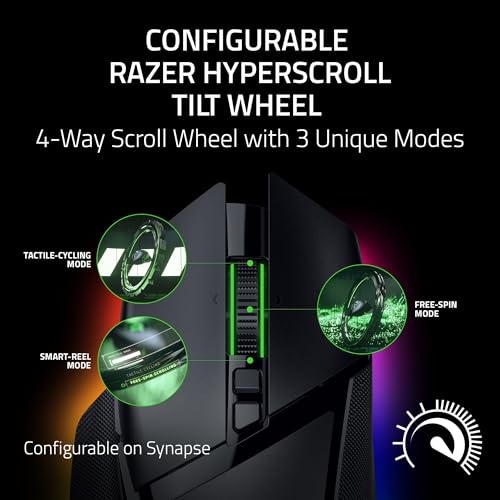
The HyperScroll Tilt Wheel is the productivity differentiator on the Razer Basilisk V3 Pro 35K. Tactile cycling mode gives you the standard ratcheted feel for inventory and weapon switching. Free-spin mode unlocks an infinite scroll for blasting through long documents, spreadsheets, and code. Smart-Reel mode auto-detects scroll speed and switches between the two — slow scrolling stays tactile, fast flicks unlock free-spin automatically. The wheel also tilts left and right for horizontal scrolling and adds two more programmable buttons, useful for spreadsheet work and timeline-based applications.
Wireless connectivity is genuinely best-in-class. 2.4GHz HyperSpeed delivers lag-free gaming performance with 140 hours of battery life. Bluetooth offers multi-device pairing for productivity — pair the mouse to a work laptop and personal desktop simultaneously, with up to 210 hours of battery on Bluetooth alone. Wired USB-C is the third option for charging or guaranteed-zero-latency play. The default 1,000Hz polling rate is plenty for nearly everyone; competitive esports players can upgrade to 8,000Hz by purchasing the Razer Mouse Dock Pro separately, which also adds wireless charging.
Razer Basilisk V3 Pro 35K vs Razer DeathAdder V3 Pro vs Logitech G502 X Plus — Comparison
| Feature | Razer Basilisk V3 Pro 35K | Razer DeathAdder V3 Pro | Logitech G502 X Plus |
|---|---|---|---|
| Price | $159.99 | $149.99 | $159.99 |
| Length | 130mm | 128mm | 131.4mm |
| Weight | 112g | 63g | 106g |
| Sensor | Focus Pro 35K Gen-2 | Focus Pro 30K | HERO 25K |
| Buttons | 13 programmable | 5 programmable | 13 programmable |
| Battery Life | 140hr (2.4GHz) / 210hr (BT) | 90 hours | 130 hours (RGB off) |
| Bluetooth | Yes | No | No |
| Thumb Rest | Sculpted with clutch button | Standard contoured side | Soft thumb rest |
| Scroll Wheel | HyperScroll Tilt — 3 modes | Standard tactile | Dual-mode + L/R tilt |
| RGB Lighting | Razer Chroma — 13 zones | None | Lightsync — 8 zones |
| Hand Size Fit | 19-22cm | 19-21cm | 20-22cm+ |
| Best Use Case | Hybrid gaming + productivity with Bluetooth | FPS + all-around lightweight | MMO + heaviest hands |
The Razer Basilisk V3 Pro 35K wins the hybrid-use category on thumb rest comfort, scroll wheel modes, and Bluetooth multi-device switching. If you want the lightest large-hand mouse for competitive FPS, the Razer DeathAdder V3 Pro at 63g is the better pick. If you have hands at 22cm or longer and want the longest shell with the most programmable buttons, the Logitech G502 X Plus is the cluster’s heaviest-hands fit. For users wanting RSI-reducing vertical orientation instead of horizontal palm grip, the Logitech MX Vertical is the only vertical option.
Who Should Buy the Razer Basilisk V3 Pro 35K?
- Users with large hands measuring 19-22cm seeking sculpted thumb rest comfort
- Hybrid gamers and productivity users who refuse to own two separate mice
- MMO and MOBA players needing 13 programmable inputs with thumb-side clutch button
- Multi-device users wanting Bluetooth pairing across work laptop + personal desktop
- Productivity users wanting the HyperScroll free-spin wheel for long documents and spreadsheets
- Buyers who prefer a substantial 112g feel over ultralight 60g mice
- Users invested in the Razer Chroma RGB ecosystem with keyboard and headset integration
- Long-session users who want 140-210 hour battery life across wireless modes
Skip it if you primarily play competitive FPS and want ultralight responsiveness (the Razer DeathAdder V3 Pro at 63g is built for that), your hands measure 22cm or longer (the Logitech G502 X Plus has a longer shell), you need a vertical orientation for wrist pain or RSI (the Logitech MX Vertical is the right choice), or you’re on a tight budget under $80 (the Logitech ERGO M575 covers entry-level needs).
Razer Basilisk V3 Pro 35K Alternatives for Large Hands
If the Razer Basilisk V3 Pro 35K doesn’t perfectly match your needs, here are the best alternatives from our cluster:
- Best overall pick: The Razer DeathAdder V3 Pro at 63g is the lightest large-hand mouse for 19-21cm hands — built for FPS-first competitive play.
- Best for heaviest hands: The Logitech G502 X Plus offers a 131.4mm shell and 13 programmable buttons for hands 20-22cm and longer.
- Best for vertical / RSI prevention: The Logitech MX Vertical puts your hand in a 57° handshake position to relieve wrist pronation strain.
- Best trackball alternative: The Logitech MX Ergo S eliminates wrist movement entirely with 20° tilt — ideal for limited desk space or wrist injuries.
- Best wired option: The Razer DeathAdder V3 Wired offers refined ergonomic shape at less than half the price for wired-only setups.
- Best budget pick: The Logitech ERGO M575 covers entry-level large-hand ergonomics under $50.
Razer Basilisk V3 Pro 35K Review — Frequently Asked Questions
Is the Razer Basilisk V3 Pro 35K good for large hands?
Yes — the Razer Basilisk V3 Pro 35K is purpose-built for large hands measuring 19-22cm with a 130mm length, sculpted thumb rest, and right-handed ergonomic shell that supports palm and claw grip styles.
What’s the difference between Basilisk V3 Pro and Razer Basilisk V3 Pro 35K?
The 35K version upgrades to the Focus Pro 35K Gen-2 sensor (versus 30K), increases battery life to 140 hours (versus 110 hours), and enables Smart Tracking + Sensitivity Matcher features in Razer Synapse 4. Same shape, same buttons, same thumb rest.
Does the Razer Basilisk V3 Pro 35K have Bluetooth?
Yes — Bluetooth is one of three connection modes alongside 2.4GHz HyperSpeed and wired USB-C. Bluetooth offers up to 210 hours of battery life, useful for productivity users wanting multi-device pairing across laptop and desktop.
How long does the battery last on the Razer Basilisk V3 Pro 35K?
Up to 140 hours over 2.4GHz HyperSpeed wireless, or up to 210 hours over Bluetooth. Recharges via USB-C, and the mouse can also charge wirelessly with the Razer Mouse Dock Pro or Wireless Charging Puck (sold separately).
What is the thumb rest button used for?
The thumb rest contains a multi-function clutch button (often called the “sniper button”). By default it temporarily lowers DPI for precision aiming in FPS games, but it’s fully programmable in Razer Synapse 4 — productivity users can map it to any macro, keystroke, or app shortcut.
How does the HyperScroll Tilt Wheel work?
The wheel offers three modes — Tactile Cycling for ratcheted weapon and inventory switching, Free-Spin for fast document and webpage scrolling, and Smart-Reel which auto-switches based on scroll speed. The wheel also tilts left and right for horizontal scrolling, useful in spreadsheets and timeline apps.
Razer Basilisk V3 Pro 35K vs Logitech MX Master 4 — which is better for large hands?
The Razer Basilisk V3 Pro 35K wins for hybrid gaming and productivity use thanks to its gaming-grade sensor, optical switches, and thumb rest with clutch button. The MX Master 4 wins for productivity-only users who want haptic feedback and the most refined scroll wheel — but it’s not designed for serious gaming and lacks the gaming-grade sensor.
Is the polling rate 8,000Hz upgrade worth it?
For most users no — the default 1,000Hz polling rate is more than sufficient for productivity and casual gaming. The 8,000Hz upgrade requires the Razer Mouse Dock Pro (sold separately) and is only worth it for competitive esports players chasing maximum responsiveness.
Razer Basilisk V3 Pro 35K Review — Final Verdict
The Razer Basilisk V3 Pro 35K is the best wireless mouse with a sculpted thumb rest for large hands measuring 19-22cm. The 130mm body fits 19-22cm hands comfortably in palm grip, the sculpted thumb rest with embedded clutch button reduces finger drag and adds a productivity macro layer, and the HyperScroll Tilt Wheel with three scroll modes handles gaming and productivity scrolling equally well. The Focus Pro 35K Gen-2 sensor delivers flagship gaming performance, and the 140-hour wireless battery (210 hours over Bluetooth) is best in class for substantial ergonomic mice. Bluetooth multi-device switching, 13 programmable controls, and Razer Chroma RGB across 13 zones make the Razer Basilisk V3 Pro 35K the cluster’s most feature-rich pick. The 112g weight will feel substantial to anyone coming from ultralight gaming mice, but for hybrid gaming-and-productivity users with large hands, that weight is the right trade-off. For the full cluster including overall, vertical, heaviest-hands, and budget alternatives, see our best ergonomic mouse for large hands roundup.
SoftPickr Rating: 9.1/10
Additional information
Specification: Razer Basilisk V3 Pro 35K Review — Best Mouse with Thumb Rest for Large Hands?
|
Price History
| Price history for Razer Basilisk V3 Pro 35K Wireless Gaming Mouse: HyperScroll Tilt Wheel - 35K DPI Optical Sensor Gen 2-13 Customizable Controls - Chroma RGB - Optical Switches Gen 3 - Up to 140 Hr Battery - Black | |
|---|---|
|
Latest updates:
|
|
There are no reviews yet.