
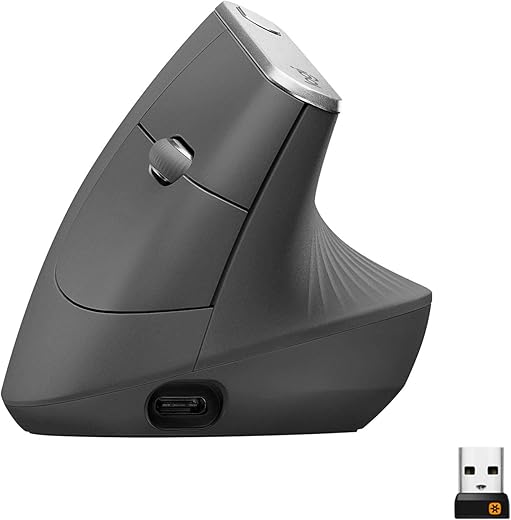
Editor choice Logitech MX Vertical Review — Best Vertical Ergonomic Mouse for Large Hands?

Logitech MX Vertical Review — Best Vertical Ergonomic Mouse for Large Hands?

Add your review
Add to compare
9
Expert ScoreRead review

Logitech MX Vertical review — ergonomic wireless mouse with 57° handshake angle, 4000 DPI sensor, 4-month battery, and Easy-Switch multi-device pairing across 3 computers. Best vertical mouse for medium-to-large hands with wrist pain or RSI symptoms.

Original price was: $119.99.Current price is: $74.99.

Best deal at: amazon.comAmazon.com
Buy for best price
Set Lowest Price Alert
×
Notify me, when price drops
Set Alert for Product: Logitech MX Vertical Wireless Mouse – Ergonomic Design Reduces Muscle Strain, Move Content Between 3 Windows and Apple Computers, Rechargeable, Graphite - $74.99
Price history
×
Price history for Logitech MX Vertical Wireless Mouse – Ergonomic Design Reduces Muscle Strain, Move Content Between 3 Windows and Apple Computers, Rechargeable, Graphite
Latest updates:
  • $74.99 - April 30, 2026
  • $272.78 - April 29, 2026
  • $74.99 - April 27, 2026
Since: April 27, 2026
  • Highest Price: $272.78 - April 29, 2026
  • Lowest Price: $74.99 - April 27, 2026
Last Amazon price update was: May 2, 2026 11:06 pm
× Product prices and availability are accurate as of the date/time indicated and are subject to change. Any price and availability information displayed on Amazon.com (Amazon.in, Amazon.co.uk, Amazon.de, etc) at the time of purchase will apply to the purchase of this product.
Add to wishlistAdded to wishlistRemoved from wishlist 0
Last updated on May 2, 2026 11:06 pm
Logitech MX Vertical Review — Best Vertical Ergonomic Mouse for Large Hands?

Original price was: $119.99.Current price is: $74.99.

Description

Logitech MX Vertical Review — Best Vertical Ergonomic Mouse for Large Hands?

This Logitech MX Vertical review covers why it has become the go-to vertical ergonomic mouse for users with medium-to-large hands suffering from wrist pain, repetitive strain injury (RSI), or carpal tunnel symptoms. With a 57° vertical angle, scientifically-tested handshake position, 4000 DPI sensor, 4-month battery life, and three connectivity options including Bluetooth multi-device switching across 3 computers, the Logitech MX Vertical is the productivity-focused pick for buyers who need to break away from traditional flat mice that cause wrist pronation strain. Logitech designed and tested this mouse with leading ergonomists across hundreds of prototypes, and the resulting form is the most refined vertical ergonomic mouse on the market. If you want a traditional ergonomic shape with palm-grip comfort instead of a vertical orientation, see our Razer DeathAdder V3 Pro review.

Logitech MX Vertical — Key Specs at a Glance

Spec Detail
Vertical Angle 57° (handshake position)
Length 78.5mm base depth
Width 78.5mm base width
Height 120mm
Weight 135 grams
Sensor 4000 DPI High-Precision Optical
DPI Range 400 to 4000 DPI
Switches Mechanical, 10M click rated
Connectivity Bluetooth + Logitech Unifying USB Receiver + USB-C wired
Battery Life Up to 4 months on full charge
Quick Charge 1 minute = 3 hours of use
Buttons 6 (4 customizable via Logitech Options)
Multi-Device Switching Easy-Switch — pair to 3 computers
Logitech Flow Yes — copy/paste between machines
Ideal Hand Size Medium to large (17-21cm)
Surface Textured rubber for natural grip
Software Logitech Options / Options+
Drop Resistance Tested up to 90cm
Muscle Strain Reduction 10% lower than flat mouse (Logitech study)
Hand Movement Reduction 4x less than 1000 DPI mouse
Warranty 1-2 years (region dependent)
Price From $99.99 on Amazon

What Makes the Logitech MX Vertical the Best Vertical Pick for Large Hands?

The Logitech MX Vertical earns the “best vertical” title for medium-to-large hands by combining ergonomist-validated science with Logitech’s mature MX Series productivity ecosystem. The 57° vertical angle is the result of Logitech testing hundreds of prototypes with ergonomic researchers — not a marketing number. According to Mayo Clinic research on carpal tunnel, wrist pronation is one of the leading causes of repetitive strain injuries from computer use — and the Logitech MX Vertical addresses this directly. That specific angle reduces wrist pronation strain by an average of 10% versus a traditional flat mouse, while still keeping the cursor speed and accuracy that flat mice are known for. For users with chronic wrist pain, RSI symptoms, or early carpal tunnel signs, that 10% reduction over an 8-hour workday is the difference between manageable discomfort and progressive injury.

What separates the Logitech MX Vertical from cheaper $20-30 vertical mice is the productivity infrastructure underneath the shape. Logitech’s Easy-Switch technology pairs the mouse to 3 computers simultaneously and switches between them with a single button click, while Logitech Flow lets you copy a file on one machine and paste it on another by simply moving the cursor across screen edges. For users who want all-around large-hand ergonomics without committing to vertical orientation, the Razer DeathAdder V3 Pro is the better fit. For the heaviest hands measuring 22cm+, the Logitech G502 X Plus offers a longer 131mm shell with 13 programmable buttons.

Logitech MX Vertical Review — Why It Works for RSI and Wrist Pain

The Logitech MX Vertical review consistently wins recommendations from RSI sufferers because of three specific design choices grounded in ergonomic research. First, the 57° vertical angle puts your forearm in a natural handshake position rather than the forced pronated (palm-down) posture that flat mice require. Pronation is the wrist position responsible for most repetitive strain injuries — eliminating it across an 8-hour workday meaningfully reduces cumulative tendon stress. Logitech worked with leading ergonomists to validate this, and verified user feedback consistently reports reduced wrist ache within the first week of switching.

Second, the textured rubber surface and contoured thumb rest support the natural grip without forcing your fingers to clench. Many cheaper vertical mice have hard plastic shells that cause your hand to grip harder for control, which defeats the ergonomic purpose. The Logitech MX Vertical’s textured grip lets your hand relax fully — the difference between a mouse that feels ergonomic for 30 minutes versus one that feels ergonomic for 8 hours.

Third, the 4000 DPI high-precision sensor reduces hand movement by up to 4x compared to a traditional 1000 DPI mouse. Less hand movement equals less wrist motion, which compounds the ergonomic benefit. For users specifically wanting a wired-only ergonomic mouse at a lower price, the Razer DeathAdder V3 Wired covers wired ergonomic shape needs. For users wanting a trackball alternative that eliminates wrist movement entirely, the Logitech MX Ergo S is a different solution to the same wrist-strain problem.

Sensor, Battery and Productivity Features

The 4000 DPI optical sensor is purpose-built for productivity rather than competitive gaming — it tracks accurately across cloth, hard, and most textured mouse pads with zero acceleration smoothing. The dedicated cursor speed switch on top of the mouse lets you toggle DPI on the fly, useful for switching between detailed design work and fast cross-monitor cursor sweeps without diving into software. The 6 total buttons (left, right, scroll click, 2 thumb buttons, and the cursor speed button) all customize via Logitech Options or Options+ software, so productivity users can map them to media controls, app shortcuts, browser tabs, or app-specific actions.

The battery life is exceptional — up to 4 months on a full charge under typical use, with USB-C quick charging that delivers 3 hours of use from a 1-minute top-up. For users who often forget to charge peripherals, this is essentially “set and forget” battery management. The mouse can be used while charging via USB-C, so there’s never any forced downtime.

The Easy-Switch and Logitech Flow features are the productivity differentiators of the Logitech MX Vertical. Easy-Switch pairs the mouse to 3 computers simultaneously and toggles between them via a button on the bottom — useful for users running a work laptop, personal desktop, and a tablet from one workspace. Logitech Flow takes this further by allowing cursor movement and file copy/paste across machines as if they were one extended display. These features alone justify the Logitech MX Vertical’s premium price for multi-device productivity users.

Logitech MX Vertical vs Razer DeathAdder V3 Pro vs Logitech G502 X Plus — Comparison

Feature Logitech MX Vertical Razer DeathAdder V3 Pro Logitech G502 X Plus
Price $99.99 $149.99 $159.99
Orientation Vertical 57° Horizontal ergonomic Horizontal ergonomic
Weight 135g 63g 106g
Sensor 4000 DPI Focus Pro 30K HERO 25K
Buttons 6 (4 customizable) 5 programmable 13 programmable
Battery Life Up to 4 months 90 hours 130 hours (RGB off)
Bluetooth Yes No No
Multi-Device Switching 3 computers (Easy-Switch) No No
Logitech Flow Yes No No (G502 line not Flow-supported)
Hand Size Fit 17-21cm 19-21cm 20-22cm+
Best Use Case RSI prevention + productivity FPS + all-around MMO + heaviest hands

The Logitech MX Vertical wins the vertical/RSI category on ergonomic angle, multi-device productivity features, and battery life. If you need horizontal palm-grip comfort instead of vertical orientation, the Razer DeathAdder V3 Pro at 63g is the lightest large-hand mouse for FPS gaming and all-around use. If you have the heaviest hands at 22cm or longer and want maximum programmable buttons, the Logitech G502 X Plus is the better fit. For users specifically wanting RSI/wrist-pain relief with multi-device productivity power, the Logitech MX Vertical is the cluster’s only vertical pick.

Who Should Buy the Logitech MX Vertical?

  • Users with wrist pain, RSI symptoms, or early carpal tunnel signs
  • Productivity buyers spending 6-10 hours daily on a computer
  • Multi-device users juggling work laptop + personal desktop + tablet
  • Buyers invested in the Logitech MX productivity ecosystem (Logitech Flow, Options+, Unifying receiver)
  • Hand sizes 17-21cm (medium to large) seeking ergonomic relief
  • Users tired of charging mice weekly — 4-month battery is best in class
  • Anyone willing to accept a 1-week learning curve for long-term wrist health

Skip it if you primarily play competitive FPS games (the Razer DeathAdder V3 Pro at 63g is built for that), your hands measure 22cm or longer (the Logitech G502 X Plus has the larger shell), you need MMO/MOBA-level button counts (G502 X Plus has 13 buttons vs 6 here), or you’re not willing to adapt to the vertical learning curve in the first week.

Logitech MX Vertical Alternatives for Large Hands

If the Logitech MX Vertical doesn’t perfectly match your needs, here are the best alternatives from our cluster:

  • Best overall pick: The Razer DeathAdder V3 Pro at 63g is the lightest large-hand mouse, ideal for 19-21cm hands and all-around productivity-plus-FPS use.
  • Best for heaviest hands: The Logitech G502 X Plus offers a 131mm length and 13 programmable buttons for hands 20-22cm and longer.
  • Best with thumb rest: The Razer Basilisk V3 Pro 35K adds a sculpted thumb rest plus Bluetooth multi-device switching for productivity buyers.
  • Best trackball alternative: The Logitech MX Ergo S eliminates wrist movement entirely with 20° tilt — ideal for limited desk space or severe wrist injuries.
  • Best wired option: The Razer DeathAdder V3 Wired offers refined ergonomic shape at less than half the price for wired-only setups.
  • Best budget pick: The Logitech ERGO M575 covers entry-level large-hand ergonomics under $50.

Logitech MX Vertical Review — Frequently Asked Questions

Is the Logitech MX Vertical good for large hands?
Yes — Logitech specifically designed the Logitech MX Vertical for medium-to-large hands measuring 17-21cm. The shell fills the palm naturally without feeling undersized, and verified user feedback consistently reports it fits hands at the larger end of the spectrum well.

Does the Logitech MX Vertical actually reduce wrist pain?
For most users yes — Logitech’s ergonomist-validated study shows a 10% reduction in muscle strain versus flat mice. Verified user feedback from RSI and carpal tunnel sufferers consistently reports reduced wrist ache within the first 1-2 weeks of switching to the Logitech MX Vertical.

How long is the learning curve for a vertical mouse?
Most users adapt within 3-7 days. The first 1-2 days feel awkward as your forearm unlearns the pronated flat-mouse posture, but by the end of week one the handshake position feels natural and many users report their flat mouse now feels uncomfortable.

How does the Logitech MX Vertical connect to my computer?
Three options: Bluetooth (low energy), the included Logitech Unifying USB receiver, or wired via the USB-C charging cable. You can pair to up to 3 computers via Easy-Switch and toggle between them with a single button.

How long does the battery last on the Logitech MX Vertical?
Up to 4 months on a full charge under typical use. A 1-minute USB-C quick charge delivers 3 hours of use, and the mouse can be used while charging.

Logitech MX Vertical vs MX Master 4 — which is better?
The Logitech MX Vertical wins for RSI prevention and reducing wrist pronation. The MX Master 4 wins for productivity-focused users who don’t need ergonomic intervention — it has more buttons, haptic feedback, and a more refined scroll wheel. Choose based on whether wrist pain is your primary concern.

Can I use the Logitech MX Vertical for gaming?
For casual gaming, strategy games, and MMOs yes — the 4000 DPI sensor handles those genres comfortably. For competitive FPS or twitch shooters, the Razer DeathAdder V3 Pro is the better fit because of its 30K sensor, 63g lightweight body, and lag-free gaming wireless protocol.

Is the Logitech MX Vertical only for right-handed users?
Yes — the Logitech MX Vertical is right-handed only. Logitech does not currently offer a left-handed version of the standard MX Vertical, though the smaller Logitech Lift comes in a left-handed variant.

Logitech MX Vertical Review — Final Verdict

The Logitech MX Vertical is the best vertical ergonomic mouse for medium-to-large hands measuring 17-21cm. The 57° handshake angle delivers ergonomist-validated 10% muscle strain reduction, the 4000 DPI sensor reduces hand movement by 4x compared to standard mice, and the 4-month battery life paired with USB-C quick charging is the longest in the productivity mouse category. Easy-Switch multi-device pairing across 3 computers and Logitech Flow for cursor-and-file movement between machines justify the premium price for productivity users. The 1-week vertical learning curve is the only meaningful downside, and most users report adapting quickly. For users with wrist pain, RSI risk, or carpal tunnel symptoms, the Logitech MX Vertical is the most refined vertical option Logitech ships. For the full cluster including overall, heaviest-hands, and budget alternatives, see our best ergonomic mouse for large hands roundup.

SoftPickr Rating: 9.0/10

Additional information

Specification: Logitech MX Vertical Review — Best Vertical Ergonomic Mouse for Large Hands?

Connectivity Technology

USB

Additional Features

Wireless

Movement Detection

Optical

Button Quantity

4

Hand Orientation

Right

Compatible Devices

Windows + macOS + iPadOS

Operating System

Windows 10, 11 or later, Linux, Chrome OS, macOS, iPadOS, Android

Battery Average Life (months)

4

Number of Batteries

1 Lithium Polymer batteries required. (included)

Hardware Platform

Laptop, PC

Power Source

Battery Powered

Mouse Maximum Sensitivity

4000 Dots per Inch

Minimum Required Operating System Version

Windows 10

Range (meters)

10.0

Color

GRAPHITE

Style Name

Right-Handed

Theme

Computer Accessories, Ergonomic Design, Office

Enclosure Material

Graphite,Rubber

Brand

Logitech

Model Name

MX Vertical Advanced Ergonomic Mouse

Antenna Location

Office

Model Number

910-005447

Built-In Media

mx vertical, quickstart guide, receiver, usb C cable

Are Batteries Included

Yes

Are Batteries Required

Yes

Manufacturer

Logitech

UPC

097855144461

Global Trade Identification Number

00097855144461

Mfr Part Number

910-005447

Warranty Description

Manufacturer’s warranty can be requested from customer service.

Item Type Name

Logitech MX Vertical Advanced Ergonomic Mouse, Wireless via Bluetooth or included USB receiver

ASIN

B07FNJB8TT

Item Weight (Pounds)

0.5

Item Dimensions L x W

7.5"L x 6"W

Unit Count (Count)

1.0

Price History

Price history for Logitech MX Vertical Wireless Mouse – Ergonomic Design Reduces Muscle Strain, Move Content Between 3 Windows and Apple Computers, Rechargeable, Graphite
Latest updates:
  • $74.99 - April 30, 2026
  • $272.78 - April 29, 2026
  • $74.99 - April 27, 2026
Since: April 27, 2026
  • Highest Price: $272.78 - April 29, 2026
  • Lowest Price: $74.99 - April 27, 2026

Reviews (0)

User Reviews

0.0 out of 5
0
0
0
0
0
Write a review

There are no reviews yet.

Be the first to review “Logitech MX Vertical Review — Best Vertical Ergonomic Mouse for Large Hands?”

Your email address will not be published. Required fields are marked *

softpickr.com
Logo
Register New Account
Compare items
  • Total (0)
Compare
0
Shopping cart