

Razer DeathAdder V3 Pro Review — Best Ergonomic Mouse for Large Hands?
Razer DeathAdder V3 Pro review — ultra-light 63g ergonomic wireless gaming mouse with 128mm body, Focus Pro 30K sensor, 90-hour battery, and palm-grip shape engineered for hands 19cm and larger. Best ergonomic mouse for large hands.
$149.99 Original price was: $149.99.$79.99Current price is: $79.99.
| Price history for Razer DeathAdder V3 Pro Gaming Mouse: 63g Ultra Lightweight - Focus Pro 30K Optical Sensor - Fast Optical Switches Gen-3 - HyperSpeed Wireless - 5 Programmable Buttons - 90 Hr Battery - Black | |
|---|---|
|
Latest updates:
|
|
$149.99 Original price was: $149.99.$79.99Current price is: $79.99.
Description
Razer DeathAdder V3 Pro Review — Best Ergonomic Mouse for Large Hands?
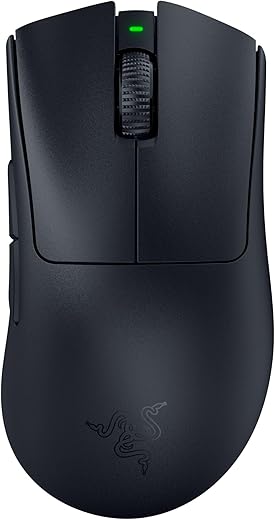
This Razer DeathAdder V3 Pro review covers why it’s become the default recommendation for users with hands measuring 19cm (7.5 inches) or longer. With a 128mm sculpted body, ultra-light 63-gram frame, Razer’s Focus Pro 30K optical sensor, and 90-hour battery life, the Razer DeathAdder V3 Pro is the all-around top pick for large-handed buyers who want palm-grip comfort, lag-free wireless performance, and zero wrist fatigue across long work or gaming sessions. Razer has refined the DeathAdder shape over a decade based on esports pro feedback, and the V3 Pro version is the most ergonomic iteration yet. If you have smaller hands or want a vertical alternative, our budget vertical pick is the Logitech MX Vertical.
Razer DeathAdder V3 Pro — Key Specs at a Glance
| Spec | Detail |
|---|---|
| Length | 128mm (5.04 inches) |
| Width | 68mm (2.67 inches) at widest grip area |
| Height | 44mm (1.73 inches) |
| Weight | 63 grams (no cable) |
| Sensor | Razer Focus Pro 30K Optical |
| Max DPI | 30,000 |
| Max Tracking Speed | 750 IPS |
| Switches | Razer Optical Gen-3 (90M click lifespan) |
| Connectivity | 2.4GHz HyperSpeed Wireless + Wired USB-C |
| Battery Life | Up to 90 hours |
| Polling Rate | 1,000Hz default (4,000Hz with HyperPolling Dongle, sold separately) |
| Buttons | 5 programmable |
| Bluetooth | No (2.4GHz wireless only) |
| RGB Lighting | None (esports-focused design) |
| Ideal Hand Size | 19-21cm (7.5-8.3 inches) |
| Grip Style Fit | Palm grip + claw grip |
| Software | Razer Synapse 3 |
| Warranty | 2 years |
| Price | From $149.99 on Amazon |
What Makes the Razer DeathAdder V3 Pro the Best Pick for Large Hands?
The Razer DeathAdder V3 Pro earns the “best overall” title for large hands by hitting the three dimensions that matter most for hands 19cm or larger — length, hump position, and weight. The 128mm body clears the 70mm effective length threshold that ergonomics research identifies as the cutoff before fingers start curling on the buttons. Below that threshold, large-handed users get pushed into a forced claw grip that causes thumb fatigue and wrist strain. The DeathAdder V3 Pro stays well above that line.
What separates it from cheaper large-hand mice is the redesigned hump. Razer shifted the highest point of the shell slightly to the left and raised it for better palm support — the kind of small geometric change that only matters once you sit at a desk for 8 hours. The peak of the hump now lines up with the meaty part of your palm rather than digging into your fingers or sitting too far back. This is the same principle that’s kept the DeathAdder line on every “best for large hands” recommendation list for over a decade. For a higher-button-count alternative aimed at MMO players, the Razer Basilisk V3 Pro 35K offers similar large-hand ergonomics with a sculpted thumb rest.
Razer DeathAdder V3 Pro Review — Why It Works for 19cm+ Hands
The Razer DeathAdder V3 Pro review consistently wins recommendations from large-handed buyers because of three specific design choices. First, the 128mm length puts your fingers at a natural rest position on the front buttons rather than forcing them to curl backward. For hands at the 19-21cm range, this is the dimensional sweet spot — the popular Logitech G Pro X Superlight at 125mm is the upper boundary for comfortable palm grip on 19cm+ hands, and community feedback consistently identifies that the extra 3mm on the DeathAdder makes a measurable comfort difference.
Second, the 63-gram weight solves the “heavy mouse fatigue” problem that traditional ergonomic mice have. Most large-format mice weigh 100-150 grams because manufacturers assume bigger hands need more substance. That assumption is wrong — over 6-8 hour sessions, the heavier weight accumulates as forearm fatigue regardless of hand size. The DeathAdder V3 Pro keeps the full ergonomic shape but cuts the weight by 25% versus its predecessor.
Third, the 90-hour battery life means you can use this as a daily driver across an entire work week without thinking about charging. For users who specifically want a wired-only option at a lower price point, see the Razer DeathAdder V3 Wired.
Sensor, Switches and Wireless Performance
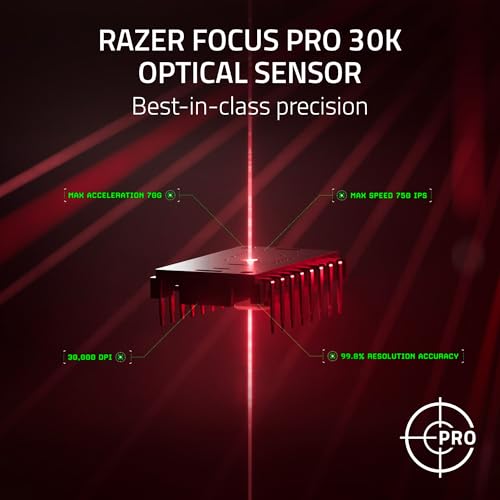
The Focus Pro 30K optical sensor is overkill for productivity work but exactly what competitive FPS players want — 30,000 DPI maximum, 750 IPS tracking speed, and 70G acceleration with no spinouts during fast swipes. The sensor tracks accurately on glass, fabric, and standard mouse pads. For everyday office use, you’ll likely run it at 800-1,600 DPI, which is well within the sensor’s tolerance window for absolute precision.
The Razer Optical Gen-3 switches actuate at 0.2ms with a rated 90 million click lifespan. In practice, the click feel is crisp and consistent, and the optical actuation eliminates the double-click problems that plague mechanical switches over time. The HyperSpeed 2.4GHz wireless is genuinely lag-free for both gaming and productivity — the small USB-A dongle plugs in via included USB-C extender for closer signal range.
The default 1,000Hz polling rate is sufficient for nearly everyone. If you’re a competitive esports player chasing maximum responsiveness, Razer sells a HyperPolling Dongle separately that pushes the polling rate to 4,000Hz. For most large-handed buyers, the included dongle is plenty.
Razer DeathAdder V3 Pro vs Logitech G502 X Plus vs Razer Basilisk V3 Pro 35K — Large Hand Comparison
| Feature | Razer DeathAdder V3 Pro | Logitech G502 X Plus | Razer Basilisk V3 Pro 35K |
|---|---|---|---|
| Price | $149.99 | $179.99 | $159.99 |
| Length | 128mm | 131.4mm | 130mm |
| Weight | 63g | 106g | 112g |
| Sensor | Focus Pro 30K | HERO 25K | Focus Pro 35K Gen-2 |
| Buttons | 5 programmable | 13 programmable | 13 programmable |
| Battery Life | 90 hours | 130 hours (RGB off) | 140 hours (2.4GHz) / 210 hours (Bluetooth) |
| RGB Lighting | None | Lightsync RGB | Razer Chroma RGB |
| Hand Size Fit | 19-21cm | 20-22cm | 19-22cm |
| Best Use Case | FPS + productivity | MMO + heaviest hands | MOBA + thumb rest + Bluetooth |
| Bluetooth | No | No | Yes |
| Best For | All-around best ergonomics | Heaviest hand + most buttons | Multi-device productivity |
The Razer DeathAdder V3 Pro wins the large-hand category on weight-to-shape ratio. If you want the most buttons and the largest body for hands 22cm or larger, the Logitech G502 X Plus is the better fit. If you want Bluetooth multi-device switching plus a sculpted thumb rest, the Razer Basilisk V3 Pro 35K wins. For most large-handed buyers who prioritize ergonomic comfort over feature count, the DeathAdder V3 Pro hits the sweet spot.
Who Should Buy the Razer DeathAdder V3 Pro?
- Users with hands measuring 19-21cm (7.5-8.3 inches) who use palm or relaxed claw grip
- Competitive FPS gamers wanting low weight without sacrificing ergonomic shape
- Hybrid productivity-and-gaming buyers who want one mouse for both
- Anyone with wrist fatigue from heavier 100g+ ergonomic mice
- Buyers prioritizing wireless reliability and 90-hour battery life
- Long-session users who don’t want to think about charging mid-week
Skip it if your hands measure 22cm or larger (look at the Logitech G502 X Plus), you need Bluetooth for multi-device switching (the Razer Basilisk V3 Pro 35K is better), you want a vertical handshake-position mouse for RSI (the Logitech MX Vertical is the right pick), or you’re on a tight budget under $80 (the Logitech ERGO M575 covers entry-level needs).
Razer DeathAdder V3 Pro Alternatives for Large Hands
If the Razer DeathAdder V3 Pro doesn’t perfectly match your needs, here are the best alternatives from our cluster:
- Best for 22cm+ hands: The Logitech G502 X Plus offers a 131.4mm length and 13 programmable buttons for the heaviest hands and MMO/MOBA players.
- Best for vertical / RSI prevention: The Logitech MX Vertical puts your hand in a 57° handshake position to relieve wrist pronation strain.
- Best with thumb rest: The Razer Basilisk V3 Pro 35K adds a sculpted thumb rest plus Bluetooth multi-device switching for productivity buyers.
- Best trackball alternative: The Logitech MX Ergo S eliminates wrist movement entirely with a 20° tilt — ideal for limited desk space or wrist injuries.
- Best wired option: The Razer DeathAdder V3 Wired offers the same ergonomic shape at less than half the price for wired-only setups.
- Best budget pick: The Logitech ERGO M575 covers entry-level large-hand ergonomics under $50.
Razer DeathAdder V3 Pro Review — Frequently Asked Questions
Is the Razer DeathAdder V3 Pro good for large hands?
Yes — the Razer DeathAdder V3 Pro is purpose-built for hands 19-21cm with a 128mm length, raised palm hump, and right-handed sculpted shape that supports palm and claw grip styles.
What hand size is the Razer DeathAdder V3 Pro best for?
Hands measuring 19-21cm (7.5-8.3 inches) from wrist crease to middle finger tip. For 22cm+ hands, the Logitech G502 X Plus is a better fit.
Does the Razer DeathAdder V3 Pro have Bluetooth?
No — the V3 Pro uses 2.4GHz HyperSpeed wireless via USB dongle only. If you need Bluetooth for multi-device switching, see the Razer Basilisk V3 Pro 35K review.
How long does the battery last on the Razer DeathAdder V3 Pro?
Up to 90 hours of continuous use on a single charge. Recharges via USB-C in about 4 hours.
Is 63 grams too light for large hands?
For most users no — the DeathAdder V3 Pro keeps a full ergonomic shape despite the low weight, so palm support is unchanged. If you specifically prefer heavier mice for stability, the Logitech G502 X Plus at 106g is a better choice.
Razer DeathAdder V3 Pro vs Logitech MX Master — which is better for large hands?
The DeathAdder V3 Pro wins for pure ergonomics and gaming. The Logitech MX Master line wins for productivity-only users who want haptic feedback, Bluetooth, and a heavier productivity feel — but it’s not engineered specifically for the 19cm+ hand demographic.
Can the DeathAdder V3 Pro be used for productivity work, not just gaming?
Yes — the ergonomic shape, low weight, and 90-hour battery make it excellent for 8-hour productivity sessions. The lack of haptic feedback or extra productivity buttons is the only tradeoff.
Does the polling rate need to be upgraded to 4,000Hz?
For most users no — the default 1,000Hz polling rate is more than sufficient for productivity and casual gaming. The HyperPolling Dongle (sold separately) is only worth it for competitive esports players chasing maximum responsiveness.
Razer DeathAdder V3 Pro Review — Final Verdict
The Razer DeathAdder V3 Pro is the best ergonomic mouse for large hands measuring 19-21cm. The 128mm length clears the finger-curl threshold, the redesigned hump aligns with palm support points, and the 63-gram weight eliminates forearm fatigue across long sessions. The Focus Pro 30K sensor and 90-hour battery deliver flagship performance, and the optical Gen-3 switches feel crisp without double-click failures over time. It’s not the cheapest mouse on the market, and it lacks Bluetooth or RGB — but for the buyer prioritizing pure ergonomic comfort for a large hand, this is the most refined option Razer ships. For the full cluster including budget, vertical, MMO, and trackball alternatives, see our best ergonomic mouse for large hands roundup.
Razer DeathAdder V3 Pro Hand Size Recommendation (Exact Measurements)
Measure your hand from the tip of your middle finger to the base of your palm (the first wrist crease). The DeathAdder V3 Pro is a large ergonomic shell at 128mm long x 68mm wide x 44mm tall, and here’s exactly who it fits:
19cm–22cm+ (7.5″–8.7″+) — ideal. Palm grip is where this mouse shines for large hands: the high rear hump fills the palm completely and the length supports your whole hand. Claw grip also works comfortably across this entire range.
17.5cm–19cm (6.9″–7.5″) — workable, with caveats. Claw and fingertip grip are fine; full palm grip starts to feel like a stretch at the bottom of this range, and your fingers may overreach the main buttons slightly.
Under 17.5cm (6.9″) — skip it. The shell is simply too long and the hump too far back for smaller hands to palm comfortably. Look at the DeathAdder V3 Mini-style shapes or a smaller symmetrical mouse instead.
Rule of thumb: if your hand measures 19cm or more, the DeathAdder V3 Pro is one of the safest ergonomic picks you can make — that’s precisely the hand size Razer sculpted this shell for.
SoftPickr Rating: 9.0/10
Additional information
Specification: Razer DeathAdder V3 Pro Review — Best Ergonomic Mouse for Large Hands?
|
Price History
| Price history for Razer DeathAdder V3 Pro Gaming Mouse: 63g Ultra Lightweight - Focus Pro 30K Optical Sensor - Fast Optical Switches Gen-3 - HyperSpeed Wireless - 5 Programmable Buttons - 90 Hr Battery - Black | |
|---|---|
|
Latest updates:
|
|
There are no reviews yet.