
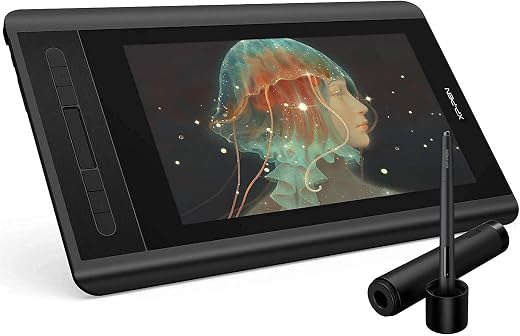


XP-PEN Artist12 — 11.6 In FHD Drawing Monitor, 8192 Levels
There are two kinds of drawing tablet and the difference is fundamental. A graphics tablet is an opaque pad: you draw on the desk and watch the screen, and your brain has to learn to separate hand position from cursor position. A pen display has a screen under the glass, so the line appears directly beneath the nib, exactly as it does on paper. A genuine pen display with a battery-free stylus at graphics-tablet money, tied to a computer by three cables it cannot do without.
Original price was: $199.99.$149.99Current price is: $149.99.
 Amazon.com
| Price history for XP-PEN Artist12 11.6 Inch FHD Drawing Monitor Pen Display Graphic Monitor with PN06 Battery-Free Multi-Function Pen Holder and Glove 8192 Pressure Sensitivity | |
|---|---|
|
Latest updates:
|
|

Original price was: $199.99.$149.99Current price is: $149.99.
Description
XP-PEN Artist12 Review: A Pen Display for the Price of a Graphics Tablet
There are two kinds of drawing tablet and the difference is fundamental. A graphics tablet is an opaque pad: you draw on the desk and watch the screen, and your brain has to learn to separate hand position from cursor position. A pen display has a screen under the glass, so the line appears directly beneath the nib, exactly as it does on paper.
Most people find the second dramatically easier to learn, and until recently it also cost three times as much. The XP-PEN Artist12 has spent years narrowing that gap and has collected over twelve thousand ratings at 4.4 stars in the process. We looked at what the 8192 pressure levels buy, and at the cabling reality nobody mentions.
Quick verdict: the XP-PEN Artist12 scores 8.1/10 in this SoftPickr review. A genuine pen display with a battery-free stylus at graphics-tablet money, tied to a computer by three cables it cannot do without.
Table of Contents
- Key Specifications
- What 8192 Pressure Levels Actually Change
- The Battery-Free Stylus and Why It Matters
- Colour, Lamination and the Parallax Question
- Six Shortcut Keys and Software Compatibility
- Limitations and Compromises
- Care and Calibration
- Who Should Buy It?
- SoftPickr Verdict
- Frequently Asked Questions
- Related Reviews
Key Specifications
| Feature | Specification |
|---|---|
| Screen size | 11.6 inches |
| Resolution | 1920 x 1080 |
| Panel | IPS LCD |
| Pressure levels | 8192 |
| Stylus | PN06 battery-free |
| Connectivity | HDMI and USB |
| Shortcut keys | 6 |
| Operating systems | Windows 7 to 11, macOS 10.10+, Linux |
| Weight | 907 g |
| Dimensions | 14.33 x 8.61 in |
| Included | Stylus, pen holder, drawing glove |
| Requires | A connected computer |
What 8192 Pressure Levels Actually Change
Pressure sensitivity determines how finely the tablet distinguishes a light touch from a heavy one, which in drawing software maps to line width, opacity or both. Early tablets offered 1024 levels and artists could feel the steps in a slow taper. At 8192 the steps are far below the threshold of human perception for any normal stroke.
The honest consequence is that pressure levels stopped being a meaningful differentiator several years ago. Every tablet in this bracket now quotes 8192 and none of them feel different because of it. What still varies between tablets is initial activation force, the pressure needed before a line appears at all, and that is what determines whether fine hatching works.
The Battery-Free Stylus and Why It Matters
The PN06 stylus draws its power inductively from the tablet surface, so it has no battery, no charging port and no cable. That is not a convenience feature, it is the difference between a pen you pick up and use and a pen you discover is flat at the moment you sit down to work. It is also lighter and better balanced than a powered pen can be.
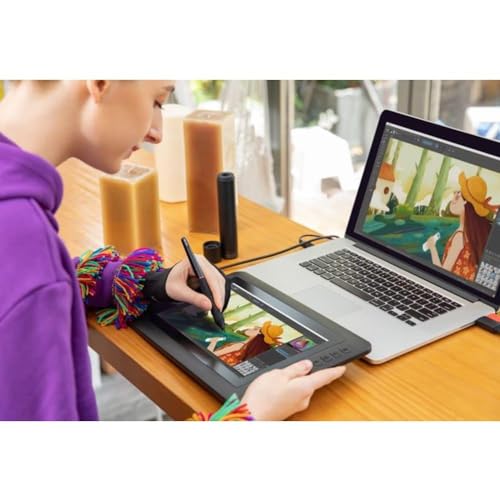
Two replacement nib sets, a pen holder that doubles as nib storage, and a two-finger drawing glove come in the box. The glove is easy to dismiss and is genuinely useful: it stops the side of your hand dragging on the glass and leaving skin oil across the surface you are drawing on, which is the main cause of tracking oddities.
Colour, Lamination and the Parallax Question
The panel is a 1920 by 1080 IPS unit, which at 11.6 inches gives a pixel density comfortably above what the eye resolves at drawing distance. IPS matters more than resolution here because it holds colour consistently as your viewing angle changes, and you spend a lot of time looking at a pen display from an angle rather than square on.
Parallax is the gap between where the nib touches the glass and where the line appears, caused by the thickness of glass above the panel. On a fully laminated display that gap is nearly zero; on a cheaper air-gapped design it is visible. The Artist12 sits between the two, with a small but perceptible offset near the screen edges that calibration reduces without eliminating.
Six Shortcut Keys and Software Compatibility
Six programmable keys sit along one edge, and they carry the modifiers you use constantly: undo, brush size, eraser toggle, and whichever two your workflow demands. Six is fewer than premium displays offer and enough for most people, because beyond about eight keys nobody remembers what they are mapped to anyway.
Driver support covers Windows 7 through 11, macOS 10.10 and later, and Linux, and the tablet works in Photoshop, Illustrator, Clip Studio, Krita, Painter, SAI and MediBang. Linux support at this price is unusual and genuinely functional. Install the manufacturer driver before plugging the display in; installing afterwards is the source of most reported setup trouble.
Limitations and Compromises
The most important limitation is stated in the listing but easy to miss: this is a pen display, not a tablet computer, and it must be connected to a computer to work at all. It has no operating system, no processor and no storage of its own. Several products in the same search results are standalone Android drawing tablets, and confusing the two categories is the most expensive mistake a first-time buyer can make here.
It is tethered by a three-headed cable carrying HDMI for video, USB for data and a second USB for power, and on many laptops that means both USB ports are occupied before you have plugged in anything else. There is no single-cable USB-C option on this model. It works reliably, it is simply untidy, and it makes the display much less portable than its size suggests.
The specification sheet carries two artefacts worth naming. The external testing certification field reads nao, a truncated Portuguese not applicable inherited from another market listing, and the EU spare part availability duration is given as one year, which is short for a display product. Neither affects how it draws, but both are reminders that the page is assembled rather than authored.
Care and Calibration
Install the driver first, restart, then connect the display, and run the calibration routine before the first drawing session. Recalibrate whenever the tablet moves to a different desk position or a different monitor arrangement, because the mapping is between the pen surface and a specific screen layout. Skipping calibration is the single most common cause of a cursor that feels slightly wrong.
Change the nib as soon as it develops a flat or a burr, because a worn nib scratches the surface film and that damage is permanent. Two spare sets are supplied and further nibs are inexpensive. Clean the surface with a barely damp microfibre cloth and no solvent, and wear the supplied glove, which does far more to keep the surface clean than any cleaning routine.
Who Should Buy It?
- Anyone who has struggled to adapt to an opaque graphics tablet and needs the line under the nib
- Illustration, comic and concept art students wanting a pen display without spending four figures
- Photo retouchers who need pressure-sensitive masking rather than mouse selections
- Linux users, who are poorly served by most tablet manufacturers at any price
- Anyone replacing a powered stylus they keep finding flat at the wrong moment
Look elsewhere if you want to draw without a computer attached, because this display cannot do that and several standalone Android tablets in the same price range can. Professionals who need colour-managed accuracy for print should choose a wider-gamut display, and anyone who needs one-cable portability for a laptop should look at a USB-C pen display instead.
SoftPickr Verdict
The XP-PEN Artist12 earns 8.1/10. Twelve thousand ratings at 4.4 stars describe a display that made the pen-under-nib experience affordable. The battery-free stylus is the right design, the IPS panel holds colour at the angles you actually work from, and Linux support at this price is genuinely rare. For someone learning digital illustration it removes the hardest part of the learning curve.
It gets no badge for two reasons. It cannot work without a computer, which puts it in a different category from half the products it appears alongside, and it needs three cables to do so. Neither is a fault so much as a description, but a badge should mean the obvious buy, and for a lot of shoppers here it is not.
Price and availability change frequently on Amazon, and prices shown here may be out of date — check the current listing before ordering.
XP-PEN Artist12 — Frequently Asked Questions
Does it work without a computer?
No. It is a pen display, not a tablet computer: it has no operating system, processor or storage and must be connected to a Windows, macOS or Linux machine to do anything at all. Several standalone Android drawing tablets appear alongside it in search results at similar prices, and confusing the two is the most common and most expensive mistake here.
How many cables does it need?
Three connections from a single three-headed cable: HDMI for video, USB for data and a second USB for power. On a laptop that typically occupies both USB ports. There is no single-cable USB-C option on this model, so while the display is physically small it is not genuinely portable in the way its size suggests. It is reliable, just untidy.
Is the stylus rechargeable?
It has no battery at all. The PN06 draws power inductively from the tablet surface, so there is nothing to charge and nothing to go flat mid-session. It is also lighter and better balanced than a powered pen. Two spare nib sets and a pen holder with integrated nib storage come in the box, and replacement nibs are inexpensive.
Is there noticeable parallax between the nib and the line?
A small amount, mostly near the screen edges. Parallax comes from the thickness of glass above the panel, and this display is not fully laminated, so a gap exists. Running the calibration routine reduces it substantially and most users stop noticing within a few sessions. Fully laminated displays eliminate it and cost considerably more.
Ready to buy? You can check the current price of the XP-PEN Artist12 on Amazon — the listing shows live pricing and current stock, both of which move around more than the specification does. SoftPickr earns a commission on qualifying purchases at no extra cost to you.
Related Reviews
If the XP-PEN Artist12 is not quite the right fit, these SoftPickr reviews cover the closest alternatives we have tested:
Additional information
Specification: XP-PEN Artist12 — 11.6 In FHD Drawing Monitor, 8192 Levels
|
Price History
| Price history for XP-PEN Artist12 11.6 Inch FHD Drawing Monitor Pen Display Graphic Monitor with PN06 Battery-Free Multi-Function Pen Holder and Glove 8192 Pressure Sensitivity | |
|---|---|
|
Latest updates:
|
|
There are no reviews yet.