

InnoView Portable Monitor Review — Is a $60 Second Screen Any Good?
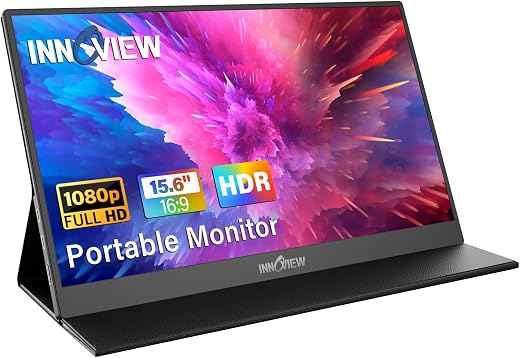
The portable monitor category has gone from novelty to commodity in about five years, and the result is a shelf full of near-identical 15.6-inch panels from brands nobody has heard of, all quoting the same specification sheet. The InnoView portable monitor is one of the better-established names in that crowd, with more than 6,000 ratings behind a 4.4-star average, which is enough history to judge it on something other than the box copy. It delivers the second-screen productivity win convincingly, but 250 nits and an 80 percent colour gamut mean it is an indoor office tool rather than a display you can work on near a window.


| Price history for InnoView Portable Monitor, 15.6 Inch FHD 1080P HDMI USB C Second External Monitor for Laptop, Desktop, MacBook, Phones, Tablet, PS5/4, Xbox, Switch, Built-in Speaker with Protective Case | |
|---|---|
|
Latest updates:
|
|

$59.99
Description
InnoView Portable Monitor Review — What Sixty Dollars Actually Gets You in a Travel Screen
The portable monitor category has gone from novelty to commodity in about five years, and the result is a shelf full of near-identical 15.6-inch panels from brands nobody has heard of, all quoting the same specification sheet. The InnoView portable monitor is one of the better-established names in that crowd, with more than 6,000 ratings behind a 4.4-star average, which is enough history to judge it on something other than the box copy.
The pitch is simple and genuinely useful: a second 1080p screen that weighs under two pounds, runs off a single USB-C cable from your laptop, and folds into a case that doubles as a stand. For anyone who works on a laptop away from a desk — in a hotel, at a client site, on a kitchen table — the productivity difference between one screen and two is large and immediate. The question is what corners get cut to hit sixty dollars.
Quick verdict: the InnoView portable monitor scores 7.9/10 in this SoftPickr review. It delivers the second-screen productivity win convincingly, but 250 nits and an 80 percent colour gamut mean it is an indoor office tool rather than a display you can work on near a window.
Table of Contents

Key Specifications
| Feature | Specification |
|---|---|
| Screen size | 15.6 inches |
| Resolution | 1920 x 1080 (FHD) |
| Panel type | IPS, matte finish |
| Refresh rate | 60 Hz |
| Brightness | 250 cd/m² (nits) |
| Contrast ratio | 1200:1 |
| Viewing angle | 178 degrees |
| Colour gamut | Approximately 80 percent sRGB |
| Ports | 2 x full-function USB-C, 1 x mini HDMI |
| HDR | Supported |
| Speakers | Built in, stereo |
| Included | Protective folding case that acts as a stand |
The Single-Cable Promise and Its Asterisk
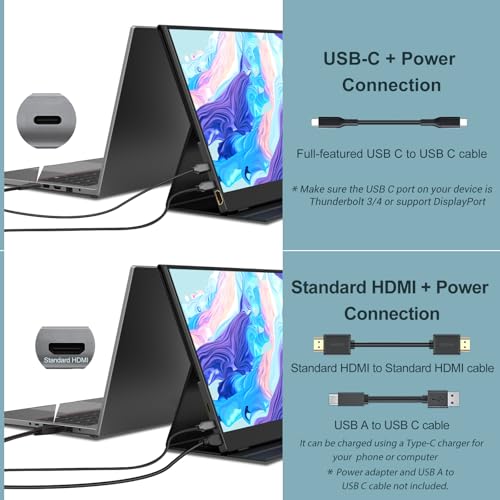
The headline convenience is that one USB-C cable carries video, data and power in both directions, so the monitor draws what it needs from the laptop and you carry one wire. When it works it is close to magic — plug in, the screen wakes, macOS or Windows extends the desktop, no drivers, no configuration.
The asterisk is that your laptop port has to support DisplayPort Alt Mode. Plenty do not. Most USB-C ports on budget Windows laptops are data and charging only, and a USB-C port that charges your phone tells you nothing about whether it can output video. If yours cannot, the fallback is mini HDMI for the picture plus a separate USB-C cable for power, which works fine but means two cables and possibly a wall socket. This is the single most common source of one-star reviews across the entire portable monitor category, and it is almost never the monitor being faulty.
The second thing to check is power budget. Driving a 15.6-inch panel over USB-C pulls meaningfully on a laptop battery. On a machine that is plugged in, irrelevant. On a thin ultrabook running on battery in a coffee shop, expect your runtime to drop by a third or more. Power pass-through is supported, so you can feed the monitor from a charger and let it power itself, which is the arrangement we would recommend for any long session.
Picture Quality: Where the Money Went and Where It Did Not
The IPS panel is the right call and it shows. Viewing angles are genuinely wide, so the picture does not wash out when the screen is propped at an awkward angle on a hotel desk, and the matte finish handles overhead lighting far better than the glossy panels some competitors use. For text, spreadsheets, code and video calls — which is what most people buy these for — it is perfectly pleasant.
Brightness is where sixty dollars shows. At 250 nits this is a dim panel by modern standards; a decent laptop screen runs 400 and a good one runs 500. Indoors under artificial light it is fine. Sitting next to a bright window it is washed out, and outdoors it is unusable. If your working pattern involves daylight, this is the specification that will bother you, and no amount of adjusting settings will fix it.
Colour coverage of around 80 percent sRGB is likewise adequate rather than good. It is enough for documents, browsing and general work, and it is not enough for photo editing, video grading or anything where colour accuracy is part of the job. The HDR support quoted on the listing is the marketing kind — the panel does not have the brightness or the contrast range to do anything meaningful with an HDR signal, and you should mentally discard that line from the specification.
Build, Stand and the Reality of the Case
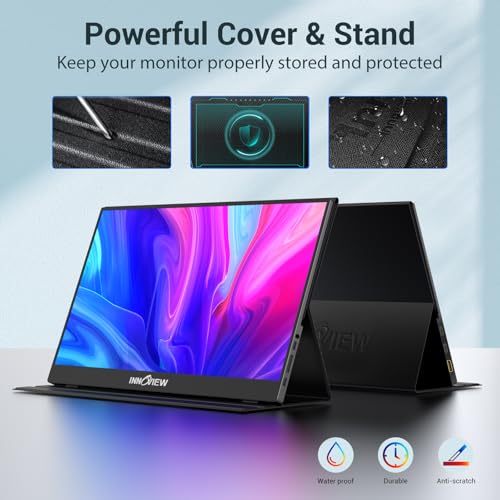
The chassis is thin aluminium-look plastic and feels appropriate to the price — not premium, not flimsy. The included folding case is the stand, origami-style, and it works: it holds two viewing angles reliably and it protects the panel in a bag. It also has no lateral stability worth speaking of, so a knock to the desk will tip it, and it cannot be adjusted to portrait orientation the way a proper kickstand monitor can.
The built-in speakers exist and should be treated as an emergency measure. They are tinny, quiet and positioned to fire backwards, which is standard for the category. Anyone who cares about audio is already using headphones or a laptop speaker that is meaningfully better.
One genuinely good detail: two full-function USB-C ports rather than one. It means you can take video in on either side depending on which way round your desk is arranged, which sounds trivial and turns out to matter constantly when you are working somewhere unfamiliar with a short cable.
Limitations and Compromises
Brightness is the defining limitation. Two hundred and fifty nits is enough for a controlled indoor environment and not enough for anything else, and because the panel is matte rather than glossy the failure mode in bright light is a flat, greyish image rather than glare. If you work in daylight, near a window, or in shared spaces with big glazing, spend more and get a 300 to 400 nit panel — this is the specification people most regret compromising on.
The compatibility question is the other real risk, and it is a risk you carry rather than the monitor. A laptop without DisplayPort Alt Mode on its USB-C port turns the elegant single-cable setup into a two-cable one, and buyers who did not check first make up a visible share of the negative reviews. Check your laptop specification before ordering; the answer is usually in the manufacturer manual under video output, and it is not something the monitor can work around.
Care and Travel Handling
A matte panel needs a different cleaning approach to a glossy one — a dry microfibre cloth first, then a barely damp one if something has stuck, and no glass cleaner at any point. Ammonia-based sprays attack the anti-glare coating and leave permanent cloudy patches, which on a matte screen are far more visible than on glass. Never spray anything directly at the panel; dampen the cloth instead.
For travel, the folding case protects the front but nothing braces the back, so pack it against the flat side of a bag rather than loose where a laptop corner can press into it. Coil the USB-C cable loosely instead of wrapping it tightly around the monitor, because the most common failure on portable screens is not the panel but the cable, and a kinked connector shell is the usual culprit.
Who Should Buy It?
- You work on a laptop away from a fixed desk and lose real time to window-switching on a single screen.
- Your work is documents, code, spreadsheets, email and calls rather than colour-critical creative work.
- You have confirmed your laptop USB-C port supports DisplayPort Alt Mode, or you are happy to use HDMI plus a power cable.
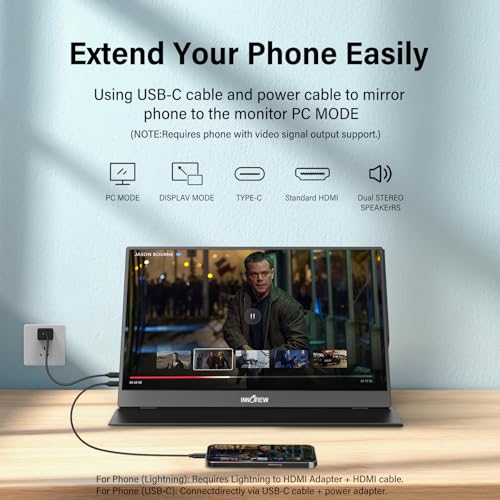
- You want a second screen for a games console or a phone as a secondary use case.
- You want to spend under seventy dollars and treat the monitor as a semi-disposable travel tool.
Look elsewhere if you regularly work in daylight — 250 nits will frustrate you and the fix costs another forty dollars for a brighter panel. Skip it if any part of your job depends on colour accuracy, because 80 percent sRGB coverage is not close to sufficient for photo or video work, and skip it if you want a display that stands up on its own, since the folding case stand is stable enough for a still desk and no more.
SoftPickr Verdict
The InnoView portable monitor earns 7.9/10. For indoor laptop work, this is a genuinely effective productivity purchase at a price that makes the decision easy, and the two full-function USB-C ports and matte IPS panel are better choices than several more expensive rivals make.
The compromise is the panel itself: 250 nits and roughly 80 percent sRGB put a hard boundary around where and what you can use it for. It takes no badge here despite a solid 4.4-star average over 6,000-plus ratings, because this is a category where a handful of near-identical panels compete on price alone and nothing about this one is distinctive enough to single out.
Price and availability change frequently on Amazon, and prices shown here may be out of date — check the current listing before ordering.
InnoView portable monitor — Frequently Asked Questions
Will it work with just one cable from my laptop?
Only if your laptop USB-C port supports DisplayPort Alt Mode. Many budget Windows laptops have USB-C ports that handle data and charging but not video, in which case you need mini HDMI for the picture and a separate USB-C cable for power. Checking your laptop manual before ordering avoids the most common disappointment in this category.
Is 250 nits bright enough to work on?
Indoors under normal artificial lighting, yes. Next to a window or outdoors, no — the image goes flat and grey rather than glaring, because the panel is matte. If daylight is part of your working environment, a 300 to 400 nit portable monitor is worth the extra outlay.
Can I use the InnoView portable monitor with a games console?
Yes, over the mini HDMI input, but it needs its own power in that configuration because a console will not supply power over the video connection. At 60 Hz and 1080p it is fine for casual play on a Switch, PlayStation or Xbox, though it is not a gaming monitor in any competitive sense.
Does it work in portrait orientation?
The panel can be rotated in your operating system display settings, but the included folding case is only designed to prop the screen in landscape. Standing it vertically requires a separate stand, which is worth knowing if reading long documents in portrait was part of the appeal.
Ready to buy? You can check the current price of the InnoView portable monitor on Amazon — the listing shows live pricing and current stock, both of which move around more than the specification does. SoftPickr earns a commission on qualifying purchases at no extra cost to you.
Related Reviews
If the InnoView portable monitor is not quite the right fit, these SoftPickr reviews cover the closest alternatives we have reviewed:
Additional information
Specification: InnoView Portable Monitor Review — Is a $60 Second Screen Any Good?
|
Price History
| Price history for InnoView Portable Monitor, 15.6 Inch FHD 1080P HDMI USB C Second External Monitor for Laptop, Desktop, MacBook, Phones, Tablet, PS5/4, Xbox, Switch, Built-in Speaker with Protective Case | |
|---|---|
|
Latest updates:
|
|

There are no reviews yet.