
HUANUO Single Monitor Mount HNSS6 — Gas Spring Arm, Clamp and Grommet, VESA
Monitor arms are the ergonomics purchase people put off longest and regret waiting on most. A screen sitting on the stand it came with is almost always four to six inches too low, which pulls the head forward and down for eight hours a day. Fixing that costs less than a good keyboard, and the HUANUO HNSS6 has become one of the most-bought ways to do it. It is the right arm for a standard 24 to 27 inch office monitor at a price that makes the ergonomics upgrade trivial, provided you check your screen against the real weight limit.
| Price history for HUANUO FlowLift™ Single Monitor Mount, 13 to 32 Inch Monitor Arm, Adjustable Monitor Stand, Vesa Mount with Clamp and Grommet Base - Fits 4.4 to 19.8lbs LCD Computer Monitors | |
|---|---|
|
Latest updates:
|
|

$47.99
Description
HUANUO Single Monitor Mount Review — Thirty-Four Dollars for a Better Neck
Monitor arms are the ergonomics purchase people put off longest and regret waiting on most. A screen sitting on the stand it came with is almost always four to six inches too low, which pulls the head forward and down for eight hours a day. Fixing that costs less than a good keyboard, and the HUANUO HNSS6 has become one of the most-bought ways to do it.
More than 16,000 buyers have rated this platform at 4.6 stars, which for a mechanical product bearing the weight of an expensive monitor is a meaningful endorsement. It is also a listing whose own specification sheet contradicts its title in a way worth understanding before ordering. We looked at what it holds, how it moves, and where the numbers stop agreeing.
Quick verdict: the HUANUO single monitor mount scores 8.4/10 in this SoftPickr review. It is the right arm for a standard 24 to 27 inch office monitor at a price that makes the ergonomics upgrade trivial, provided you check your screen against the real weight limit.
Table of Contents
- Key Specifications
- The Ergonomic Case, in Plain Numbers
- Movement, Adjustment and Daily Use
- What It Will Actually Hold
- Reading the Contradiction on the Listing
- Limitations and Compromises
- Installation, Tension and Cable Routing
- Who Should Buy It?
- SoftPickr Verdict
- Frequently Asked Questions
- Related Reviews

Key Specifications
| Feature | Specification |
|---|---|
| Model | HNSS6 |
| Mount type | Tabletop — desk clamp and grommet base both included |
| Movement | Articulating, rotate, swivel, tilt |
| Maximum tilt | 85 degrees |
| Weight capacity | 4.4 to 19.8 lb |
| Screen size — title claim | 13 to 32 inches |
| Screen size — specification field | 17 to 27 inches |
| VESA patterns | 75 x 75 mm and 100 x 100 mm |
| Construction | Alloy steel |
| Cable management | Integrated channels along the arm |
| Colour | Black |
| Spare part availability | 5 years (EU) |
The Ergonomic Case, in Plain Numbers
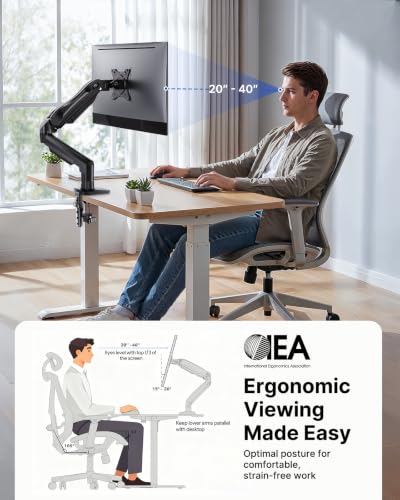
The top of a monitor should sit at or just below eye level, with the screen an arm length away and tilted back slightly. Almost no factory stand achieves that, because factory stands are designed to make the box smaller rather than to fit a human. The gap is typically four to six inches of height, and the body compensates by tipping the head forward, which loads the cervical spine considerably more than a neutral posture does.
An arm removes that constraint completely. Height, depth, tilt and rotation all become adjustable in seconds rather than fixed at manufacture, and the screen can be pushed back to free the desk surface underneath. For anyone working eight hours a day at a desk, this is the cheapest meaningful ergonomic intervention available, and it costs about the same as two decent mouse mats.
Movement, Adjustment and Daily Use
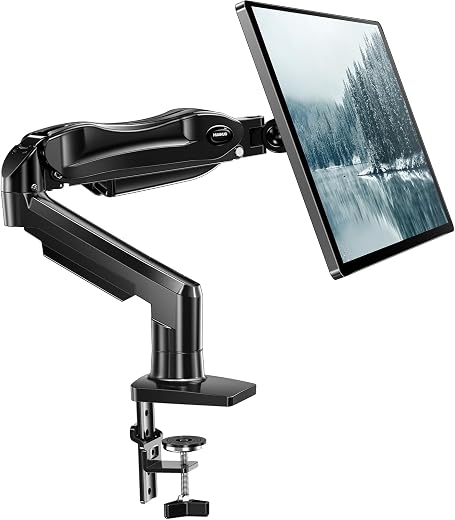
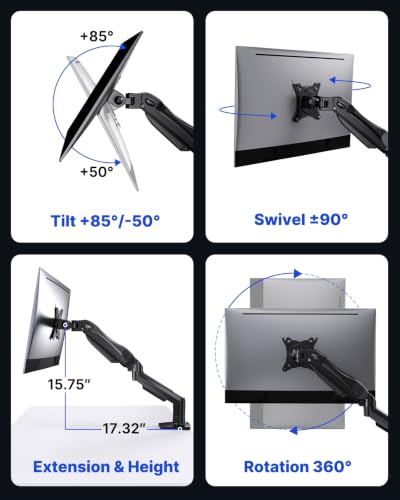
The arm articulates through four axes: it extends and retracts, swivels left and right at two joints, tilts through 85 degrees, and rotates the screen between landscape and portrait. In practice the movements people use daily are height and depth, and both respond to a firm push once the tension is set correctly. Portrait rotation matters more than it sounds if you read long documents or write code.
Tension setting is the step most people rush and then complain about. The gas spring is adjusted with the supplied hex key while the monitor is mounted, and it needs to be tuned to the actual weight of the screen — too loose and the monitor sags, too tight and it creeps upward. Five minutes spent on that at installation is the difference between an arm that feels premium and one that feels cheap.
What It Will Actually Hold
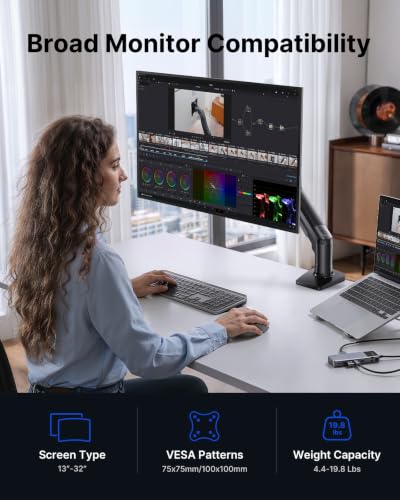
The weight range is 4.4 to 19.8 pounds, and the lower bound is not a typo. A very light monitor will not compress the spring enough to hold position, which is why some buyers with small panels report the screen drifting upward. The upper bound covers essentially every mainstream 24 and 27 inch office monitor, most 32 inch panels, and stops short of heavyweight ultrawides and anything with a built-in speaker bar.
Both mounting options are supplied. The C-clamp fits desks up to roughly three inches thick and is the right choice for almost everyone; the grommet base is for desks with an existing cable hole and gives a slightly more solid feel. What the arm cannot do is mount to a glass desk safely, or to a thin flat-pack top without a supporting plate underneath the clamp.
Reading the Contradiction on the Listing
The product title says the arm fits 13 to 32 inch monitors. The manufacturer specification field on the same page says the maximum supported screen size is 27 inches and the minimum is 17. Those cannot both be right, and in our experience of these listings the structured specification field is the more reliable of the two, because titles are written by marketing and specification fields are pulled from manufacturer data.
The practical reading is that the arm is comfortable with 24 and 27 inch monitors, which is what the vast majority of buyers own, and that a 32 inch screen is at the edge of what it was designed for even if the weight is within range. If you are mounting a 32 inch panel, check its weight carefully and expect the arm to be working near its limit rather than comfortably inside it.
Limitations and Compromises
The screen-size contradiction between title and specification is the honest headline limitation, and it is not a small one for anyone shopping for a large monitor. A buyer with a 32 inch screen is relying on the title over the manufacturer data, and the arm may hold it while still sagging under leverage the design did not anticipate. Anyone in that position should look at an arm rated unambiguously for their panel.
The 4.4 pound minimum weight is unusual and catches people out. Small, light panels and portable monitors do not load the gas spring enough for it to hold a position, which produces the exact opposite of the intended behaviour — the screen creeps upward on its own. There is no way to reduce the spring below its floor, so a very light monitor is simply the wrong pairing.
It is a single-monitor arm with a single point of failure at the clamp. Thin desks, hollow-core flat-pack tops and glass surfaces are all poor mounting substrates, and the leverage a fully extended arm applies to a desk edge is considerable. A supporting plate under a thin desktop is not optional if the desk is anything less than solid.
Installation, Tension and Cable Routing
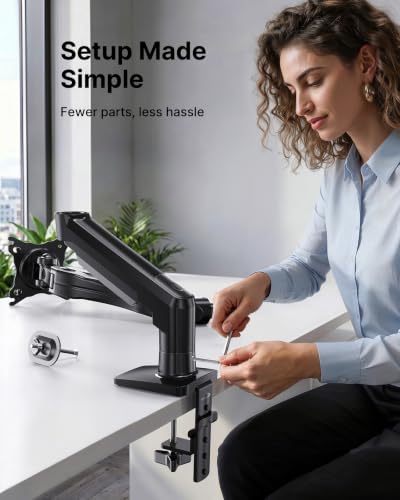
Install the clamp first, with the desk clear, and check it is genuinely tight before attaching anything expensive to it. Mount the VESA plate to the monitor while the screen is face down on a towel, then lift the screen onto the arm rather than the other way around. Set the gas spring tension last, with the monitor attached, adjusting in small increments until the screen holds position anywhere in its travel.
Route cables through the arm channels rather than around them, leaving enough slack for the full range of movement — a cable pulled taut at maximum extension will eventually unseat a connector or damage a port. Re-check the clamp bolt after a fortnight, because desk surfaces compress slightly under a new clamp, and then annually thereafter. Nothing else on the arm needs attention.
Who Should Buy It?
- Your monitor is a mainstream 24 or 27 inch panel weighing between 4.4 and 19.8 pounds.
- You want the desk space back that a factory stand currently occupies.
- You work long hours at a desk and your screen is too low.
- You want portrait rotation for reading documents or writing code.
- Your desk is solid wood, laminate over particle board, or has a grommet hole.
Look elsewhere if your monitor is a 32 inch or larger panel, because the specification field caps this arm at 27 inches whatever the title says, and an arm rated properly for the size is worth the extra outlay. Look elsewhere too if your screen is very light or a portable panel, since it will not compress the spring enough to stay put, and if your desk is glass or hollow flat-pack, where no clamp of this type belongs without a proper support plate.
SoftPickr Verdict
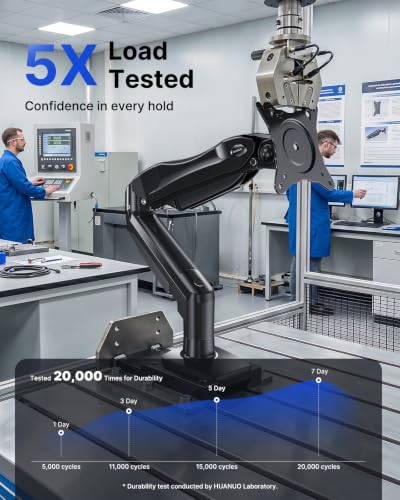
The HUANUO single monitor mount earns 8.4/10. For thirty-four dollars it does the job the category exists to do. Four axes of movement, both mounting bases in the box, alloy steel construction and a 4.6-star average across more than 16,000 ratings make it the sensible default for anyone putting a standard office monitor at the right height for the first time. The ergonomic gain is immediate and permanent.
The compromise is that its own listing cannot agree with itself about screen size, and the specification field caps it at 27 inches. For a 24 or 27 inch monitor that is irrelevant, and this is a straightforwardly good purchase. For a 32 inch panel it is a reason to spend more elsewhere, and we would rather say so than let the title stand unquestioned.
Price and availability change frequently on Amazon, and prices shown here may be out of date — check the current listing before ordering.
HUANUO single monitor mount — Frequently Asked Questions
What size monitor does the HUANUO single monitor mount actually support?
The title claims 13 to 32 inches, while the manufacturer specification field on the same listing states 17 to 27 inches. We consider the specification field the more reliable figure. In practice the arm is well suited to 24 and 27 inch monitors, and a 32 inch panel puts it at the edge of its design envelope even when the weight is within limits.
Will it fit a monitor with no VESA holes?
Not directly. The arm uses the standard 75 x 75 mm and 100 x 100 mm VESA patterns, and a monitor without those holes needs a VESA adapter bracket, sold separately, that grips the panel around its original stand mount. Those adapters work but add weight, which counts against the 19.8 pound limit.
Does it come with both the clamp and the grommet base?
Yes, both are in the box at no extra cost. The C-clamp suits desks up to roughly three inches thick and is what most buyers use. The grommet base passes through an existing cable hole and bolts underneath, which feels marginally more solid and leaves the desk edge clear.
Why does the screen drift upward on its own?
Almost always because the gas spring tension is set too high for the weight of the monitor, or because the monitor is below the 4.4 pound minimum the arm needs to work correctly. Adjust the tension with the supplied hex key in small increments with the screen mounted. If the panel is genuinely lighter than 4.4 pounds, no adjustment will fix it.
Ready to buy? You can check the current price of the HUANUO single monitor mount on Amazon — the listing shows live pricing and current stock, both of which move around more than the specification does. SoftPickr earns a commission on qualifying purchases at no extra cost to you.
Related Reviews
If the HUANUO single monitor mount is not quite the right fit, these SoftPickr reviews cover the closest alternatives we have tested:
Additional information
Specification: HUANUO Single Monitor Mount HNSS6 — Gas Spring Arm, Clamp and Grommet, VESA
|
Price History
| Price history for HUANUO FlowLift™ Single Monitor Mount, 13 to 32 Inch Monitor Arm, Adjustable Monitor Stand, Vesa Mount with Clamp and Grommet Base - Fits 4.4 to 19.8lbs LCD Computer Monitors | |
|---|---|
|
Latest updates:
|
|
Reviews (0)
User Reviews
Be the first to review “HUANUO Single Monitor Mount HNSS6 — Gas Spring Arm, Clamp and Grommet, VESA”
Related Products


There are no reviews yet.