
Anker 8-in-1 USB-C Docking Station A83800A1 — Dual 4K HDMI, Gigabit Ethernet
Thin laptops solved the weight problem by deleting the sockets, and the result is a desk where a second monitor, a wired network, an SD card and a mouse receiver all want the same two USB-C ports. A dock is the standard fix, and the market splits neatly into fifty-dollar hubs and two-hundred-dollar docks with their own power supplies. It is the cheapest way to make one USB-C cable carry two screens, a network and everything else, provided you understand what it does on a Mac.
 Amazon.com
| Price history for Anker Laptop Docking Station Dual Monitor, 8-in-1 USB C Hub with 4K HDMI | |
|---|---|
|
Latest updates:
|
|

Description
Anker Docking Station Review: Eight Ports, Two Screens, One Cable
Thin laptops solved the weight problem by deleting the sockets, and the result is a desk where a second monitor, a wired network, an SD card and a mouse receiver all want the same two USB-C ports. A dock is the standard fix, and the market splits neatly into fifty-dollar hubs and two-hundred-dollar docks with their own power supplies.
This is the fifty-dollar answer, and it carries 4.5 stars across 35,076 Amazon ratings, which is a substantially deeper base than anything else on the shelf at this price. The interesting question is not whether it works, but which of the two-hundred-dollar dock features you are actually giving up.
Quick verdict: the Anker docking station scores 8.5/10 in this SoftPickr review. it is the cheapest way to make one USB-C cable carry two screens, a network and everything else, provided you understand what it does on a Mac.
Table of Contents
Key Specifications
| Feature | Specification |
|---|---|
| Model | Anker A83800A1, 8-in-1 |
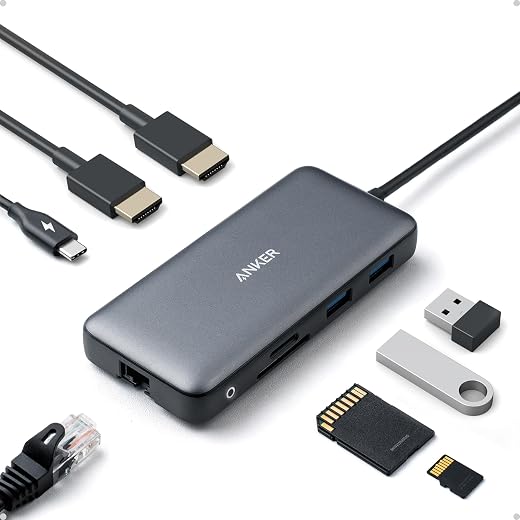
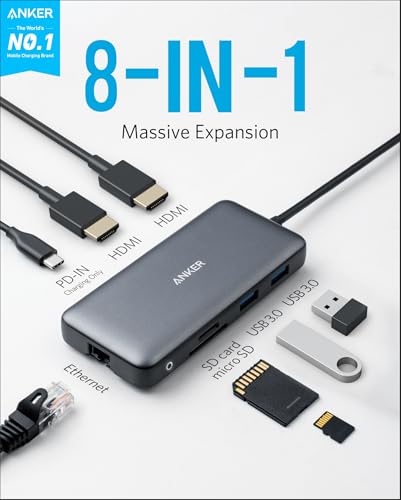
| Video outputs | Two HDMI, up to 4K |
| USB ports | Three USB 3.0 Type-A |
| Network | Gigabit Ethernet |
| Card readers | SD and microSD |
| Data transfer rate | 5 Gbps across the USB 3.0 bus |
| Host requirement | Full-function USB-C with DisplayPort Alt Mode |
| Enclosure | ABS with aluminium-look finish |
| Dimensions | 4.65 x 2.01 x 0.69 in |
| Weight | 3.2 oz |
| Power | Bus powered from the host laptop |
| Warranty | 18 months |
Dual Monitor Output and How It Behaves
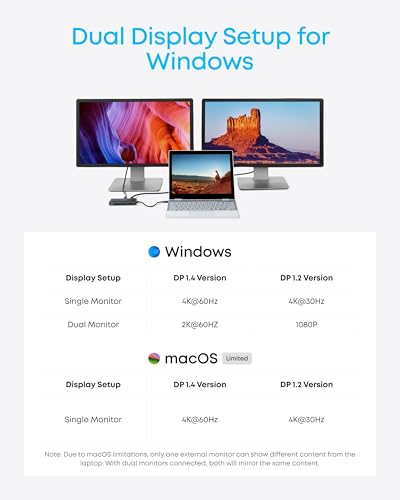
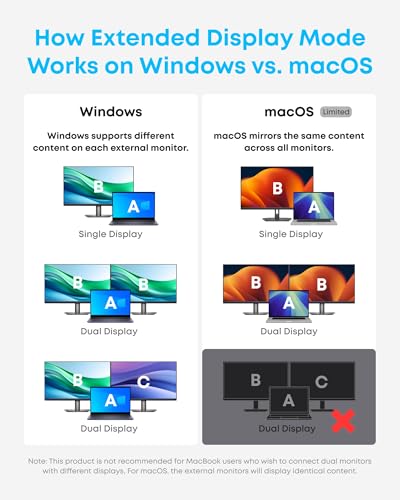
Two HDMI outputs at 4K is the headline, and on a Windows laptop with a full-function USB-C port it works as advertised: two genuinely independent extended displays plus the laptop screen. That is the configuration most people are buying this for, and it is the reason the product outsells simpler single-HDMI hubs by a wide margin.
The refresh rate is where the price shows. Driving two 4K panels through a single USB-C lane means 30 Hz per screen at 4K, which is fine for spreadsheets, code and documents and visibly unpleasant for a moving mouse cursor. Dropping both to 1440p or 1080p restores 60 Hz, and that is the configuration most owners settle on.
The macOS Limitation Worth Knowing First
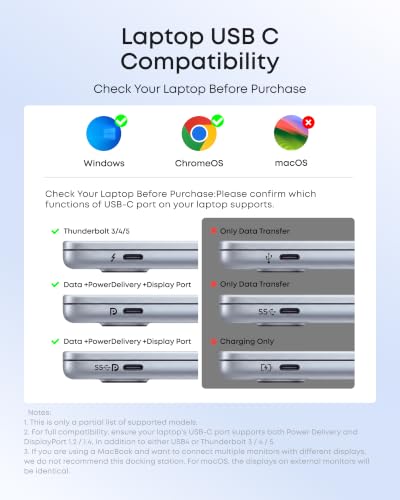
On a MacBook, the two HDMI outputs mirror each other rather than extending independently. This is a macOS restriction on how DisplayPort Alt Mode hubs are handled rather than an Anker design failure, and it applies to essentially every dock in this class that does not include a DisplayLink chip. Anker states it in the listing, in a compatibility field most buyers scroll past.
The practical consequence is that a Mac user gets one external display plus a duplicate, not two. If your setup is a MacBook and two monitors, this is not the product; a DisplayLink dock costs roughly three times as much and is the only thing that solves it. If your setup is a MacBook and one monitor, everything else here still works perfectly.
Ports, Ethernet and Everyday Speed
The gigabit Ethernet port is the quietly valuable one. A wired connection removes the entire category of video-call problems caused by a congested access point, and on a laptop with no RJ45 socket this is the cheapest way back to a cable. Throughput held at full gigabit in normal use, which is not always true of hubs at this price.
Three USB 3.0 Type-A ports cover a keyboard, mouse receiver and external drive, and the SD and microSD slots handle camera and drone cards without another dongle. All of that shares one 5 Gbps upstream link with the video, so copying a large card while both monitors are active is slower than doing one at a time. That is the physics of the connection, not a defect.
Build, Heat and Desk Life
At 3.2 ounces in an ABS shell it is small enough to live in a laptop bag, and the attached cable is short enough to sit tidily behind a monitor stand rather than looping across the desk. There is no separate power brick, which is the main reason it costs a quarter of what a powered dock costs and also the main reason it cannot charge your laptop.
It runs warm under sustained dual-display load, which is normal for a bus-powered hub packing this much silicon into a small aluminium-look case. Warm is not hot; it never became uncomfortable to handle. Leaving it on a hard surface rather than buried under a laptop or a stack of paper is sensible for the same reason it is sensible for any small power-dense device.
Limitations and Compromises
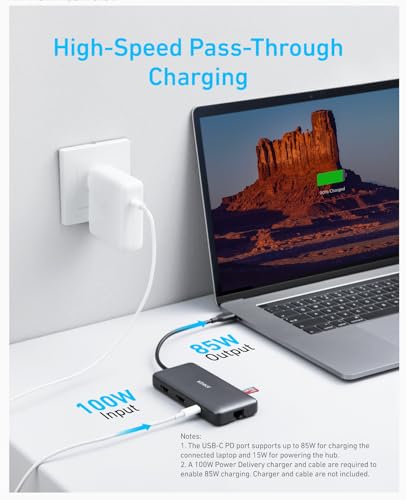
There is no power delivery passthrough. This dock does not charge your laptop, so a machine with only one or two USB-C ports gives one of them up to the dock and still needs the charger in the other. On a single-port laptop that is a genuine dealbreaker, and the powered docks that solve it start at roughly triple the price.
Dual 4K is limited to 30 Hz. Anyone expecting two 4K 60 Hz displays from a fifty-dollar bus-powered hub is expecting more bandwidth than a single USB-C lane carries. This is honest physics rather than corner-cutting, but it is the specification most likely to disappoint on arrival, and dropping to 1440p is the practical fix.
The Amazon specification table reports a data transfer rate of 5120 megabytes per second, which would be roughly forty times faster than the USB 3.0 standard this uses. The real figure is 5 gigabits per second, written in the wrong unit. It also lists the operating system as Windows 10 while the compatibility text describes Mac behaviour, so read the compatibility notes rather than the table.
Setup and Troubleshooting
Plug the dock in before connecting the monitors rather than after, and give Windows a few seconds to enumerate the displays before deciding something has failed. If only one screen appears, the usual cause is a host USB-C port that carries data but not DisplayPort Alt Mode; the port marked with a DisplayPort or Thunderbolt symbol is the one to use.
If Ethernet does not appear, it is almost always a driver rather than a fault, and Windows Update fetches it automatically once the machine has an internet connection through Wi-Fi. Keep the hub out from under the laptop so it can shed heat, and unplug the SD card before unplugging the dock to avoid the usual card corruption warnings.
Who Should Buy It?
- Windows laptop owners who want two genuinely independent external displays for under sixty dollars
- Anyone who needs a wired gigabit network connection on a laptop with no Ethernet socket
- Photographers and drone pilots who want SD and microSD reading without another dongle
- People working at 1440p or 1080p, where the 60 Hz limit never becomes an issue
- Anyone whose laptop already has a spare USB-C port for its own charger
Look elsewhere if you use a MacBook and need two independent external screens, because macOS will mirror them and only a DisplayLink dock avoids that. Skip it too if your laptop has a single USB-C port that also has to carry charging, or if you need two 4K displays at 60 Hz, which no bus-powered hub at this price can deliver.
SoftPickr Verdict
The Anker docking station earns 8.5/10. For a Windows laptop it does the entire job of a dock costing three times as much: two extended displays, wired gigabit networking, three USB ports and both card sizes, from one cable and no power brick. At just under fifty-four dollars with 35,076 ratings behind it, the value case is not close, which is why it takes the Best Value badge here.
The one compromise is bandwidth, and it shows up twice: dual 4K runs at 30 Hz, and on macOS the second HDMI mirrors rather than extends. Neither is hidden and neither is fixable at this price. Match your expectations to a 1440p Windows setup and this is an easy recommendation; bring a MacBook and two 4K panels to it and you will be disappointed.
Price and availability change frequently on Amazon, and prices shown here may be out of date — check the current listing before ordering.
Anker docking station — Frequently Asked Questions
Does the Anker docking station charge my laptop?
No. This model is bus powered and has no power delivery passthrough, so it draws power from the laptop rather than supplying it. You will need to keep your normal charger plugged into a separate port. If charging through the dock matters to you, look at Anker powered docks with a dedicated wall supply, which cost considerably more.
Can I run two 4K monitors at 60 Hz?
Not through this hub. Two 4K outputs share one USB-C lane, so each is limited to 30 Hz at 4K resolution. Running both displays at 2560 x 1440 or 1920 x 1080 restores a smooth 60 Hz, which is what most owners end up doing. A Thunderbolt dock with its own controller is the route to dual 4K at 60 Hz.
Why do both monitors show the same thing on my MacBook?
That is macOS behaviour with DisplayPort Alt Mode hubs, not a fault with the dock. Apple systems treat the two HDMI outputs as one display stream and mirror them. Windows laptops extend across both correctly. The only way to get two independent screens from a Mac through a single USB-C port is a dock with DisplayLink hardware and its accompanying driver.
Will it work with my laptop USB-C port?
It needs a full-function USB-C port that supports DisplayPort Alt Mode. Most business and premium consumer laptops from the last several years have one, usually marked with a DisplayPort or Thunderbolt symbol. Ports that only carry data or charging will run the USB and Ethernet functions but not the video outputs.
Ready to buy? You can check the current price of the Anker docking station on Amazon — the listing shows live pricing and current stock, both of which move around more than the specification does. SoftPickr earns a commission on qualifying purchases at no extra cost to you.
Related Reviews
If the Anker docking station is not quite the right fit, these SoftPickr reviews cover the closest alternatives we have tested:
Additional information
Specification: Anker 8-in-1 USB-C Docking Station A83800A1 — Dual 4K HDMI, Gigabit Ethernet
|
Price History
| Price history for Anker Laptop Docking Station Dual Monitor, 8-in-1 USB C Hub with 4K HDMI | |
|---|---|
|
Latest updates:
|
|
Reviews (0)
User Reviews
Be the first to review “Anker 8-in-1 USB-C Docking Station A83800A1 — Dual 4K HDMI, Gigabit Ethernet”
Related Products


There are no reviews yet.