


NexiGo N60 1080P Webcam with Microphone — Privacy Cover, Adjustable FOV, Plug and Play
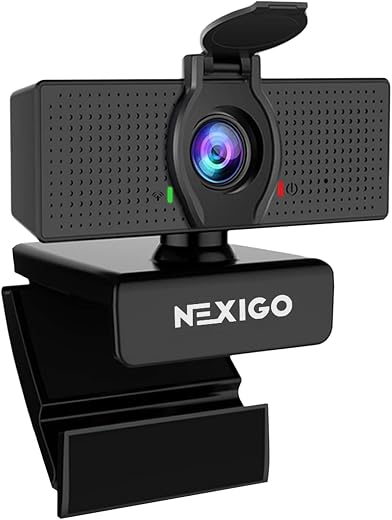
Laptop webcams are bad on purpose. The sensor has to fit in a lid a few millimetres thick, and no amount of processing makes up for that. The NexiGo N60 is the cheap external camera that most people replace theirs with: 1080p, a built-in microphone, a sliding privacy cover, and 4.3 stars across 48,629 ratings. It is a clear upgrade over any laptop camera and a clear step below anything with autofocus.
 Amazon.com
Description
NexiGo N60 Webcam Review — The Default Upgrade From a Laptop Camera
Laptop webcams are bad on purpose. The sensor has to fit in a lid a few millimetres thick, and no amount of processing makes up for that. The NexiGo N60 is the cheap external camera that most people replace theirs with: 1080p, a built-in microphone, a sliding privacy cover, and 4.3 stars across 48,629 ratings.
At this price the honest question is not whether it beats a professional streaming camera, because it does not and does not claim to. It is whether it clears the bar set by the camera already built into your machine, by enough of a margin to be worth the desk space and the USB port. We read the full specification to find out where the money went.
Quick verdict: the NexiGo N60 webcam scores 8.1/10 in this SoftPickr review. It is a clear upgrade over any laptop camera and a clear step below anything with autofocus.
Table of Contents
- Key Specifications
- Why an External Camera Beats a Built-In One
- The Adjustable Field of View Is the Clever Bit
- The Privacy Cover Is Not a Gimmick
- Microphone, Mounting and Compatibility
- Limitations and Compromises
- Setup and Maintenance
- Who Should Buy It?
- SoftPickr Verdict
- Frequently Asked Questions
- Related Reviews
Key Specifications
| Feature | Specification |
|---|---|
| Video resolution | 1080p at 30 fps |
| Sensor | 1/3-inch CMOS |
| Field of view | 110 degrees, software adjustable |
| Aperture | f/2.0 |
| Focus type | Fixed focus |
| Microphone | Built in, noise reduction |
| Privacy cover | Integrated sliding shutter |
| Connectivity | USB, plug and play |
| Operating systems | Windows, macOS, Linux, Android, Chrome OS |
| Dimensions | 2.55 in D x 3.14 in W x 2.16 in H |
| Digital zoom | 4x |
| Warranty | 1 year |
Why an External Camera Beats a Built-In One
The single biggest factor in image quality is how much light reaches the sensor, and that is decided by the physical size of the sensor and the aperture in front of it. A 1/3-inch CMOS behind an f/2.0 lens is not large by camera standards, but it is meaningfully larger and brighter than what fits inside a laptop lid, and the difference shows immediately in skin tone and noise.
Position matters almost as much. A laptop camera looks up at you from desk height, which is the least flattering angle available and also puts a ceiling light directly in frame. An external camera sits on top of a monitor at eye level, which is where a camera should be for a video call. Half the improvement people notice is geometry rather than optics.
The Adjustable Field of View Is the Clever Bit
A 110-degree lens is wide — wide enough to take in a whole room, which is usually not what you want on a work call. NexiGo’s software lets you narrow the effective field of view, so you can frame a head and shoulders shot without your kitchen, your laundry or your housemate appearing behind you. On most cameras at this price the framing is whatever the lens decided.
It is a software crop rather than an optical zoom, which means narrowing the view uses fewer of the sensor’s pixels and image quality falls slightly as you go tighter. In practice at 1080p there is enough resolution to crop moderately without anyone on a call noticing. Set it once for your desk and it stays put.
The Privacy Cover Is Not a Gimmick
A physical sliding shutter over the lens is the only webcam privacy measure that cannot be defeated by software, and it is the reason a lot of people choose one camera over another. Indicator lights can be suppressed and drivers can be compromised; a piece of plastic in front of the glass cannot. It slides with a thumb and it stays where you put it.
It also solves a smaller everyday problem, which is the low-level unease of having a camera pointed at you all day in a room you live in. Being able to close it without unplugging anything means the camera stays set up and aimed correctly for the next call. Cameras that get unplugged and stashed in a drawer get used less.
Microphone, Mounting and Compatibility
The built-in microphone with noise reduction is adequate rather than good, which is the right expectation for any microphone mounted on top of a monitor several feet from your mouth. It will carry a meeting perfectly well. It will not sound like a podcast, and if audio quality matters to you at all, a twenty-dollar headset will do more for how you come across than any webcam upgrade.
Mounting is the usual folding clip that grips a monitor bezel or a laptop lid and unfolds into a stand for a desk, with a tripod thread underneath. Compatibility is listed across Windows, macOS, Linux, Android and Chrome OS with no driver install, which is what plug and play should mean. The FOV control software is the one part that is not cross-platform.
Limitations and Compromises
It is fixed focus. There is no autofocus motor, so the lens is set to a depth of field that covers a person sitting at a desk and everything outside that range is soft. For its intended job that is fine and arguably more reliable than a cheap autofocus that hunts every time you move. If you want to hold a document or an object up to the camera and have it snap sharp, this camera will not do it.
Thirty frames per second is the ceiling, and there is no 60 fps mode. For meetings and calls that is entirely standard and nobody will notice. For streaming gameplay or anything with fast movement, 30 fps looks visibly less smooth than 60, and the cameras that offer it start not far above this price. Know which you are buying for.
Low light is where the 1/3-inch sensor runs out of road. The listing advertises low light correction, and what that does in practice is raise gain, which brightens the picture and adds visible noise along with it. A cheap desk lamp aimed at your face will improve this camera more than any setting will, and that is true of every webcam at this price.
Setup and Maintenance
Set the field of view once, at your normal seating position, and leave it. Most people over-tighten the crop, which puts their head at the top of the frame and their ceiling in shot; frame so there is a small gap above your head and your shoulders are visible. Raise the camera to eye level if your monitor is low, because a book under the base fixes more than any software setting.
Clean the lens with a microfibre cloth and nothing else — no glass cleaner, no alcohol wipes, both of which strip lens coatings. Slide the privacy cover closed when the camera is not in use, which keeps dust off the glass as well as keeping the room private. If the picture ever goes to a lower resolution unexpectedly, it is almost always the conferencing app throttling for bandwidth rather than the camera.
Who Should Buy It?
- You are on video calls regularly and your laptop camera is embarrassing you.
- You want a physical privacy shutter rather than trusting an indicator light.
- You want to control how much of your room appears behind you.
- You need something that works on Windows, macOS, Linux or Chrome OS without drivers.
- You want the cheapest sensible upgrade rather than a streaming-grade camera.
Look elsewhere if you stream or record anything with fast motion, because 30 fps is the ceiling and 60 fps cameras sit only a little higher up the range. Look elsewhere too if you present physical objects or documents on camera, where fixed focus will let you down every time, or if you work in a dim room and cannot add a light — a larger sensor is the only real fix for that and it costs considerably more.
SoftPickr Verdict
The NexiGo N60 webcam earns 8.1/10. It does the job it exists for at a price that makes the decision trivial, and 48,629 ratings say a great many people have reached the same conclusion. The privacy shutter and the adjustable field of view are two genuinely useful features that plenty of more expensive cameras leave out, and plug-and-play across five operating systems is exactly what a peripheral like this should offer.
The compromise is that fixed focus and a 30 fps ceiling put a hard limit on what it can be used for, and the 4.3-star average reflects a camera that is good for calls rather than good outright. That is why it takes no badge. Buy it to stop looking grey and grainy in meetings and it will not let you down; buy it to stream and it will.
Price and availability change frequently on Amazon, and prices shown here may be out of date — check the current listing before ordering.
NexiGo N60 webcam — Frequently Asked Questions
Does the NexiGo N60 need drivers?
No. It is listed as plug and play across Windows, macOS, Linux, Android and Chrome OS, and it will be recognised as a standard USB video device on all of them. The optional NexiGo software that adjusts the field of view is a separate download and is not required for the camera to work.
Is the built-in microphone good enough for meetings?
For meetings, yes. It has noise reduction and it will carry your voice clearly across a normal desk. It will not sound close or rich, because no microphone several feet away on top of a monitor does. If audio quality matters to you, a cheap headset will improve how you sound far more than any webcam will.
Can I use it for streaming on Twitch or YouTube?
You can, but 30 frames per second is the ceiling and fixed focus means you cannot lean in or hold objects up sharply. For a talking-head stream in good light it is serviceable. For gameplay or anything with fast motion, a 60 fps camera is worth the modest step up in price.
Does the privacy cover actually block the camera?
Yes. It is a physical sliding shutter that sits in front of the lens, so no software can see past it. That is the difference between a mechanical cover and relying on an indicator light or an operating system permission, both of which are software and both of which can in principle be worked around.
Ready to buy? You can check the current price of the NexiGo N60 webcam on Amazon — the listing shows live pricing and current stock, both of which move around more than the specification does. SoftPickr earns a commission on qualifying purchases at no extra cost to you.
Related Reviews
If the NexiGo N60 webcam is not quite the right fit, these SoftPickr reviews cover the closest alternatives we have tested:
Additional information
Specification: NexiGo N60 1080P Webcam with Microphone — Privacy Cover, Adjustable FOV, Plug and Play
|
There are no reviews yet.