

DJI Osmo Mobile 7 — 3-Axis Smartphone Gimbal Stabilizer, Built-In Tripod
Phone cameras have been good enough for years; phone video has not, and the reason is almost never the sensor. It is that a hand holding a phone shakes, and electronic stabilisation fixes that by cropping and warping until the footage looks like it was shot through jelly. A mechanical gimbal fixes it by physically holding the phone still on three axes, which is a completely different result. It is the best sixty dollars you can spend on phone video, provided you are not an Android user who relies on Google Play.
Original price was: $75.00.$59.00Current price is: $59.00.
 Amazon.com
Original price was: $75.00.$59.00Current price is: $59.00.
Description
DJI Osmo Mobile 7 Review: The Phone Gimbal Worth Carrying?
Phone cameras have been good enough for years; phone video has not, and the reason is almost never the sensor. It is that a hand holding a phone shakes, and electronic stabilisation fixes that by cropping and warping until the footage looks like it was shot through jelly. A mechanical gimbal fixes it by physically holding the phone still on three axes, which is a completely different result.
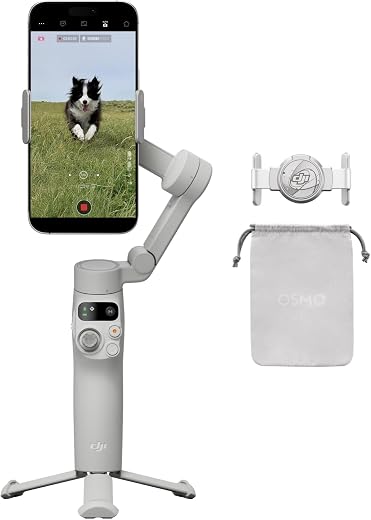
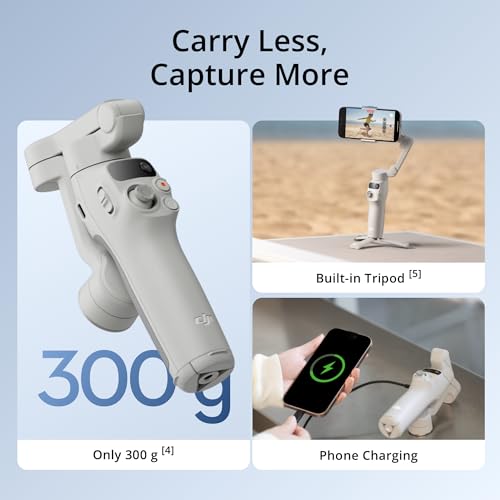
The Osmo Mobile 7 is DJI’s entry point into that, at around sixty dollars. It weighs 300 grams, folds flat, carries a tripod built into the handle, runs for a claimed ten hours and can charge your phone from its own battery. It also does subject tracking, which is the feature that turns a gimbal from a stabiliser into a camera operator. There is one real problem with it, and it is not the hardware.
Quick verdict: the DJI Osmo Mobile 7 scores 8.6/10 in this SoftPickr review. It is the best sixty dollars you can spend on phone video, provided you are not an Android user who relies on Google Play.
Table of Contents
Key Specifications
| Feature | Specification |
|---|---|
| Brand | DJI |
| Model | Osmo Mobile 7 |
| Axes stabilised | 3 |
| Weight | 300 g |
| Unfolded dimensions | 10.94 in H x 4.21 in D x 3.66 in W |
| Folded size | 179 x 95 x 39 mm |
| Tripod | Built into the handle |
| Tracking | ActiveTrack 7.0 with dual-lens enhanced tracking |
| Stated operating time | Up to 10 hours |
| Phone charging | Yes, via USB-C from the gimbal battery |
| Compatibility | iPhone and Android, via magnetic phone clamp |
| Companion app | DJI Mimo (not available on Google Play) |
What Three-Axis Stabilisation Actually Buys You
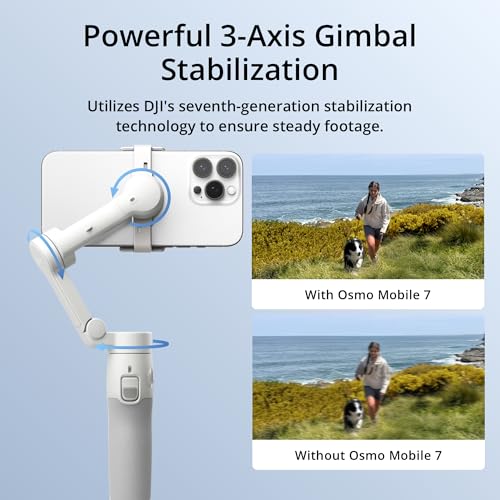
Three brushless motors correct pitch, roll and yaw independently and continuously. The effect is not that the footage is smoother; it is that the horizon stays level and the frame stops reacting to your footsteps. Walking shots become usable, which is the single thing handheld phone video cannot do. Pans become even rather than jerky, because the motor is arbitrating between your hand and the frame.
Electronic stabilisation cannot do this because it works after the fact, cropping into the sensor and warping the image to hide movement. That costs resolution, introduces the rubbery wobble people recognise instantly as phone footage, and fails completely in low light where the shutter is already slow. A mechanical gimbal removes the motion before the sensor sees it, which is why the two approaches are not comparable.
ActiveTrack and Why It Changes Solo Filming
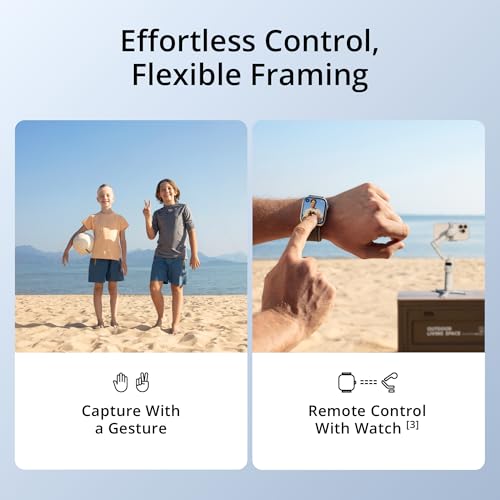
ActiveTrack 7.0 lets you select a subject and have the gimbal follow it, rotating to keep the person in frame as they move. For anyone filming themselves — demonstrations, workouts, cooking, walk-and-talks — this is the difference between needing a second person and not. Set the gimbal on its tripod, tap yourself, and it becomes an operator that never gets bored.
DJI has added dual-lens tracking here, where the phone’s two rear cameras cooperate to hold focus on a subject that is moving fast or close to the lens. In practice tracking is confident on a single well-lit subject and gets confused when someone walks between the gimbal and you, which is a limitation of every tracking system rather than this one. For solo creators it is the feature that justifies the purchase.
The Built-In Tripod and the Weight
The tripod folding out of the handle sounds like a minor convenience and is not. A gimbal without one is a device you have to hold for the entire shot, which means no static setups, no timelapse and no self-filming. With one, the gimbal converts into a small tripod in two seconds, and the tripod is exactly where you need it rather than in a bag at home.
At 300 grams the whole thing weighs about as much as a large phone, and folded it is 179 by 95 by 39 millimetres, which fits a coat pocket or the side sleeve of a small bag. Both figures matter more than they look. Gimbals are famously bought and then left at home because they are bulky, and the gap between a device you carry and one you own is the entire value of the purchase.
The Android App Problem
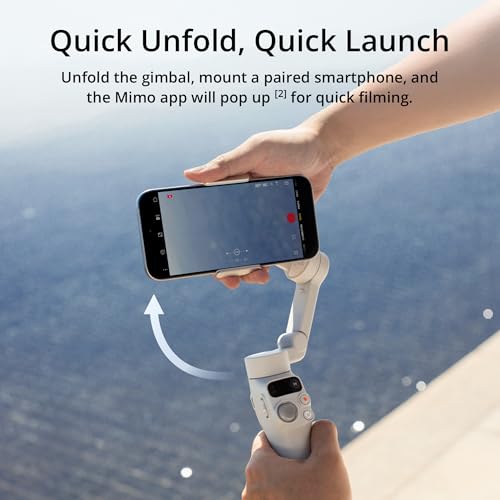
The listing states plainly that the DJI Mimo app has been removed from Google Play, and that Android users should download it from DJI’s own site. That is a significant caveat presented as a footnote. Mimo is where ActiveTrack, ShotGuides and One-Tap Edit live; without it you have a stabiliser with buttons rather than the smart gimbal you paid for.
Sideloading an APK is straightforward for the technically confident and a genuine obstacle for everyone else, and it means no automatic updates through the usual channel. iPhone users are unaffected and get the full experience through the App Store. Anyone buying this as an Android user should understand they are accepting a manual install and manual updates for the life of the product.
Limitations and Compromises
The Google Play removal is the real limitation and it is not a small one. On Android, the entire intelligent feature set depends on an app you must fetch and update yourself from DJI’s website. That is fine for a confident user and a meaningful barrier for a casual one, and the fact that DJI has printed it on the listing does not make it less of a problem for half the phone market.
The specification sheet is thin — nine fields — and omits the number a gimbal is actually chosen on: the payload limit. There is no maximum phone weight or width anywhere. Owners of the largest folding phones or heavy cases are left guessing whether the motors will hold balance, and payload is precisely the spec that decides whether a gimbal works with the phone you already own.
Motorised gimbals also have inherent quirks that no listing mentions. They need a moment to balance and initialise before each session, they cannot be switched between phones instantly, and the motors are audible in a quiet room if you are recording audio from the phone itself. None of this is a fault; all of it is why a gimbal is a deliberate tool rather than something you leave permanently attached.
Handling and Care
The motors are the fragile part and they are fragile in one specific way: never force an arm by hand while the gimbal is powered on, because you are fighting a motor that will fight back and the gearing does not enjoy it. Fold and unfold it only when it is off. If the gimbal starts drifting or holding a tilted horizon, that is a calibration issue rather than damage and the app has a routine for it.
Store it folded, which is what the design invites, and keep the magnetic clamp with it rather than loose in a bag where it will attract every paperclip you own. The battery benefits from the treatment any lithium cell does: avoid storing it fully flat for months, and top it up occasionally if the gimbal is not in regular use. A wipe of the clamp pads keeps them gripping a phone case properly.
Who Should Buy It?
- Anyone filming themselves without a second person to hold the camera.
- Creators who need walking shots that are actually usable rather than merely stabilised.
- iPhone users, who get the full Mimo feature set with no installation friction.
- Travellers who want stabilisation and a tripod in one pocket-sized object.
- Anyone whose current phone footage looks warped from electronic stabilisation.
Look elsewhere if you are an Android user who will not sideload an app, because the intelligent features are the product and they live behind a manual install. Look elsewhere too if you own an unusually heavy phone or a very large folding model, since DJI publishes no payload limit at all. And if all you want is a static camera for a fixed shot, a twenty-dollar tripod does that job with no motors to balance.
SoftPickr Verdict
The DJI Osmo Mobile 7 earns 8.6/10. The hardware here is excellent and priced where it should not be. Genuine three-axis mechanical stabilisation, confident subject tracking, a tripod that is always with you, ten hours of runtime and the ability to charge the phone it is holding, all in a 300 gram object that folds into a pocket. Nothing else at sixty dollars comes close, and DJI has been refining this line longer than anyone.
The compromise is that on Android the app that unlocks all of it is no longer on Google Play, which turns the headline features into a sideloading exercise. iPhone owners should buy this without hesitation. Android owners should buy it knowing exactly what they are signing up for, and it still earns our editor pick on the strength of what the hardware does.
Price and availability change frequently on Amazon, and prices shown here may be out of date — check the current listing before ordering.
DJI Osmo Mobile 7 — Frequently Asked Questions
Does the Osmo Mobile 7 work with Android phones?
The hardware does, but the DJI Mimo app has been removed from Google Play and must be downloaded from DJI’s website instead. Since ActiveTrack, ShotGuides and One-Tap Edit all live in that app, Android users are accepting a manual install and manual updates. iPhone users get the app normally through the App Store.
How is a gimbal different from my phone’s built-in stabilisation?
Electronic stabilisation crops into the sensor and warps the image after capture to hide movement, which costs resolution and produces the rubbery look people recognise as phone video. A gimbal uses motors to physically hold the phone still before the sensor sees the shake, so nothing is cropped and walking shots stay level.
What size phone does it hold?
DJI does not publish a payload limit anywhere in the nine specification fields, which is the most useful thing missing. It ships with a magnetic clamp and is sold for iPhone and Android generally. Owners of very heavy phones, thick cases or large folding models should verify compatibility before ordering.
Does it really run for ten hours?
Ten hours is DJI’s stated maximum operating time, which assumes light stabilisation load and no phone charging. Real sessions with active tracking and pass-through charging will be considerably shorter. Even so it comfortably outlasts a day of filming, and it can put charge back into the phone it is holding.
Ready to buy? You can check the current price of the DJI Osmo Mobile 7 on Amazon — the listing shows live pricing and current stock, both of which move around more than the specification does. SoftPickr earns a commission on qualifying purchases at no extra cost to you.
Related Reviews
If the DJI Osmo Mobile 7 is not quite the right fit, these SoftPickr reviews cover the closest alternatives we have tested:
Additional information
Specification: DJI Osmo Mobile 7 — 3-Axis Smartphone Gimbal Stabilizer, Built-In Tripod
|
There are no reviews yet.