


Portta VHS to Digital Converter Review — Best No-PC Tape Recorder?
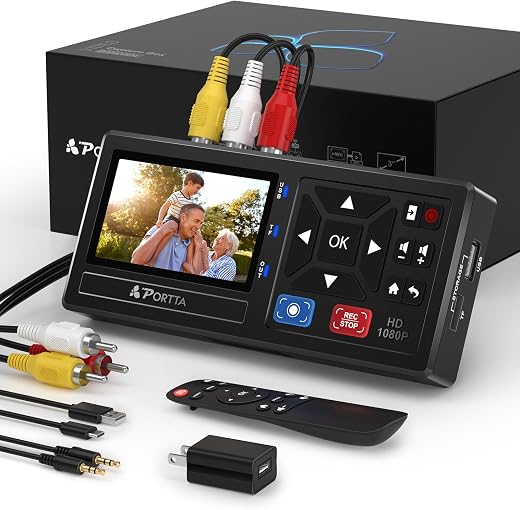
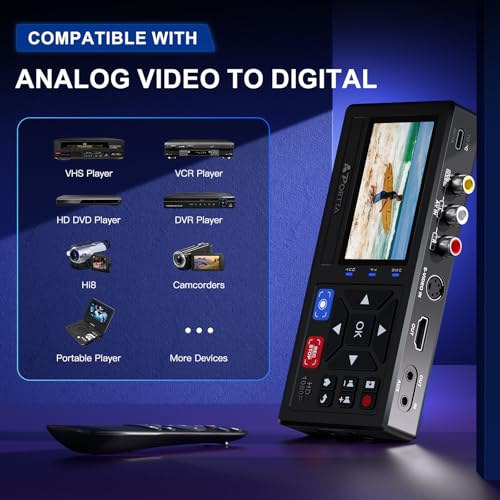
The Portta VHS to digital converter is a standalone recorder box: you plug a VCR or camcorder into its composite or S-Video inputs, put a USB stick or SD card in the side, press record, and it writes an MP4 file at up to 1080p 30Hz. There is no PC, no capture software, no driver, and nothing to install. A 3-inch preview screen and a small speaker let you confirm you are recording the right thing, and a remote handles the menus from across the room. It is expensive next to a USB dongle and worth it if you actually have a box of tapes to get through.
Original price was: $168.99.$128.99Current price is: $128.99.
 Amazon.com
Original price was: $168.99.$128.99Current price is: $128.99.
Description
Portta VHS to Digital Converter Review (2026) — Digitising Tapes Without a Computer
The Portta VHS to digital converter is a standalone recorder box: you plug a VCR or camcorder into its composite or S-Video inputs, put a USB stick or SD card in the side, press record, and it writes an MP4 file at up to 1080p 30Hz. There is no PC, no capture software, no driver, and nothing to install. A 3-inch preview screen and a small speaker let you confirm you are recording the right thing, and a remote handles the menus from across the room.
We reviewed it because the alternative most people try first — a $13 USB dongle and free capture software — is where tape digitising projects go to die. The dongles work, technically, but they demand a computer with a free port, drivers that are frequently unsigned, software that drops frames when anything else runs, and a machine tied up for the full real-time length of every tape. The Portta trades money for the removal of all of that.
Quick verdict: the Portta VHS to digital converter scores 8.2/10 in this SoftPickr review. It is expensive next to a USB dongle and worth it if you actually have a box of tapes to get through.
Table of Contents
Key Specifications
| Feature | Specification |
|---|---|
| Brand | Portta |
| Type | Standalone analog-to-digital video recorder |
| Inputs | AV / RCA composite (CVBS + L/R), S-Video, 3.5 mm AUX |
| Recording Resolution | Up to 1080p 30Hz |
| Video Format | MP4 |
| Audio Format | MP3, up to 48 kHz LPCM |
| Storage | USB drive or TF/microSD card, no stated capacity limit |
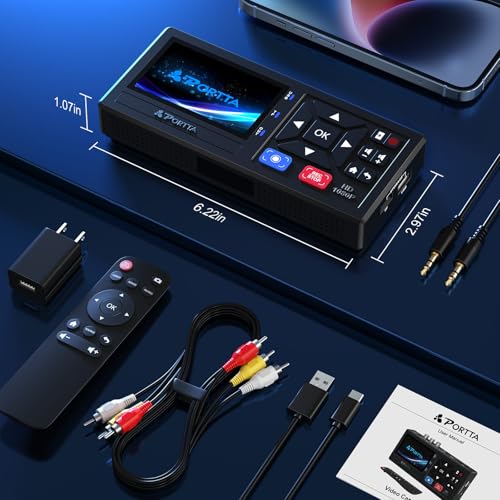
| Preview | 3.0 in LCD with built-in speaker |
| TV Standards | NTSC-M/J 3.58, NTSC 4.43, PAL B/G/H/I/D |
| In the Box | Recorder, power adapter, remote, AV cable, 3.5 mm cable |
| Warranty | 2 years |
| Amazon Rating | 4.5 / 5 from roughly 1,952 ratings |
| Price at Review | $128.99 (from $168.99) |
No PC Is the Entire Point
Digitising tape is real-time work. A three-hour wedding tape takes three hours, and there is no way around that — the tape has to physically play. The question is what else is tied up during those three hours.
With a capture dongle, the answer is a computer. It needs to stay awake, stay unlocked, not run an update, and not have anything else demanding the CPU, because dropped frames on a capture are permanent. Anyone digitising a real collection quickly discovers that their computer is now a single-purpose appliance for a fortnight.
The Portta removes the computer from the loop entirely. It writes directly to the USB stick or card, so the recording runs on a box on a shelf while the household carries on. For a project that involves twenty or thirty tapes, that is the difference between it happening and it staying in the loft for another five years.
S-Video, and Why the Input Matters More Than the Output
A lot of cheap capture devices offer composite only. Composite carries brightness and colour on a single wire, and the resulting crosstalk is the source of the smeared colour edges and dot-crawl shimmer that people assume is just what old tape looks like.
S-Video separates the two, and on a source that can output it — Hi8 and S-VHS camcorders and better VCRs — the difference is immediately visible. Edges are cleaner, colour bleeds less, and fine detail like text on a sign actually resolves. If your source has an S-Video port, using it is the single biggest quality decision in the whole process, and it is free.
The 1080p recording ceiling is worth understanding correctly. VHS holds roughly 240 lines of real detail; recording at 1080p does not create detail that was never there. What it does is avoid a second generation of scaling loss, so the file you end up with is as close to the tape as the tape allows.
Files That Just Work
It writes standard MP4 with MP3 or LPCM audio. That sounds mundane and it is the most practically important thing about the device.
Capture cards frequently produce huge intermediate files in codecs that need converting before anything will play them, which adds a second real-time pass to every tape. The Portta output plays on a phone, a TV, a laptop, and uploads to cloud storage or a family group chat without an intermediate step. For the audience actually buying this — people digitising family footage to share with relatives — that matters more than any specification.
The 3-inch screen and speaker are similarly practical rather than impressive. They exist so you can confirm the tape is playing, the audio is not muted, and the input is the right one, without connecting a television. Given how many failed captures are silent recordings of a blue screen, that confirmation is worth having.
Limitations and Compromises
It does not play tapes. This is the point people miss, and it accounts for a visible share of the disappointed reviews: you still need a working VCR, camcorder or Hi8 deck to play the tape into it. The box is a recorder, not a player.
At $128.99 it is roughly ten times the price of a USB capture dongle. If you have three tapes, buy the dongle. The economics only work across a real collection.
Audio setup is the most common stumbling block. Depending on whether you use the AV audio or the 3.5 mm AUX input, the corresponding volume in the settings menu must be unmuted, and if you get it wrong you record perfect silent video and only find out afterwards. Test with sixty seconds before committing to a three-hour tape.
High-capacity USB drives may need their own power supply, since the box supplies limited bus power. A powered drive or a decent large SD card is the safer choice.
There is no editing, no colour correction and no noise reduction. It captures what you feed it faithfully, including the tracking noise, and cleanup is a separate job on a computer afterwards.
Setup and Getting the Best Capture
Connect the source with S-Video if it has it and composite if it does not, then confirm the audio path: AV audio and the 3.5 mm AUX input are separate, and the matching Video-IN or AUX-IN volume in Settings must be unmuted. Record sixty seconds, play it back on the built-in screen, and only then start a full tape.
Format the USB stick or card in the device rather than on a computer. Cards formatted with exFAT on a laptop are the second most common cause of recordings that stop unexpectedly partway through.
Clean the VCR heads before a long session. A dirty head produces tracking noise that gets permanently baked into the digital file, and no amount of later processing removes it properly. If a tape has been in storage for decades, fast-forward and rewind it fully once before recording to redistribute the tape tension.
Label files as you go. The device names them sequentially, and after fifteen tapes a folder of identically named MP4s is its own small disaster. Rename each one on a computer at the end of every session while you still remember what it was.
Who Should Buy It?
- Anyone with a genuine box of family tapes rather than two or three
- People who do not want a computer tied up in real time for days on end
- Owners of Hi8, MiniDV or S-VHS sources that can output S-Video
- Anyone who wants files that play on a phone or TV immediately with no conversion
- Households digitising for elderly relatives, where the output needs to be shareable without technical steps
Look elsewhere if you have only a handful of tapes — a $13 USB dongle plus an evening of patience is genuinely the right answer at that scale. It is also the wrong purchase if you do not own a working VCR or camcorder, because this box will not play anything, and if you want restoration rather than capture, a professional transfer service will do a better job on precious footage than any consumer device.
SoftPickr Verdict
The Portta VHS to digital converter earns 8.2/10. It removes the part of tape digitising that actually makes people give up. No computer, no drivers, no capture software, no dropped frames because something else woke up mid-recording — just a box that writes MP4 files to a USB stick while you get on with your day. S-Video input, standards-compliant output and a preview screen that catches setup mistakes before they cost you three hours are all sensible, unglamorous choices.
The one compromise is that it needs a player and it is priced like an appliance. If you own a working VCR and have a real collection to get through, the price disappears against the time it saves. If you have three tapes and no deck, this is the wrong end of the market and the cheap dongle is the honest recommendation.
Price and availability change frequently on Amazon, and prices shown here may be out of date — check the current listing before ordering.
Portta VHS to digital converter — Frequently Asked Questions
Do I still need a VCR to use it?
Yes. The Portta VHS to digital converter is a recorder, not a player — it captures the signal a VCR, camcorder or Hi8 deck sends into it. This is the single most common misunderstanding about the product and the reason for most of its disappointed reviews. If you do not own a working player, budget for one before buying this.
Does it need a computer or software?
No. It writes MP4 files straight to a USB drive or TF card with no PC, no drivers and no capture application involved. That is the reason to buy it over a cheap USB dongle: your computer is not tied up in real time for the full length of every tape, and nothing can drop frames by waking up mid-recording.
What quality can I expect from a VHS tape?
About what the tape holds, which is roughly 240 lines of real detail. Recording at 1080p does not invent detail that was never on the tape; it avoids adding a second generation of scaling loss. If your source offers S-Video, use it — separating brightness from colour removes the smeared edges most people assume are simply what old video looks like.
Why did my recording come out silent?
Almost always the audio input setting. The AV/RCA audio and the 3.5 mm AUX input are separate paths, and the matching Video-IN or AUX-IN volume in the Settings menu has to be unmuted for the one you are using. Record a sixty-second test and play it back on the built-in screen before starting any long tape.
Ready to buy? You can check the current price of the Portta VHS to digital converter on Amazon — the listing shows live pricing and current stock, both of which move around more than the specification does. SoftPickr earns a commission on qualifying purchases at no extra cost to you.
Related Reviews
If the Portta VHS to digital converter is not quite the right fit, these SoftPickr reviews cover the closest alternatives we have tested:
Additional information
Specification: Portta VHS to Digital Converter Review — Best No-PC Tape Recorder?
|
There are no reviews yet.